
37-Inch PC Monitors: 4 Models Compared

For a 37-inch PC monitor, Samsung ViewFinity S70D 37-inch is the straightforward choice if you want 4K resolution and standard 60Hz refresh; choose LG 37U730SA-W Smart Monitor instead if you want smart-TV apps and USB-C power delivery. The 37-inch models are the exact-size options, while the 32-inch displays suit buyers willing to trade screen size for different refresh-rate choices.
We earn a commission if you buy through links on this page. As an Amazon Associate I earn from qualifying purchases. Products are compared on manufacturer specifications, not hands-on testing.
- Best overall: Samsung ViewFinity S70D 37-inch – Its 37-inch 4K screen and HDMI and DisplayPort inputs suit a conventional desktop setup.
- Best for smart features: LG 37U730SA-W Smart Monitor – It combines a 37-inch 4K IPS display with webOS, a built-in speaker and USB-C PD up to 65W.
- Best for high refresh: SANSUI 32-inch Curved 240Hz – Its 32-inch Full HD panel reaches 240Hz and has a 1500R curve.
| Product | Best for | Screen size | Resolution | Refresh rate | Shop |
|---|---|---|---|---|---|
| Samsung ViewFinity S70D 37-inch | 4K desktop work | 37 inches | 4K UHD | 60Hz | Check Price on Amazon |
| LG 37U730SA-W Smart Monitor | Smart screen use | 37 inches | 4K UHD | 60Hz | Check Price on Amazon |
| SANSUI 32-inch Curved 240Hz | Fast-paced gaming | 32 inches | Full HD | 240Hz | Check Price on Amazon |
| Philips 32E1N1100L 32-inch | Basic desktop use | 32 inches | Full HD | 100Hz | Check Price on Amazon |
37-Inch PC Monitors and Alternatives
Compare the two 37-inch 4K choices with two 32-inch alternatives before deciding which screen fits your desk and workload.
Samsung ViewFinity S70D 37-inch

Samsung ViewFinity S70D 37-inch is a conventional 37-inch 4K monitor with HDMI and DisplayPort inputs, making it the simpler fit for a computer-centered setup than the smart-feature-rich alternative. Samsung says the display provides 1 billion colors, with a 60Hz refresh rate and 5ms response time for everyday computing, content creation and casual entertainment. Choose it if you want a large 4K workspace without making built-in streaming apps a priority. Its 60Hz rate is a limitation for buyers who specifically want high-refresh competitive gaming; SANSUI 32-inch Curved 240Hz offers a much higher refresh rate but is smaller and Full HD.
Bottom line: Pick this if a 37-inch 4K screen with conventional computer inputs is your priority.
LG 37U730SA-W Smart Monitor

LG 37U730SA-W Smart Monitor stands out among the 37-inch choices for its webOS smart functions, USB-C power delivery up to 65W, built-in speaker and adjustable stand with tilt, height and swivel. The 4K IPS panel supports HDR10, and LG says it covers up to 90% DCI-P3 and offers access to streaming and cloud gaming apps through webOS. It suits a desk that doubles as an entertainment setup, or a compatible laptop connection where USB-C power delivery is useful. Unlike a simpler monitor, its smart features may not matter to buyers who only need a display connected to a desktop PC.
Bottom line: Choose this when integrated smart features or USB-C charging matter alongside 4K.
SANSUI 32-inch Curved 240Hz

SANSUI 32-inch Curved 240Hz trades the requested 37-inch size and 4K resolution for a 32-inch curved Full HD panel with a 240Hz refresh rate. Its 1500R curvature, 1ms MPRT response time, FreeSync, HDMI and DisplayPort inputs target gaming, while the tilt-adjustable stand and 100 × 100mm VESA compatibility offer setup flexibility. SANSUI says the panel reaches 300 nits and includes HDR technology; it has no built-in speakers. This is a better fit for someone prioritizing refresh rate over pixel density and screen size, but not for a buyer set on a 37-inch workspace.
Bottom line: Pick this for high-refresh gaming if 32 inches is acceptable.
Philips 32E1N1100L 32-inch
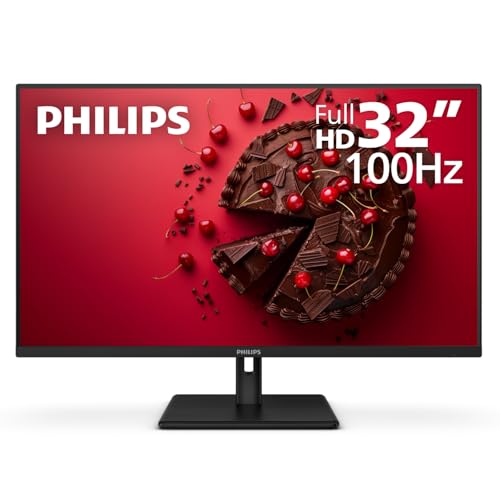
Philips 32E1N1100L 32-inch is a 32-inch Full HD alternative with a 100Hz refresh rate, rather than a 37-inch 4K screen. Its VA panel supports Adaptive-Sync and has HDMI, VGA and audio-out connections; it is also VESA compatible. Philips says the monitor includes a four-year Advance Replacement Warranty in the United States. The extra VGA connection can suit an older computer, but the lower resolution across a 32-inch screen gives less fine detail than either 37-inch 4K option. Consider it when matching an existing Full HD setup matters more than screen size or pixel density.
Bottom line: Choose this if you need a 32-inch Full HD screen with VGA input.
How to Choose a 37-Inch PC Monitor
Start with resolution and the work you do: 4K provides 3,840 × 2,160 pixels, while Full HD provides 1,920 × 1,080. At the same screen size, 4K has four times as many pixels, making it better suited to fitting detailed content on screen; Full HD places fewer pixels across the same area. A 37-inch 16:9 4K display works out to about 119 pixels per inch, compared with about 60 pixels per inch for 37-inch Full HD. If you mainly play fast competitive games, prioritize refresh rate too: 60Hz updates 60 times per second, while 240Hz can show more frequent updates when the computer can produce them.
37-Inch Versus 32-Inch Monitor Fit
A 37-inch display is about 15% wider and 15% taller than a 32-inch display when both use a 16:9 aspect ratio, so measure desk width and viewing distance before choosing. Screen diagonal does not include stand depth or the bezel, and curved monitors can need extra front-to-back clearance. For a rough desk check, a 37-inch 16:9 panel is about 32 inches wide before accounting for its frame. A 32-inch option is the sensible trade when desk space is tight or a higher refresh rate matters more than a larger 4K workspace. Confirm available depth and stand footprint against the monitor’s physical dimensions before ordering.
Monitor Resolution and Refresh Rate Tradeoffs
Resolution and refresh rate answer different needs: resolution determines image detail, while refresh rate determines how often the display can update each second. A 4K 60Hz monitor favors crisp text and detailed images; a Full HD 240Hz screen favors frequent motion updates but has fewer pixels for fine detail. Adaptive-Sync or FreeSync can help coordinate display refresh with a compatible graphics card, but the card, cable and connection must support the desired mode. Use this guide to set priorities rather than treating one specification as a universal winner.
| Priority | Useful target | Tradeoff |
|---|---|---|
| Fine desktop detail | 4K, 3,840 × 2,160 | 60Hz in these two 37-inch models |
| Fast motion updates | 240Hz | Full HD and 32-inch size here |
| Middle-ground refresh | 100Hz | Full HD and 32-inch size here |
Monitor Connections and Stand Clearance
Check that a monitor input matches the computer output and that the selected connection supports the resolution and refresh rate you intend to use. HDMI and DisplayPort are common PC display connections, while USB-C power delivery can reduce cable clutter for a compatible laptop, but USB-C charging does not guarantee every video mode works with every computer. A VESA-compatible monitor can use a separate arm or wall mount if the mount pattern matches; verify the pattern and the mount’s supported load. Measure the full monitor width, depth and height with its stand, and leave room to tilt or swivel an adjustable stand without striking a wall or shelf.
Frequently Asked Questions
How far should I sit from a 37-inch monitor?
A practical starting range is about 2 to 3 feet for a desktop monitor, then adjust until you can read text without leaning or turning your head often. A larger screen or smaller text may call for more distance, while desk depth can limit placement.
Does a higher monitor refresh rate need a better graphics card?
Yes, the computer must render enough frames to make full use of a high refresh rate. At 240Hz, it needs to produce up to 240 frames per second in the chosen game and resolution; demanding games may require lower graphics settings.
Can I use a USB-C monitor with any laptop?
No; the laptop’s USB-C port must support video output, and its power needs must fit the monitor’s charging capability. For a monitor offering up to 65W PD, check that this is enough for the laptop under its normal workload.
What does a 1500R curved monitor measurement mean?
The 1500R figure describes a curve based on a 1,500mm radius, or about 59 inches. A smaller R number indicates a more pronounced curve, so consider desk depth and how centered you sit before choosing a curved panel.