
Long Micro USB Cable Options for Charging and Data

For most people, Amazon Basics 10-Foot Micro USB Cable is the clearest long micro USB choice: its 10-foot length pairs with a USB 2.0 data rate of up to 480 Mbps and charging capability up to 2,100 mA. Choose a 15-foot option instead if the outlet or console is farther away, or a multi-length pack if you need different reaches.
Micro USB is the small, trapezoidal Micro-B connector used by some older phones, controllers and accessories; check that your device has a Micro-B port rather than USB-C or Lightning.
We earn a commission if you buy through links on this page. As an Amazon Associate I earn from qualifying purchases. Products are compared on manufacturer specifications, not hands-on testing.
- Best overall: Amazon Basics 10-Foot Micro USB Cable – The 10-foot cable gives a 480 Mbps data rate and charging capability up to 2,100 mA.
- Best for extra reach: DEEGO 15-Foot Micro USB Cable – Its 15-foot length provides more reach than the 10-foot alternatives.
- Best for two lengths: DEEGO 10- and 6-Foot 2-Pack – The two-pack includes 10-foot and 6-foot cables for different setups.
| Product | Best for | Length | Data rate | Charging capability | Shop |
|---|---|---|---|---|---|
| Amazon Basics 10-Foot Micro USB Cable | Everyday charging | 10 ft | Up to 480 Mbps | Up to 2,100 mA | Check Price on Amazon |
| DEEGO 15-Foot Micro USB Cable | Extra-long reach | 15 ft | — | — | Check Price on Amazon |
| SCOVEE 15-Foot Micro USB Cable | Gaming distance | 15 ft | — | — | Check Price on Amazon |
| DEEGO 10- and 6-Foot 2-Pack | Two cable lengths | 10 ft and 6 ft | Up to 480 Mbps | Up to 2.4 A | Check Price on Amazon |
| 6amLifestyle 10-Foot Braided 2-Pack | Braided controller cord | 10 ft each | — | — | Check Price on Amazon |
Long Micro USB Cables
Compare cable reach and stated charging and data specifications against the distance and device you need to connect.
Amazon Basics 10-Foot Micro USB Cable

Amazon Basics 10-Foot Micro USB Cable is the option here with both a data rate and charging capability, alongside a 10-foot reach. Its USB-A to Micro-B ends connect a compatible Micro-B device to a USB-A port, and the cable supports USB 2.0 data transfer up to 480 Mbps. The maker says charging capability is up to 2,100 mA; actual charging depends on the power source and device. Gold-plated plugs and a flexible cable are also specified. Its 10-foot length is shorter than the 15-foot choices, so measure the route if the outlet is far away.
Bottom line: Choose this for a 10-foot run when both charging and data transfer matter.
DEEGO 15-Foot Micro USB Cable
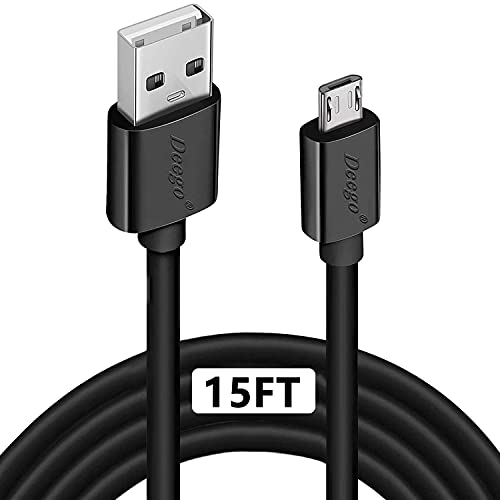
DEEGO 15-Foot Micro USB Cable reaches 15 feet, the longest single-cable length among these options, making it suited to a controller or device used farther from its power source. The maker lists compatibility with Micro-USB devices including PS4 controllers, Kindle Fire tablets and Bluetooth speakers, as well as charging and syncing. The cable is a single black cord. A longer run can also be less convenient to manage around furniture.
Bottom line: Pick this when the extra 15-foot reach is the deciding need.
SCOVEE 15-Foot Micro USB Cable

SCOVEE 15-Foot Micro USB Cable is a 15-foot Micro USB cord whose use centers on game controllers, including Xbox One and PS4 controller models. The maker says the cable is designed for playing while charging and says it can withstand more than 10,000 bending tests. Its compatibility also includes Fire Stick and older Android phones. That stated bend-test figure is the feature that distinguishes it from the other 15-foot choice here; the maker does not give a charging-current or data-rate figure. Confirm the controller uses Micro USB, since connector fit matters more than the console name.
Bottom line: Choose it for a long controller connection if your device has a Micro USB port.
DEEGO 10- and 6-Foot 2-Pack
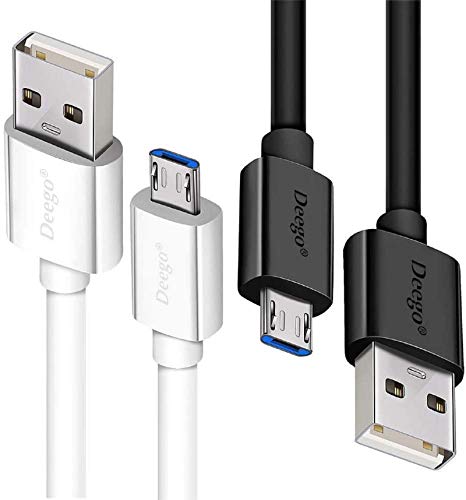
DEEGO 10- and 6-Foot 2-Pack provides two different reaches, 10 feet and 6 feet, rather than a pair of matching cords. Both are USB-A to Micro-B cables; the maker specifies USB 2.0 data transfer up to 480 Mbps and charging speed up to 2.4 A. Its compatibility list includes older Galaxy phones, tablets, controllers and other Micro USB devices. The shorter cord can suit a nearby port while the longer one reaches farther. The pack is a stronger match for households needing two lengths than for someone who needs a single 15-foot cable.
Bottom line: Pick this pack when you can use both a 6-foot and a 10-foot cable.
6amLifestyle 10-Foot Braided 2-Pack

6amLifestyle 10-Foot Braided 2-Pack is a two-pack of 10-foot braided Micro USB cords aimed at controller use. The maker describes a locking-fit Micro USB head for DualShock 4 ports, a stepped housing intended to clear thick cases, and a braided jacket with reinforced core. It also claims more than 10,000 90-degree bend tests. Those gaming-focused connector and cable-construction features set it apart from the plain flexible cords.
Bottom line: Choose it for two braided 10-foot cords and a controller-focused connector design.
How to choose a long Micro USB cable
Choose cable length by measuring the actual route from the USB power source to the device, including slack for movement. USB 2.0 data transfer has a maximum signaling rate of 480 Mbps; that is not the same as a guaranteed file-copy speed, which also depends on the connected devices and their ports. For charging, compare the cable’s current with the charger’s output and the device’s supported input. Longer cables can lose more voltage through wire resistance, especially with thin conductors and higher current, so a 15-foot cable may charge more slowly than a shorter one in the same setup. For a fixed route, allow a little extra length without coiling a large surplus tightly.
Micro USB fit and connector checks
Confirm the device port is Micro USB Type-B before choosing a cable: USB-C has a reversible oval connector, while Micro-B is smaller and has a non-reversible plug. A USB-A-to-Micro-B cable requires a USB-A host or power source at its other end; it will not plug directly into a USB-C-only port without a suitable adapter. For controllers, verify the exact controller generation and connector, because device families can change ports between versions. If a case surrounds the port, check that the connector housing can reach the socket. A snug fit should not require force; forcing an incorrectly oriented Micro-B plug can damage the port.
Long cable lengths compared
A 6-foot cable suits a nearby desk or bedside setup, 10 feet covers a longer room-side reach, and 15 feet is useful when the outlet or console is farther away. These are practical reach categories rather than performance guarantees: cable routing and the location of the power source determine the needed length. Use this guide to narrow the length first, then compare connector fit and charging/data specifications.
| Need | Length to consider | Trade-off |
|---|---|---|
| Nearby device | 6 ft | Less slack to manage |
| Across a desk or seating area | 10 ft | Moderate extra reach |
| Farther from outlet or console | 15 ft | More cable to route; charging may be affected by resistance |
Measure along the route rather than across the room in a straight line; furniture and safe cable routing add distance. If you need more than 10 feet, compare the 15-foot cords first.
Charging and data expectations
A cable’s maximum data rate and current rating describe different jobs: Mbps measures data signaling, while amps measure electrical current. USB 2.0 supports a maximum signaling rate of 480 Mbps, but a connected device may transfer less depending on its hardware and protocol. Charging is likewise limited by the charger, cable and device working together; the lowest supported limit governs the setup. Avoid treating a higher current figure as a promise that every phone will charge faster. For reliable use, keep plugs clean and stop using any cable with exposed wire, cracked insulation or a loose connector, since damaged cables can overheat or cause intermittent power.
Frequently Asked Questions
Can a 15-foot Micro USB cable charge as fast as a short cable?
Not necessarily; longer wire can have more resistance and voltage drop, particularly at higher current. Actual charging also depends on the charger and the device’s supported input.
Does a Micro USB cable work with USB-C phones?
No, a Micro-B plug does not fit a USB-C port. A compatible adapter may bridge the connector types, but the adapter and cable still need to support the device’s charging or data needs.
What does 480 Mbps mean on a USB cable?
It is the maximum USB 2.0 data signaling rate, not a guaranteed file-transfer speed. The connected device, port and protocol can all reduce actual throughput.
How much extra length should I allow for cable routing?
Measure the route around furniture and leave enough slack for the device to move without pulling at the connector. Avoid routing a cable where people can trip over it or where a chair or door can crush it.
Can I use a long Micro USB cable with a game controller?
Yes, if the controller has a Micro USB port and the cable’s connector fits the port without forcing it. Check the exact controller generation because some versions use a different connector.