
Best Portable CD Player for Car: 3 Options Compared

The POSSPO Jupiter suits most drivers whose stereo has a USB port, because it connects as a USB drive and shows CD tracks through the stereo. Choose a different option if your car has AUX but no compatible USB playback, or if you need FM transmission instead.
Portable car CD players add disc playback to a stereo without a built-in drive, but their connection method determines whether your stereo can play the audio.
We earn a commission if you buy through links on this page. As an Amazon Associate I earn from qualifying purchases. Products are compared on manufacturer specifications, not hands-on testing.
- Best overall: POSSPO Jupiter USB CD Player – USB-drive playback is designed for a car stereo with a USB port.
- Best for AUX input: DDup Portable Car CD Player – Offers both USB and AUX connections, plus an included USB-C adapter.
- Best for FM transmission: ENVYCLOUD Portable Car CD Player – Can broadcast CD or USB audio to a nearby stereo on a clear FM frequency.
| Product | Best for | Connection options | Dimensions | Shop |
|---|---|---|---|---|
| POSSPO Jupiter USB CD Player | USB stereo playback | USB | 6.3 × 6.1 × 2.0 in | Check Price on Amazon |
| DDup Portable Car CD Player | USB or AUX access | USB, AUX; USB-C adapter | — | Check Price on Amazon |
| ENVYCLOUD Portable Car CD Player | Compact placement | USB, AUX | 4.5 × 4.5 × 0.85 in | Check Price on Amazon |
Portable CD Players for Car
Choose by the input your stereo can use and the disc formats you want to play.
POSSPO Jupiter USB CD Player

The POSSPO Jupiter is the most direct match for a car stereo with USB: connect the player to the stereo’s USB port, then select it as a USB drive to view CD tracks. A USB extension cable lets you place the player in the center console, dashboard or glove box. The maker says it supports anti-skip, seamless playback and resume playback.
This option suits drivers whose stereo can read the player through USB. It is not the right choice when the stereo lacks a USB port or cannot recognize the player as a drive; confirm USB-drive playback compatibility before ordering.
Bottom line: Pick this if your stereo has a USB port that can read the player as a drive.
DDup Portable Car CD Player

The DDup offers both USB and AUX connections, giving drivers more connection paths than a USB-only setup. It includes a USB-C adapter, extension cable and remote control, and supports CD, CD-R/RW, MP3, WMA and WAV playback. Four rubber feet are intended to help stabilize the unit on bumpy roads, while a magnetic cover and internal lock protect the disc.
It fits drivers who have an AUX input or want a choice of connection types. Its broad compatibility is not universal: the maker notes some devices are unsupported, so check the stereo’s input type and disc needs before choosing it.
Bottom line: Choose this when AUX access or its included remote matters to your setup.
ENVYCLOUD Portable Car CD Player
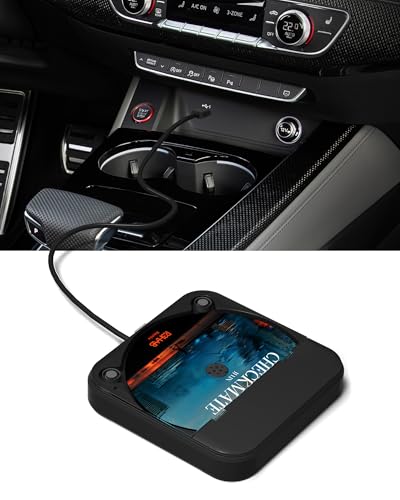
The ENVYCLOUD is the smallest specified unit here at 4.5 inches square and 0.85 inch thick, so it may suit a tight console or storage space. It connects through a car’s USB or AUX port and the maker says it supports touchscreen and steering-wheel control when connected. The maker also describes its playback as resistant to skipping.
This option is aimed at drivers whose stereo has one of those inputs and whose system supports the controls. No disc-format range is given, so buyers with CD-R/RW or file-format requirements should confirm the player supports those discs before ordering.
Bottom line: Pick this if compact dimensions and stated stereo controls are priorities.
How to choose a portable CD player for a car
Start with the car stereo’s available input: USB-drive playback, AUX audio, or FM radio reception. A USB port alone does not guarantee that a stereo can play audio from an external CD player; some ports only handle charging or flash drives. AUX is a direct analog audio input, while an FM transmitter sends audio to a radio frequency that the stereo tunes in.
Use this need-to-connection guide before comparing extra functions:
| Stereo setup | Connection to consider | Key check |
|---|---|---|
| USB audio playback | USB player connection | Can the stereo read the player as a drive |
| AUX input | AUX cable | Does the player include or accept the needed cable |
| FM radio only | FM transmitter | Can you tune a clear local frequency |
With no AUX or compatible USB input, favor an FM-transmitter model over assuming any USB connection will work.
USB, AUX and FM connections compared
USB, AUX and FM solve different connection problems, so match the connection to what the stereo actually accepts. USB may display tracks or control playback through the stereo, but that behavior depends on stereo compatibility. AUX carries audio through a cable and generally requires choosing the auxiliary source. FM avoids a cable to the stereo, but interference from nearby stations can affect clarity; tuning an unused frequency may help.
Disc formats and playback features
Disc compatibility matters when your collection includes burned discs or data CDs. CD-R and CD-RW are recordable formats, and a player must explicitly support them to reliably play those discs; MP3 CDs also depend on the player accepting that format.
Playback controls such as resume, shuffle or repeat are useful distinctions, but they do not change whether the car stereo can receive the audio. If a disc format is essential, choose a model that names it rather than assuming standard audio CD support covers every burned or data disc.
Placement and safe operation in the car
Place a portable CD player where it is stable and does not obstruct the driver’s view, steering, pedals or access to controls. A loose player can shift during braking or cornering; secure cables and the unit, and avoid placing it where it could become a projectile. Extension cables can make placement more flexible, but cable routing should stay clear of moving controls and footwells.
Do not handle discs or adjust the player while driving. Set up the connection, select a disc and choose the stereo input while parked; use steering-wheel controls only if the car and connected player actually support them. Compact dimensions help with storage, but do not establish that a unit is safe in a particular mounting spot. Prioritize visibility, secure placement and reachable controls without taking attention from the road.
Frequently Asked Questions
Will any car USB port play a portable CD player?
No; some car USB ports only charge devices or read ordinary flash drives. The stereo must support playback from the connected player, so confirm that function if USB is your only input.
Can an FM transmitter work without AUX?
Yes, an FM-transmitter CD player sends audio to a nearby radio stereo without an AUX cable. Tune the stereo and transmitter to a clear frequency, since a strong local station can cause interference.
What does anti-skip mean in a car CD player?
Anti-skip features are intended to reduce interruptions when bumps disturb disc playback. They cannot guarantee uninterrupted audio on every road, so secure the player on a stable surface.
Which CD formats should I check before buying?
Check for CD-R/RW or MP3 CD support if your collection includes those formats; standard CD playback alone does not establish compatibility with them.