
Micron 1100 SATA 256GB: Fit and Alternatives

Micron 1100 256GB 2.5-inch SATA is the direct match because it is a 256GB Micron 1100 in a 2.5-inch SATA format. Choose a different option only if your device takes an M.2 drive or you need another capacity; M.2 SATA and M.2 NVMe drives are not interchangeable by shape alone.
We earn a commission if you buy through links on this page. As an Amazon Associate I earn from qualifying purchases. Products are compared on manufacturer specifications, not hands-on testing.
- Best overall: Micron 1100 256GB 2.5-inch SATA – The only 256GB Micron 1100 identified as a 2.5-inch SATA drive.
- Best for 1TB capacity: Micron 1100 1TB 2.5-inch SATA – A Micron 1100 2.5-inch SATA drive with 1TB capacity.
- Best for M.2 fit: Micron 1100 256GB M.2 – A 256GB Micron 1100 identified as an M.2 drive.
| Product | Best for | Capacity | Interface | Form factor | Shop |
|---|---|---|---|---|---|
| Micron 1100 256GB 2.5-inch SATA | Direct 256GB match | 256 GB | SATA | 2.5-inch | Check Price on Amazon |
| Micron 2200S 256GB M.2 2280 | NVMe systems | 256 GB | NVMe PCIe 3.0 x4 | M.2 2280 | Check Price on Amazon |
| Micron 1300 256GB SATA M.2 | M.2 SATA systems | 256 GB | SATA 600 | M.2 | Check Price on Amazon |
| Micron 1100 1TB 2.5-inch SATA | More storage | 1 TB | SATA 6 Gb/s | 2.5-inch | Check Price on Amazon |
| Micron 1100 256GB M.2 | M.2-sized drive | 256 GB | — | M.2 | Check Price on Amazon |
Micron 1100 SATA 256GB drives and alternatives
Compare capacity, interface, and physical format before choosing a replacement drive.
Micron 1100 256GB 2.5-inch SATA
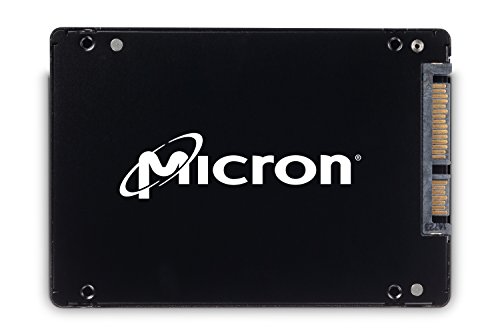
Micron 1100 256GB 2.5-inch SATA is the direct match for a 256GB Micron 1100 SATA replacement: its name identifies a 2.5-inch internal drive, and its feature string gives the Micron model number MTFDDAK256TBN-1AR1ZA. The dimensions supplied convert to roughly 0.28 by 3.95 by 2.75 inches. This format suits a device with a 2.5-inch SATA bay and connector. Its limitation is that the maker does not give transfer rates, so buyers who need a particular speed should verify that requirement before ordering.
Bottom line: Pick it when your system requires a 256GB, 2.5-inch SATA SSD.
Micron 2200S 256GB M.2 2280

Micron 2200S 256GB M.2 2280 differs from the requested drive in both line and interface: it is a Micron 2200S M.2 2280 NVMe SSD, not a Micron 1100 SATA model. Its sequential read and write rates are up to 3,000 and 1,600 MB/s, respectively, and its random rates are up to 240K and 210K IOPS. Those figures matter only in a system that supports an M.2 2280 NVMe PCIe 3.0 x4 drive. It is the wrong choice for a 2.5-inch SATA bay, despite having the same 256GB capacity.
Bottom line: Choose it only for a compatible M.2 2280 NVMe system.
Micron 1300 256GB SATA M.2

Micron 1300 256GB SATA M.2 keeps the 256GB capacity and SATA interface but changes the drive line and form factor: it is identified as a Micron 1300 M.2 SSD. The maker gives maximum read and write rates of 530 and 520 MB/s, 180 TBW endurance, and 256-bit encryption. It may suit an M.2 SATA system, but its M.2 format will not fit a standard 2.5-inch bay, and the label alone does not establish compatibility with every M.2 slot. Confirm that the device supports SATA over M.2 before choosing it.
Bottom line: Choose it for an M.2 SATA slot when 256GB is the target.
Micron 1100 1TB 2.5-inch SATA

Micron 1100 1TB 2.5-inch SATA is the closest alternative in product line and format: it is a 2.5-inch Micron 1100 SATA SSD, but its capacity is 1TB rather than 256GB. Its maker lists 3D TLC NAND, a SATA 6 Gb/s interface, and maximum sequential rates of 530 MB/s read and 500 MB/s write. That makes capacity the deciding distinction for a user whose system accepts this physical format. The limitation is straightforward: it is not a 256GB drive, so it is not a like-for-like capacity replacement.
Bottom line: Pick it when you want a 2.5-inch Micron 1100 with 1TB capacity.
Micron 1100 256GB M.2

Micron 1100 256GB M.2 matches the Micron 1100 line and 256GB capacity, but its name identifies an M.2 SSD rather than the 2.5-inch SATA drive requested. The model string is MTFDDAV256TBN, which distinguishes it from the MTFDDAK256TBN-1AR1ZA model in the direct match. An M.2 drive can use SATA or NVMe, so the form factor by itself does not establish whether it will work in a particular slot. Verify the interface compatibility before choosing it; this option is not a substitute for a 2.5-inch bay drive.
Bottom line: Choose it only when your system accepts this M.2 drive and interface.
How to choose a Micron 1100 SATA 256GB replacement
Start with the drive interface and physical bay, then match capacity. A 2.5-inch SATA SSD connects to a SATA data and power connection; an M.2 drive plugs into a motherboard slot, and M.2 can carry either SATA or NVMe. The M.2 shape does not prove protocol compatibility. A SATA 6 Gb/s connection has a theoretical signaling ceiling near 600 MB/s, while practical SSD transfers fall below that ceiling. In this group, the 256GB 2.5-inch Micron 1100 is the direct match; alternatives change format, capacity, or drive family. Use this quick rule: if your existing drive is a 2.5-inch SATA unit, do not substitute an M.2 NVMe model simply because it also holds 256GB.
| Current system requirement | Relevant option |
|---|---|
| 2.5-inch SATA, 256GB | Micron 1100 256GB 2.5-inch SATA |
| 2.5-inch SATA, 1TB | Micron 1100 1TB 2.5-inch SATA |
| M.2 SATA, 256GB | Micron 1300 256GB SATA M.2 |
| M.2 NVMe 2280, 256GB | Micron 2200S 256GB M.2 2280 |
2.5-inch SATA and M.2 fit differences
A 2.5-inch SSD is typically about 100 mm long and 70 mm wide, with common thicknesses of 7 mm or 9.5 mm; the device bay and mounting hardware determine which thickness fits. The dimensions for Micron 1100 256GB 2.5-inch SATA are about 100 by 70 mm, consistent with the footprint named for it. M.2 dimensions use a width-and-length code: 2280 means 22 mm wide and 80 mm long. Physical fit is only half the check, because M.2 slots vary in supported protocols and keying. Before replacing a drive, identify whether the old one uses SATA or NVMe and whether the system accepts the drive length. Avoid relying on the connector appearance alone.
What SATA and NVMe speed figures mean
SATA 6 Gb/s SSDs commonly top out around 550 MB/s in sequential transfers because protocol overhead reduces throughput below the link’s nominal rate. NVMe drives use PCIe lanes and can exceed SATA limits, but only when the computer supports the matching PCIe generation, lane count, and drive protocol. The Micron 2200S figures are explicitly for PCIe 3.0 x4, while the Micron 1100 1TB option gives a maximum of 530 MB/s read and 500 MB/s write. Those figures should not be transferred to the 256GB Micron 1100: capacities within one drive family can have different performance. Choose based on the intended workload only after confirming system compatibility.
Replacement checks that prevent fit mistakes
Back up files before replacing any storage drive; installation or cloning errors can make existing data inaccessible. Check the device manual or existing drive label for capacity, interface, form factor, and physical thickness, and confirm whether the system requires a particular M.2 length. A SATA 2.5-inch replacement also needs the appropriate SATA connection and a way to secure the drive in its bay. For an M.2 replacement, confirm both SATA-versus-NVMe support and slot length; a 2280 SSD is 80 mm long, while other slot lengths exist. Do not assume that a 256GB capacity or a Micron brand name alone guarantees compatibility.
Frequently Asked Questions
Can an M.2 SATA SSD replace a 2.5-inch SATA SSD?
Not directly, because the drives have different physical connectors and mounting formats. An M.2 SATA drive requires an M.2 slot that supports SATA, while a 2.5-inch SATA drive uses a drive bay and SATA connections.
Does M.2 mean a drive uses NVMe?
No. M.2 describes a physical form factor; M.2 drives can use SATA or NVMe. Check the device’s supported protocol before selecting an M.2 replacement.
How fast can a SATA 6 Gb/s SSD transfer data?
SATA 6 Gb/s SSDs commonly reach roughly 500 to 550 MB/s for sequential transfers, below the interface’s nominal 600 MB/s signaling ceiling. Actual performance depends on the drive and workload.
What does M.2 2280 mean for SSD dimensions?
M.2 2280 means the drive is 22 mm wide and 80 mm long. Confirm that the computer’s slot and mounting point support that length before buying.
Can a 1TB Micron 1100 replace a 256GB version?
It can only if the system accepts the same 2.5-inch SATA format and has no capacity restriction; the drive has four times the nominal capacity. Check the device’s supported drive capacity as well as its connector and physical bay.