
NVIDIA 1050 Ti Low Profile Cards Compared by Fit

The SRhonyra GTX 1050 Ti SRhonyra GTX 1050 Ti Single-Slot suits most compact-PC buyers because it is a single-slot card rated for up to 60 watts and draws power from the PCIe bus. Choose another model if you need a particular port layout, a different card design or a named brand.
We earn a commission if you buy through links on this page. As an Amazon Associate I earn from qualifying purchases. Products are compared on manufacturer specifications, not hands-on testing.
- Best overall: SRhonyra GTX 1050 Ti Single-Slot – Single-slot design and a maximum draw of 60 watts, with no additional power connector.
- Best for a simple fit: Yeston GTX 1050 Ti 4GB Low Profile – Identified as a low profile GTX 1050 Ti with a 22 mm thickness.
- Best for three display ports: ZOTAC GeForce GTX 1050 Ti Low Profile – Includes DisplayPort, HDMI and dual-link DVI outputs.
| Product | Best for | Slot design | Video outputs | Shop |
|---|---|---|---|---|
| SRhonyra GTX 1050 Ti Single-Slot | Single-slot PCs | Single slot | HDMI, DisplayPort | Check Price on Amazon |
| ZOTAC GeForce GTX 1050 Ti Low Profile | Three display ports | Low profile | DisplayPort, HDMI, dual-link DVI | Check Price on Amazon |
| Yeston GTX 1050 Ti 4GB Low Profile | Compact card body | Low profile; 22 mm thick | — | Check Price on Amazon |
NVIDIA 1050 Ti Low Profile Cards
Compare card layout, display connections and power requirements against your PC before choosing.
SRhonyra GTX 1050 Ti Single-Slot

The SRhonyra GTX 1050 Ti is the single-slot choice in this group, and its maximum power draw is 60 watts without an extra power connector. It has 4GB of GDDR5 memory and a PCIe 3.0 x16 interface. HDMI 2.0 supports up to 3840 × 2160 at 60Hz, while DisplayPort 1.4 supports up to 7680 × 4320 at 60Hz, according to the manufacturer. Choose it when slot width and bus power matter; confirm your case clearance and available display connections before purchase.
Bottom line: Choose this for a single-slot build that can supply the card through PCIe.
ZOTAC GeForce GTX 1050 Ti Low Profile
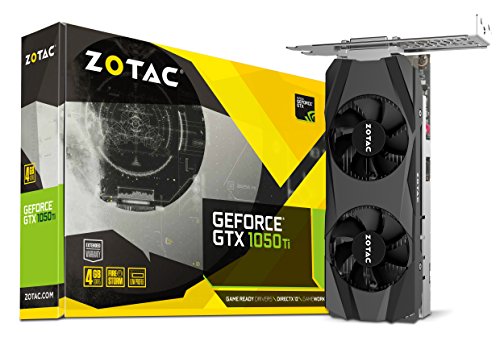
The ZOTAC GTX 1050 Ti stands out for its three different display connections: DisplayPort 1.4, HDMI 2.0b and dual-link DVI. It has 4GB of GDDR5 memory on a 128-bit interface and a boost clock of 1,392MHz. The manufacturer describes it as a low profile card and claims 1080p gaming at 60 frames per second for classic and modern games. Pick it when DVI is needed alongside HDMI or DisplayPort; the maker does not establish its slot thickness, so verify that against your case.
Bottom line: Choose this when you need DVI as well as HDMI and DisplayPort.
Yeston GTX 1050 Ti 4GB Low Profile
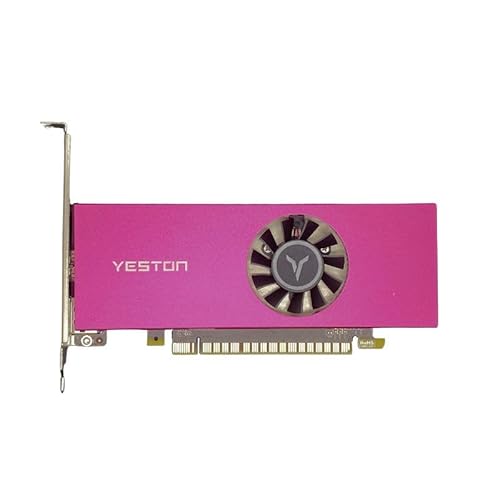
The Yeston GTX 1050 Ti is identified as a low profile card with a 22 mm thickness, making its body dimensions the clearest distinction here. It has 4GB of GDDR5 memory according to the product name, but the maker gives no port or power figures to compare. That makes it a possible match when the card’s physical profile is the main requirement, but a poor choice if you must confirm display compatibility or power draw from these figures alone. Check the exact card dimensions and ports against your system before selecting it.
Bottom line: Choose this only when its exact dimensions and ports suit your build.
How to choose an NVIDIA 1050 Ti low profile card
Start with the physical space and power available in the PC, then compare display outputs. A low profile card needs a matching low profile bracket and enough room for its cooler; a single-slot card can fit where a thicker cooler cannot. Measure the case opening and clearance from the expansion slot to nearby panels or components. PCIe x16 cards use a standard expansion interface, but confirm the motherboard has a suitable slot and that the case has room for the card. Match the output type to the monitor: HDMI, DisplayPort and DVI use different connectors, and an adapter cannot add capabilities the graphics output lacks. If either slot width or port arrangement is a hard constraint, rule out cards that do not explicitly meet it.
Low profile card clearance and slot fit
Low profile describes card height, not necessarily thickness or length. The common low profile bracket height is about 2.7 inches; card length and cooler width still vary, so measure all three dimensions in the case. A single-slot design is narrower than a dual-slot cooler, but it still needs unobstructed airflow around its fan or heatsink. Check the bracket opening too: a full-height case may accept a low profile card, while a small-form-factor case can require the shorter bracket. Before ordering, confirm the exact card dimensions, bracket type and clearance around the PCIe slot. A card that fits the slot electrically can still be blocked by the case or neighboring components.
Power and display compatibility
Power needs are model-specific: a card powered only through PCIe does not need a separate graphics power plug, while other card designs may. Check the card’s maximum draw and your PC’s power supply capacity rather than assuming every GTX 1050 Ti uses the same amount. Display output limits also depend on the port version, cable and monitor; the highest resolution printed for a port does not guarantee every setup supports that mode. For a multi-monitor system, count the outputs you will actually use and match their connector types. Leave room for cable bends near the case panel, especially in compact systems where a stiff cable can press against the chassis.
What to check before installing a low profile GPU
Shut down and unplug the PC before handling an internal graphics card, and avoid touching the gold contacts or components. A PCIe x16 connector should be seated fully in the matching motherboard slot, with the bracket secured so the card does not sag or shift. Remove any unused cover plate from the case opening and use the appropriate bracket for the chassis; a full-height bracket will not secure a low profile opening properly. After installation, connect the monitor to the graphics card rather than a motherboard video port. Confirm the PC starts and recognizes the card before closing the case, and keep vents clear so the cooler can move air.
Frequently Asked Questions
Will a low profile GTX 1050 Ti fit any small PC?
No; case support for a low profile bracket does not guarantee enough card length, thickness or airflow clearance. Measure the usable space around the PCIe slot and confirm the exact bracket and card dimensions.
Does a GTX 1050 Ti need a power cable?
Power requirements vary by model, so check the specific card. A bus-powered model draws from the PCIe slot and needs no separate graphics power connector; do not assume that applies to every design.
Can a low profile GTX 1050 Ti run two monitors?
A card needs at least two usable video outputs for two direct monitor connections. Match each monitor’s connector to an available HDMI, DisplayPort or DVI output, and check the supported resolution and refresh rate for that port.
What does single-slot mean on a graphics card?
Single-slot refers to the space occupied across the expansion-slot area, not the card’s height or length. Measure the cooler thickness separately because a low profile card can still use more than one slot.
Can I use a PCIe 3.0 card in a PCIe x16 slot?
A PCIe 3.0 x16 graphics card uses a PCIe x16 slot, and PCIe generations are designed for backward compatibility. The installed system may operate at the capabilities of its slot and platform, so check the motherboard manual for slot configuration.