
Logia Weather Station Problems: Fixes and Models Compared

For Logia weather station problems, start by checking the outdoor sensor’s power and placement, then confirm the console’s wireless connection; the 10-inch model suits readers who want a larger display. Choose a different station if you need a no-Wi-Fi setup or want the two-year data logging feature.
A home weather station pairs an outdoor sensor array with an indoor console, so a fault may come from power, radio communication, network setup, or the measurement environment.
We earn a commission if you buy through links on this page. As an Amazon Associate I earn from qualifying purchases. Products are compared on manufacturer specifications, not hands-on testing.
- Best overall: Logia 18-in-1 Solar WiFi Station – The 5.5-inch Logia console pairs with a solar-powered outdoor sensor array.
- Best for a large display: Logia 21-in-1 WiFi Station – Its 10-inch display offers a larger viewing area than the 5.5-inch Logia console.
- Best for data history: Sainlogic Wi-Fi Weather Station – It supports up to two years of weather logging and Excel export.
| Product | Best for | Display size | Connectivity | Outdoor measurements | Shop |
|---|---|---|---|---|---|
| Logia 18-in-1 Solar WiFi Station | Compact Logia console | 5.5 in | Wi-Fi | Rain, wind, UV/light, temperature, humidity | Check Price on Amazon |
| Logia 21-in-1 WiFi Station | Large-screen Logia | 10 in | Wi-Fi | Rain, wind, UV/light, temperature, humidity | Check Price on Amazon |
| Ambient Weather WS-2902 | Smart-home integration | LCD color display | Wi-Fi; IFTTT, Google Home, Alexa | Wind, temperature, humidity, rain, UV | Check Price on Amazon |
| Sainlogic Wireless Station, 7.5-Inch Display | No-Wi-Fi setup | 7.5 in | No Wi-Fi | Rain, wind, temperature, humidity, pressure | Check Price on Amazon |
| Sainlogic Wi-Fi Weather Station | Weather data logging | — | 2.4/5 GHz Wi-Fi | Temperature, humidity, wind, rainfall | Check Price on Amazon |
Logia Weather Stations and Related Models
Compare the Logia stations with related options by display, connectivity and measured conditions.
Logia 18-in-1 Solar WiFi Station

The 5.5-inch screen makes this Logia the smaller-console option, while its outdoor array uses a built-in solar panel. The feature set includes a rain collector, wind speed cups and direction vane, UV/light sensor, and indoor and outdoor temperature and humidity alerts. For connection or reading trouble, check that the array is powered and positioned where buildings or metal objects are not blocking its radio path; a sheltered or obstructed sensor can also distort wind and rain readings. The compact screen may be harder to read across a large room than a 10-inch console.
Bottom line: Choose this if a smaller console and solar-powered sensor array suit your setup.
Logia 21-in-1 WiFi Station
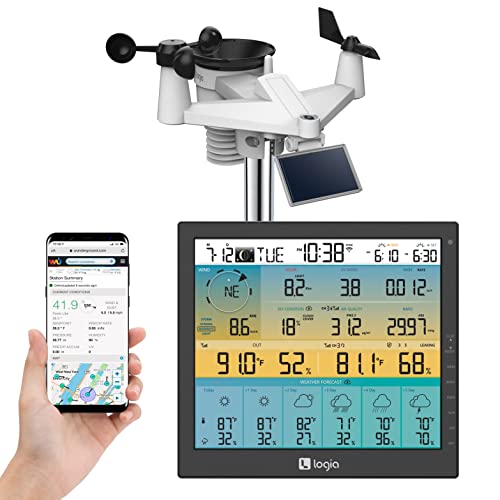
The 10-inch display is the defining difference from the smaller Logia console, making readings easier to view from farther away. Its feature set includes a wireless outdoor sensor array with solar power, a rain collector, wind cups and vane, UV/light sensing, and indoor/outdoor temperature and humidity monitoring. If readings disappear, verify the sensor has power and that the console and array can communicate without major obstructions; for Wi-Fi problems, separate the local sensor-to-console link from the internet connection before changing network settings. The larger screen needs more console space.
Bottom line: Pick this when a large display matters more than minimizing console size.
Ambient Weather WS-2902
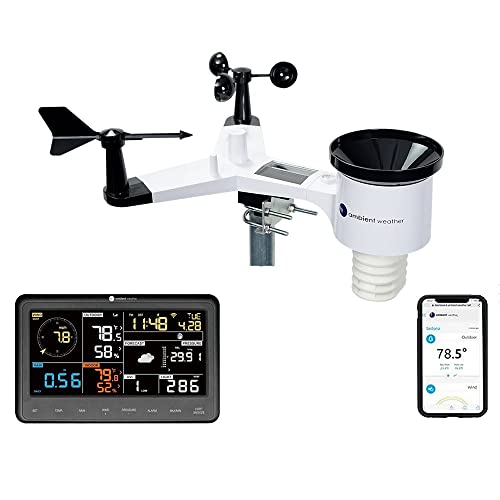
The Ambient Weather WS-2902 differs from the Logia choices by naming integrations with IFTTT, Google Home and Alexa, alongside Wi-Fi remote monitoring and alerts. Its sensor array measures wind speed and direction, temperature, humidity, rainfall, UV intensity and solar radiation, with a color LCD console. For troubleshooting, test whether local console readings work before investigating remote access: a working console with unavailable remote data points toward the network or service connection rather than the outdoor sensors. Choose it for smart-home connections; it is not a Logia station.
Bottom line: Choose this if named smart-home integrations are a priority.
Sainlogic Wireless Station, 7.5-Inch Display

The Sainlogic 7.5-inch station is the no-Wi-Fi alternative in this group, with a color display and measurements that include rainfall, wind speed and direction, indoor/outdoor temperature and humidity, barometric pressure and dew point. Its display brightness has three levels, useful when console visibility is the concern. A wireless sensor still depends on a clear radio path and adequate power, even when the station does not use Wi-Fi. Because this model lacks Wi-Fi, it is not the right alternative for someone whose main requirement is remote app access.
Bottom line: Pick this if you want a local display without Wi-Fi.
Sainlogic Wi-Fi Weather Station

The Sainlogic Wi-Fi model is the option here with a specifically stated two-year history and Excel export in 30-day segments. Its measurements cover indoor/outdoor temperature and humidity, wind, rainfall and barometric pressure, and the feature set describes Weather Underground connectivity and app alerts. When setup fails, first confirm the station joins the home network, then check its service connection separately; this helps isolate local Wi-Fi trouble from remote access. Choose it for historical data workflows, but note that its display size is not provided in the specifications.
Bottom line: Choose this if keeping and exporting weather history is the priority.
How to troubleshoot Logia weather station problems
Start with the simplest split: determine whether the problem affects local sensor readings, the console, or internet access. Check that the outdoor array has power, then compare the console’s indoor readings with outdoor measurements; if indoor values appear but outdoor values do not, focus on sensor power and the wireless path. Keep the array away from walls, large metal surfaces and dense obstructions, which can weaken radio communication and skew wind or rain measurements. For Wi-Fi trouble, verify the router connection independently of the sensor-to-console link. A station can display local readings while failing to send data remotely, so changing sensor placement will not fix a router or service issue.
Where to place a weather station sensor
Placement affects accuracy even when the station is communicating normally. Mount outdoor temperature and humidity sensors in a ventilated, shaded location; direct sun and nearby heat sources can raise readings. Wind sensors need exposure, with common meteorological siting guidance placing an anemometer about 33 feet above open ground; a backyard installation may not meet that standard, so nearby roofs and trees can alter wind readings. Rain gauges need a level position with open sky rather than eaves or branches overhead. Choose a site with the clearest practical radio path to the console, then judge readings against the site conditions rather than expecting a sheltered sensor to match an exposed station.
How Logia station sizes and alternatives differ
Choose the console size by viewing distance and available counter space; the two Logia options here use 5.5-inch and 10-inch displays. Then decide whether Wi-Fi is necessary: the Sainlogic local station has no Wi-Fi, while the Wi-Fi options support remote-oriented features. Typical home stations combine temperature, humidity, wind and precipitation sensors, but sunlight sensing and data history vary by model. The table separates these purchase decisions so you can first rule out stations that lack an essential capability.
| Need | Consider | Tradeoff |
|---|---|---|
| Smaller Logia console | 5.5-inch Logia | Smaller viewing area |
| Larger Logia display | 10-inch Logia | Requires more console space |
| Local-only setup | 7.5-inch Sainlogic | No Wi-Fi |
| Exportable weather history | Sainlogic Wi-Fi | 30-day export segments |
Common setup mistakes that distort readings
A station can report plausible but misleading data when the sensor is installed in the wrong microclimate. Sun on a temperature sensor, wind blocked by a fence, or a rain gauge under a roof edge changes what the array measures without indicating a hardware failure. Leveling matters for many rain collectors, and moving a sensor close to the console can help diagnose a weak radio path before choosing a permanent mount. For outdoor arrays with solar panels, keep the panel exposed to daylight and check for debris. If a reading remains implausible after placement and power checks, compare it with a nearby trusted observation over several intervals rather than reacting to a single moment.
Frequently Asked Questions
Why is my Logia weather station not showing outdoor readings?
Check outdoor-array power and the wireless path to the console first. Move the array temporarily closer to the console; if readings return, obstruction or range is a likely factor.
Why does my weather station show the wrong temperature?
Direct sunlight, walls and heat sources can bias an outdoor temperature sensor. Place it in a shaded, ventilated location and allow readings to settle after moving it.
Can Wi-Fi fail while local weather readings still work?
Yes, local sensor-to-console communication and internet access are separate links. If the console still shows outdoor data, troubleshoot the router or remote service connection rather than repositioning the outdoor array.
How high should a home wind sensor be mounted?
A common meteorological reference is about 33 feet above open ground for an anemometer. Lower residential mounts are affected more by roofs, trees and nearby structures.
How can I tell whether a rain gauge is installed correctly?
Set the gauge level in an open area with no roof or branches above it. Eaves can add runoff and overhead foliage can intercept rainfall, making totals unrepresentative.