
Memory Pro Duo Reader: 5 Models Compared by Fit

For a Memory Stick PRO Duo reader that connects to USB-C and USB-A devices, choose 4-in-1 USB-C/USB Reader; its card support explicitly includes Memory Stick PRO Duo. Choose Bawanfa 4-in-1 Reader instead if you need Lightning connectivity, or 8-in-1 Multi-Interface Reader if you want extra USB 2.0 ports alongside card slots.
A card reader bridges a memory card and a compatible phone or computer, but the connector alone does not guarantee that the device can open the card’s files.
We earn a commission if you buy through links on this page. As an Amazon Associate I earn from qualifying purchases. Products are compared on manufacturer specifications, not hands-on testing.
- Best overall: 4-in-1 USB-C/USB Reader – Explicitly supports Memory Stick PRO Duo and includes USB-C plus a detachable USB adapter for USB devices.
- Best for Lightning devices: Bawanfa 4-in-1 Reader – Combines Lightning, USB-C and USB-A interfaces with a slot that supports Memory Stick PRO Duo.
- Best for USB peripherals: 8-in-1 Multi-Interface Reader – Adds three USB 2.0 ports to its multi-format card reader and offers Lightning, USB-C and USB-A connectors.
| Product | Best for | Card formats | Device connectors | Shop |
|---|---|---|---|---|
| 4-in-1 USB-C/USB Reader | USB-C and USB-A | SD, TF, CF, Memory Stick PRO Duo | USB-C, USB-A adapter | Check Price on Amazon |
| Bawanfa 4-in-1 Reader | Lightning connections | SD, TF, MS, xD | Lightning, USB-C, USB-A | Check Price on Amazon |
| 8-in-1 Multi-Interface Reader | USB peripheral ports | SD, TF, MS, CF, xD | Lightning, USB-C, USB-A | Check Price on Amazon |
| 5-in-1 USB-C/USB Reader | USB-C camera transfers | SD, MicroSD, MS | USB-C, USB-A adapter | Check Price on Amazon |
| BENFEI 4-in-1 USB-C/USB 3.0 Reader | USB 3.0 connections | SD, MicroSD, MS, CF | USB-C, USB 3.0 | Check Price on Amazon |
Memory Pro Duo Readers Compared
Compare the supported card formats and connectors to find a reader that matches your card and device.
4-in-1 USB-C/USB Reader

Explicit Memory Stick PRO Duo support and a detachable USB adapter distinguish this reader. The four slots cover CF, SD, TF and MS formats, and the USB-C connector is intended for compatible phones, tablets and computers. The adapter lets it connect to USB ports as well. Its USB-C-first design suits buyers whose devices use that connector, with legacy USB access as an option. The tradeoff is that Lightning connectivity is not part of the connector setup, so choose another model if your target device requires Lightning.
Bottom line: Pick this if your devices use USB-C or USB-A and you need explicit PRO Duo support.
Bawanfa 4-in-1 Reader

Lightning support sets this reader apart from the USB-C/USB-A-focused options. Its slots support Memory Stick PRO Duo, Memory Stick PRO-HG, Memory Stick Duo, xD-Picture, SD-family and microSD-family cards, making it a broad choice for mixed camera media. The maker says it transfers at up to 480 Mbps. This model suits users who need one reader for Apple Lightning and other connector types. The transfer figure is a maker claim, and actual speed can vary with the card, port and device.
Bottom line: Choose this when Lightning access and xD support matter alongside PRO Duo.
8-in-1 Multi-Interface Reader

Three USB 2.0 ports make this reader different from the other options, which focus on card slots and device connectors. It supports Memory Stick PRO Duo along with SD, TF, CF and xD formats, and its three connector types cover Lightning, USB-C and USB-A devices. That combination suits a desk setup where a card reader and a few wired accessories are useful together. The extra ports are USB 2.0, so buyers seeking faster peripheral connections should choose a separate hub with a higher-speed standard.
Bottom line: Choose this if the built-in USB 2.0 ports are useful for your setup.
5-in-1 USB-C/USB Reader
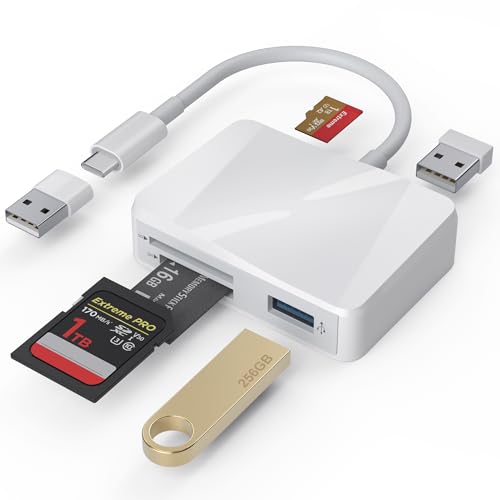
Its photography-oriented positioning and USB-C connector suit transferring camera media to a compatible phone, tablet or computer. The name identifies SD, MicroSD and MS support, and the detachable USB adapter adds a way to connect to USB ports. The reader is presented for camera workflows, including transfers from digital cameras and trail or dash cameras. Compared with readers whose features explicitly spell out Memory Stick PRO Duo, its card-format wording is less specific, so confirm the exact card fit before ordering if your card is PRO Duo.
Bottom line: Consider this for USB-C camera transfers, after confirming your specific card fits.
BENFEI 4-in-1 USB-C/USB 3.0 Reader
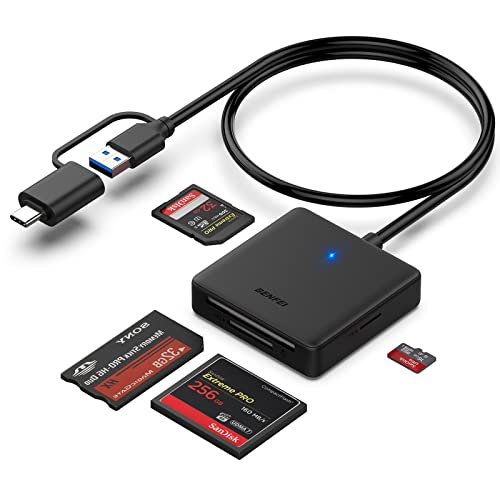
USB 3.0 support and simultaneous access to four card types distinguish this BENFEI reader. Its slots cover SD, MicroSD, Memory Stick and CF, while USB-C supports connection to compatible newer devices; USB 3.0/2.0 ports cover computers with those ports. The maker says UHS-I transfer rates can reach 160 MB/s, with actual speed depending on the card and connected device. Its maker names Memory Stick generally rather than PRO Duo specifically, so verify physical fit for a PRO Duo card before choosing it.
Bottom line: Pick this for USB 3.0 and multiple card types, after confirming PRO Duo fit.
How to choose a Memory Stick PRO Duo reader
Start with the card slot and the connector your device accepts; a matching connector does not prove that the reader supports your card format. Check whether your card is Memory Stick PRO Duo, PRO-HG Duo or another Memory Stick variant, then match that wording to the reader’s supported formats. For the device end, distinguish USB-C, USB-A and Lightning rather than relying on broad phone compatibility language. A removable adapter can add a USB connection, but it does not add card-format support. If the card’s exact subtype is not named, verify physical fit before ordering.
Also consider your workflow: a reader with SD, microSD, CF or xD slots can consolidate other camera cards, while extra USB ports serve peripherals rather than additional card formats.
Card formats and connector choices
Memory Stick PRO Duo support is the deciding format; other card slots are useful only if your workflow also uses those cards. The table separates card compatibility from the device-side connector so you can compare those needs independently.
| Need | What to match |
|---|---|
| Read a PRO Duo card | A supported MS or Memory Stick PRO Duo slot |
| Connect to a phone or tablet | The device’s USB-C or Lightning port |
| Connect to an older computer port | USB-A or a compatible included adapter |
| Read camera formats too | Additional SD, microSD, CF or xD slots as needed |
A compact multi-slot reader can still require the right card orientation and a compatible host device. Confirm the card label and device port before choosing based on slot count alone.
Check device and file compatibility
A reader can pass card data to a device, but the device’s operating system and apps determine whether files can be browsed or imported. Photo and video formats, file systems and app permissions can all affect access; a card that mounts successfully may still contain files a particular app cannot open. On a phone, check that the device supports external storage access through its port and that the intended photo or file app can import from a card. On a computer, confirm the port and card format are supported. If a card is not detected, reconnect it securely, try a compatible port and avoid formatting it before preserving any files.
Use a card reader without risking files
Safely eject a mounted card before unplugging the reader, especially during a transfer; removing it mid-write can corrupt files. Copy important photos to another storage location before deleting or reformatting the card. For troubleshooting, test one card and one connection at a time, then check whether the card is recognized on a second compatible device. Do not force a Memory Stick into a slot that does not match its shape; a different format or orientation can damage the card or reader. For phone transfers, keep the device powered during large imports and make sure the destination has enough free storage.
Frequently Asked Questions
Will every MS card reader accept Memory Stick PRO Duo?
No; check for explicit Memory Stick PRO Duo support or confirm that the reader’s MS slot accepts that card’s shape. General MS wording may not identify every variant.
Can a USB-C reader work with a Lightning iPhone?
A USB-C connector does not plug directly into a Lightning port. Choose a reader that explicitly includes Lightning connectivity for a Lightning device.
Why does my phone not show the card files?
A phone needs both a compatible reader connection and software support for the card and file types. Check that external storage access is supported and try a file or photo app that can import from the card.
Should I remove a card during a transfer?
No; wait until copying finishes and eject the card before disconnecting the reader. Removing a card during a write can corrupt its files.
Can one reader handle camera and phone cards?
Yes, if its slots support the camera’s card format and its connector matches the phone. Check each format separately, since SD, microSD, CF, xD and Memory Stick are distinct card types.