
Bags for Microsoft Surface Pro: 3 Cases Compared

For most Surface Pro owners carrying a charger, mouse or other accessories, USA Gear S7 Pro Small Messenger is the clearest match because its adjustable dividers and accessory pockets provide more organization than a slim sleeve. Choose Omnpak Multi-Pocket Sleeve or Bagasin 12.3–13-Inch Sleeve instead if you want a thinner case to carry alone or slide into a backpack.
A Surface Pro bag is sized around the tablet, but a keyboard cover or protective shell can change the fit. Compare the device-and-cover dimensions with the bag’s internal space before choosing.
We earn a commission if you buy through links on this page. As an Amazon Associate I earn from qualifying purchases. Products are compared on manufacturer specifications, not hands-on testing.
- Best overall: USA Gear S7 Pro Small Messenger – Adjustable padded dividers and accessory pockets make room for a Surface Pro setup beyond the tablet.
- Best for handle carry: Omnpak Multi-Pocket Sleeve – A side handle and four exterior pockets suit users who want a slim case with quick-grab storage.
- Best for measured fit: Bagasin 12.3–13-Inch Sleeve – Its internal dimensions are provided, making it easier to compare against a device and attached keyboard.
| Product | Best for | Carry style | Dimensions (inches) | Storage | Shop |
|---|---|---|---|---|---|
| USA Gear S7 Pro Small Messenger | Accessory carry | Shoulder strap | 12 × 9.3 × 4.8 | Adjustable dividers; accessory pockets | Check Price on Amazon |
| Omnpak Multi-Pocket Sleeve | Handle carry | Side handle | 12.7 × 9.8 × 0.7 | Three front pockets; large back pocket | Check Price on Amazon |
| Bagasin 12.3–13-Inch Sleeve | Measured fit | Sleeve | 12.01 × 8.46 × 1.18 internal | Four-layer protection | Check Price on Amazon |
Bags for Microsoft Surface Pro
Compare each bag’s carry style and dimensions against your Surface Pro, keyboard and any protective case.
USA Gear S7 Pro Small Messenger
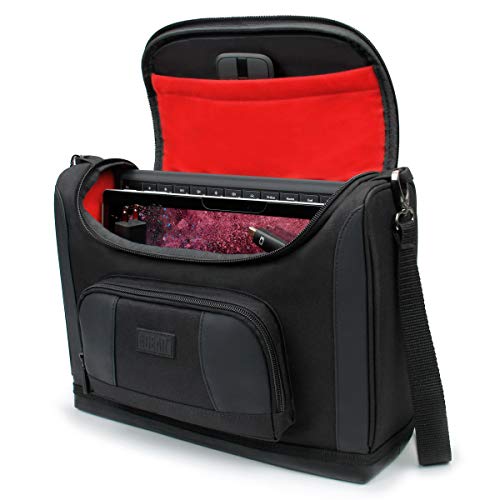
USA Gear S7 Pro Small Messenger is the only messenger-style option here, with more depth for accessories than either slim sleeve. It measures 12 × 9.3 × 4.8 inches and weighs 1.2 pounds; adjustable padded dividers help separate a Surface Pro from gear such as a charger, mouse or keyboard. The maker says its RipStop Nylon shell has a weather-resistant bottom. The larger profile suits people carrying several add-ons, but may feel bulky if you only need a tablet sleeve. Check the packed dimensions if your Surface has a keyboard or thick protective cover.
Bottom line: Choose this if you carry accessories and prefer a shoulder bag over a sleeve.
Omnpak Multi-Pocket Sleeve
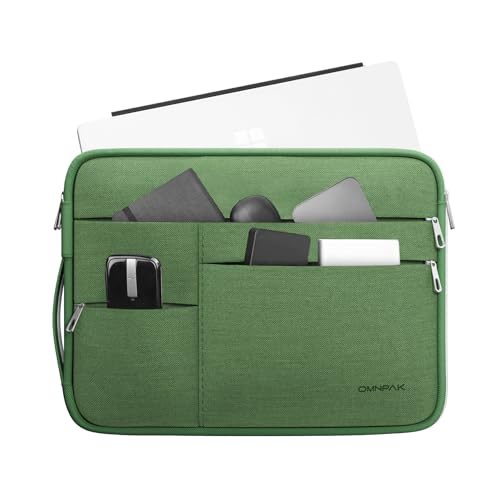
Omnpak Multi-Pocket Sleeve stands out for its side handle and multiple outer pockets, while remaining only 0.7 inch thick. It measures 12.7 × 9.8 inches across its length and width and is designed for several Surface Pro generations, with the maker specifying some older models without a hard case. The soft, water-repellent material and pocket layout suit someone moving a tablet between rooms or sliding it into a backpack. Its slim depth limits how much bulky gear it can carry compared with a messenger bag, so measure the device with its cover attached before relying on the fit.
Bottom line: Pick this for a slim sleeve with a handle and separated pocket storage.
Bagasin 12.3–13-Inch Sleeve

Bagasin 12.3–13-Inch Sleeve is the pick for buyers who want an internal size to compare before ordering: 12.01 × 8.46 × 1.18 inches. The sleeve is compatible with Surface Pro 11, 10, 9, 8 and X, as well as several other 13-inch-class devices. Its four-layer construction is aimed at protection in a compact sleeve rather than carrying a bundle of accessories. The maker asks buyers to measure their device first; that matters especially if a keyboard or shell stays attached, since the internal width and height leave less room than the outside dimensions suggest.
Bottom line: Choose this if you can measure your setup and want a compact, dimension-led sleeve.
How to choose a Surface Pro bag
Choose by the complete carry setup, not just the tablet’s screen size. Surface Pro generations use different chassis dimensions, and a keyboard cover or hard case adds thickness and can make a close-fitting sleeve too tight. Measure the device with every cover that will stay attached, then compare those measurements with the bag’s internal dimensions; exterior dimensions include fabric and padding. A shoulder bag with dividers is more useful when you carry a charger, mouse or other accessories, while a sleeve is easier to place inside a backpack. As a practical rule, if the complete setup is wider or thicker than the internal space, choose a larger bag rather than forcing the fit.
Messenger bags versus sleeves
A messenger bag is the better format when accessories need separate storage; a sleeve is better when the goal is a thin layer around the tablet. Padding can reduce scuffs and cushion minor bumps, but a soft case is not a substitute for a rigid shell against crushing or a hard fall. Water-resistant fabric also does not mean waterproof: seams, zippers and openings can still admit water. Keep electronics away from heavy rain, and do not assume a water-resistant label makes a bag safe to submerge. Use this comparison to match the format to the load rather than treating every Surface Pro bag as interchangeable.
| Need | Choose | Trade-off |
|---|---|---|
| Carry a charger and mouse | Messenger bag | Bulkier than a sleeve |
| Slide a tablet into a backpack | Slim sleeve | Less room for bulky accessories |
| Carry by hand between rooms | Sleeve with handle | Still measure the covered device |
Measure for a keyboard or protective case
Measure the device’s length, width and thickness with the keyboard and shell attached if they will remain on during storage. Compare those values with internal measurements, not the bag’s exterior; padding occupies space and can make the opening narrower than the outer shape suggests. For reference, a 13-inch-class tablet’s screen diagonal does not equal its body width, so screen size alone is a poor fit test. A snug sleeve can hold the tablet in place, but a tight zipper may press on corners or make removal awkward. If the bag gives no internal dimensions, verify the fit before buying rather than inferring it from a “13-inch” label.
Protect a Surface Pro during everyday carry
Keep the tablet’s screen facing the padded side of a case and avoid placing hard accessories loose against it. A charger or mouse can shift during travel, so use separate pockets or dividers when available. Padding helps with scratches and small knocks but cannot guarantee protection from drops; avoid stacking heavy objects on a soft sleeve. Water resistance is useful for brief splashes, not immersion, and a wet bag should be opened and dried before storing electronics again. For air travel, a TSA-friendly design refers to easier screening access, not extra impact or water protection; the bag still needs to fit your device securely when packed.
Frequently Asked Questions
Will a 13-inch bag fit every Surface Pro?
No; screen class alone does not establish fit. Compare the Surface Pro’s body dimensions with the bag’s internal space, including any keyboard cover or case that stays attached.
Should I measure my Surface Pro with its keyboard?
Yes, if you plan to store it with the keyboard attached. Measure the full setup in length, width and thickness, since even a thin cover can make a close-fitting sleeve difficult to zip.
Are water-resistant Surface Pro bags waterproof?
No; water-resistant fabric can repel light moisture, but seams and closures may still let water through. Keep the bag out of heavy rain and never submerge electronics in it.
Can a padded sleeve protect against drops?
Padding can soften minor bumps, but a soft sleeve does not guarantee protection from a drop or crushing load. Use a rigid protective case if those hazards are a concern.
Do Surface Pro bags fit a charger and mouse?
A messenger bag with dividers and accessory pockets is generally better suited to a charger and mouse than a slim sleeve. Check pocket size and keep hard accessories separated from the screen.