
Atari Throwback Game Systems: 5 Models Compared

For most players, My Arcade Atari Game Station Pro is the best fit because it pairs more than 200 built-in games with two wireless joysticks for TV play. Choose a different system if you want a portable screen, a handheld pocket device, or a tabletop arcade cabinet instead of a compact console.
An Atari throwback game system is a modern device with built-in classic games; the options here range from TV-connected consoles to self-contained handhelds and arcade-style units.
We earn a commission if you buy through links on this page. As an Amazon Associate I earn from qualifying purchases. Products are compared on manufacturer specifications, not hands-on testing.
- Best overall: My Arcade Atari Game Station Pro – More than 200 built-in games and two wireless joysticks suit shared TV play.
- Best for handheld play: My Arcade Atari Gamestation Go – A 7-inch color display, rechargeable battery and multiple built-in control types enable portable play.
- Best for arcade setup: Atari Flashback 12 Gold – The 10.1-inch display and tabletop cabinet bring integrated controls to a counter or table.
- Best for pocket portability: My Arcade Atari Pocket Player – The compact 2.8-inch screen and battery-or-USB-C power suit portable solo play.
| Product | Best for | Play format | Built-in games | Screen or TV output | Shop |
|---|---|---|---|---|---|
| My Arcade Atari Game Station Pro | Shared TV play | TV console | 200+ | HDMI | Check Price on Amazon |
| My Arcade Atari Gamestation Go | Portable variety | Handheld, TV-capable | 200+ | 7-inch display; HDMI | Check Price on Amazon |
| Atari Flashback 12 Gold | Wired TV setup | TV console | 130 | HDMI, 720p | Check Price on Amazon |
| My Arcade Atari Pocket Player | Pocket portability | Handheld | 100 | 2.8-inch display | Check Price on Amazon |
| My Arcade Atari Gamestation Mega | Tabletop arcade | Tabletop cabinet | 200+ | 10.1-inch display; HDMI | Check Price on Amazon |
Atari throwback game systems compared
Start with where you plan to play, then compare the screen, game count and controls that matter for that setup.
My Arcade Atari Game Station Pro

Two wireless 2.4 GHz joysticks distinguish this compact TV console from the handheld and tabletop options. It includes more than 200 built-in games, officially licensed Atari titles, game-save options, and paddle controls for games designed around them. The HDMI connection sends play to a TV, so it suits two-player sessions and living-room use. Its limitation is that it depends on a separate TV rather than providing its own screen; choose a handheld if you want to play away from a television. The included HDMI and USB power cables simplify setup.
Bottom line: Pick this for shared play on a TV with wireless joystick controls.
My Arcade Atari Gamestation Go
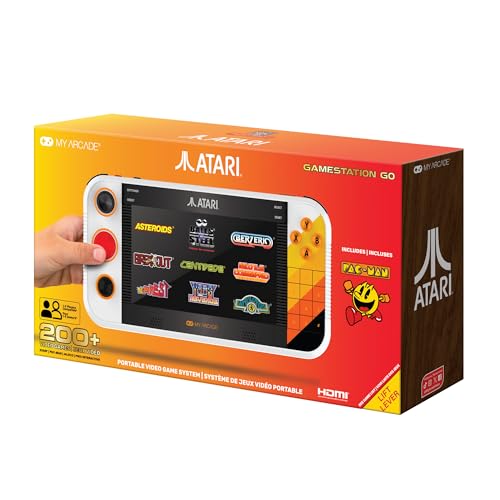
A built-in 7-inch color display and several integrated control types set this handheld apart: paddle, trackball, numeric keypad, D-pad and gamepad buttons. It has more than 200 games, including PAC-MAN, Atari Recharged titles and games from Jaleco and PIKO Interactive, plus game-save options. Rechargeable-battery power makes it the portable choice for players who want more than a joystick layout; it can also connect to a TV by HDMI. The many controls make it less pocketable than a small handheld, so it suits a bag or tabletop more than a pocket.
Bottom line: Choose this for portable play with a large screen and varied controls.
Atari Flashback 12 Gold

At 130 built-in games, this mini TV console has a smaller game library than the systems with 200-plus titles, but its included wired joystick and paddle controllers cover two familiar classic control styles. HDMI output is 720p, and save, load and rewind functions are included. It suits players who prefer a straightforward plug-and-play console and do not need wireless controllers. The joystick is wired, so the cable can limit seating distance from the console; choose a wireless setup if you want more flexibility. The product notes that picture and sound may not match modern technology.
Bottom line: Pick this for a compact wired console with save and rewind functions.
My Arcade Atari Pocket Player

The 2.8-inch screen makes this the smallest-screen option here, and the handheld format is built for solo play rather than a shared TV setup. It comes with 100 built-in games, a speaker with volume control, brightness adjustment and a 3.5 mm headphone jack. Power comes from four AA batteries or a USB-C cable; neither is included, and the maker specifies standard non-rechargeable batteries. That power requirement is a limitation for buyers who want a ready-to-play rechargeable device, but the small size suits travel and private listening.
Bottom line: Choose this for a compact handheld with a headphone jack.
My Arcade Atari Gamestation Mega

The 10.1-inch color display, illuminated marquee and wood construction give this 200-plus-game system an arcade-cabinet format rather than a handheld or compact console. Its integrated paddle, trackball and keypad support different control styles, while SmartGlow illuminates the controls needed for each game. Built-in Wi-Fi supports updates, and the unit includes an HDMI cable and AC adapter. At 17 inches high and 16.5 pounds, it needs a stable tabletop or counter and is less suited to frequent moving than the handheld systems. Choose it when an all-in-one arcade presentation matters more than portability.
Bottom line: Pick this for a permanent tabletop arcade-style setup.
How to choose an Atari throwback game system
Choose by play location first: a TV console needs an HDMI-equipped display, while a handheld supplies its own screen and a tabletop cabinet takes dedicated surface space. A game count is only one filter; the available control style can matter more for classics built around paddles, trackballs or keypads. Paddle controls rotate to move a game element horizontally, while a trackball rolls in multiple directions; a standard joystick is better suited to directional movement. If you mostly play with another person, prioritize a second controller. For solo travel, prioritize a self-contained display and power source. Check whether the TV has an available HDMI input before choosing a TV-connected system.
Controller types and classic game fit
Match the controller to the game mechanic: paddle games use rotational input, while many maze and action games use directional controls. A trackball offers rolling movement, and a keypad can reproduce number-entry controls used by some titles. Wireless controls reduce cable reach constraints, whereas wired controllers require a clear path to the console. The systems here include different combinations, so “more games” does not automatically mean the best fit if the controls feel wrong for the games you want. A useful decision rule: choose a system with an integrated paddle if paddle titles are a priority; choose a joystick-based setup for directional play and shared sessions. Check which control types the games you care about use before settling on a format.
TV consoles, handhelds and tabletop systems
TV consoles keep the play screen on a television, handhelds combine controls and screen in one device, and tabletop systems resemble small arcade cabinets. TV output is useful for a larger shared display but adds a cable and a compatible HDMI input to the setup. A handheld avoids that display requirement and is easier to carry, though screen size is smaller than a typical TV. Tabletop units trade portability for a larger integrated screen and built-in controls. Use this guide to narrow the format before comparing game libraries:
| Play need | Format to consider | Trade-off |
|---|---|---|
| Shared living-room play | TV console | Needs an HDMI-equipped TV |
| Play away from a TV | Handheld | Smaller built-in screen |
| Arcade-style home setup | Tabletop cabinet | Needs a stable surface |
Power and setup checks
Power and connection needs differ by format: a TV console uses a power cable and HDMI connection, a handheld may use batteries or a rechargeable battery, and a tabletop unit may use an AC adapter. Keep cables away from walkways and place heavier tabletop cabinets on a steady surface to reduce the chance of a fall. For battery-powered handhelds, check the required battery type before a trip and carry spares if the device does not use a rechargeable pack. For TV play, verify that the display has an open HDMI input and enough room for the console and controller cables. These simple checks prevent a system from arriving at a setup that cannot support its intended play style.
Frequently Asked Questions
Can these Atari systems connect to a modern TV?
The TV-oriented consoles connect through HDMI, and the Atari Flashback 12 Gold outputs 720p. Confirm that the TV has an available HDMI input before choosing a TV-connected system.
What is the difference between a paddle and joystick?
A paddle rotates to control horizontal movement, while a joystick gives directional input. Choose a system with paddle controls if paddle-based games are a priority.
Are handheld Atari systems suitable for travel?
Handheld systems have their own screens and do not require a TV, which makes them easier to take along than a tabletop cabinet. Check the power source first; the Pocket Player uses four AA batteries or USB-C, and its batteries and cable are not included.
How much screen space does a tabletop arcade need?
The Gamestation Mega measures 12 inches long by 13 inches wide and 17 inches high, so allow a stable surface wider and deeper than its footprint. Keep the surface clear of edges and cords that could snag during play.
Do built-in game counts tell me which system is best?
No; game count is only one factor, and control type and play format can matter more. If you mainly want paddle games, prioritize paddle controls even if another system has a larger library.