
Stand PS4 Pro Vertical: 3 Options Compared by Fit

For a stand PS4 Pro vertical, the Younik stand suits most PS4 Pro owners because its push-fit base has anti-slip feet and cooling vents. Choose a different option if you want controller charging or game storage, or verify compatibility carefully if you own a PS4 Slim or original PS4.
We earn a commission if you buy through links on this page. As an Amazon Associate I earn from qualifying purchases. Products are compared on manufacturer specifications, not hands-on testing.
- Best overall: Younik PS4 Pro Vertical Stand – PS4 Pro-specific push-fit base pairs cooling vents with rubber stabilizers and anti-slide feet.
- Best for a locking fit: eXtremeRate PS4 Pro Vertical Stand – Uses a locking mechanism and rubber pads for a PS4 Pro-specific vertical hold.
| Product | Best for | Stability feature | Shop |
|---|---|---|---|
| Younik PS4 Pro Vertical Stand | Simple Pro setup | Rubber stabilizers, anti-slide feet | Check Price on Amazon |
| eXtremeRate PS4 Pro Vertical Stand | Locking Pro hold | Locking mechanism, rubber pads | Check Price on Amazon |
| KlsyChry PS4 Pro Vertical Stand | Basic Pro stand | Rubber stabilizers, anti-slide feet | Check Price on Amazon |
Stand PS4 Pro Vertical Options
Compare console compatibility first, then choose between a simple base and added charging or storage features.
Younik PS4 Pro Vertical Stand

The Younik stand keeps the design simple: a push-fit base for PS4 Pro with rubber stabilizers, anti-slide footpads and cooling vents. Its dimensions are 14.57 inches long, 3.15 inches wide and 0.79 inches high, so check the available shelf depth and width before choosing it. This option suits owners who want a vertical holder without a charging station or game storage. Its compatibility is limited to PS4 Pro, so it is not the right match for an original PS4 or PS4 Slim.
Bottom line: Choose this if you want a straightforward vertical base for PS4 Pro.
eXtremeRate PS4 Pro Vertical Stand
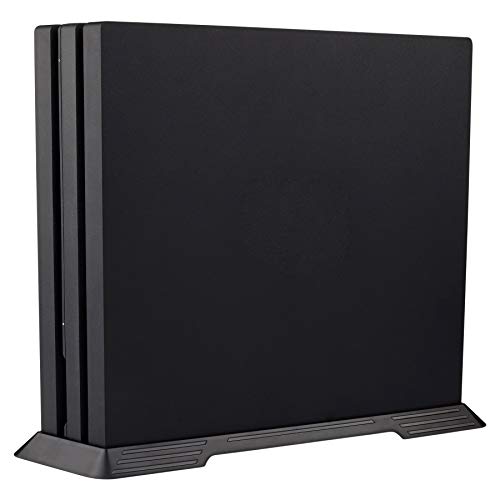
The eXtremeRate stand differentiates itself with a locking mechanism alongside two rubber pad nails, rather than relying only on a push-fit. It is made for PS4 Pro and has built-in cooling holes; its footprint measures 11.02 inches long by 3.54 inches wide, with a height of 0.79 inches. That shorter length may suit a narrower shelf, but measure the actual space before setting up. The stand does not fit other console models, so PS4 Slim and original PS4 owners need another option.
Bottom line: Pick this for a PS4 Pro-only stand with a locking hold.
KlsyChry PS4 Pro Vertical Stand
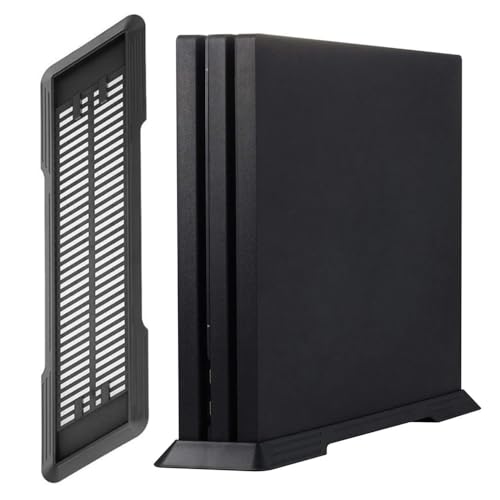
The KlsyChry stand is a PS4 Pro-only holder with heat-dissipation holes, rubber stabilizers and anti-slide footpads. Its push-fit installation avoids a separate locking mechanism, which keeps setup simple for a console that will remain in one place. The main limitation is its narrow compatibility: it does not suit the original PS4 or PS4 Slim. Choose it when the Pro fit and basic upright support matter more than storage or charging; owners of multiple console types should select a cross-compatible stand instead.
Bottom line: Choose this for a basic, Pro-specific push-fit holder.
How to choose a vertical PS4 Pro stand
Choose a stand by matching the console model first, then checking how it holds the console and how much shelf space it uses. PS4 Pro, PS4 Slim and original PS4 are distinct console variants; a Pro-only holder is not a safe assumption for another model. A push-fit base is quick to place, while a locking design adds a specific securing mechanism. For a setup with under 4 inches of available shelf width, compare the stand’s width against that limit and leave room for cables rather than forcing a tight fit. Vented stands leave openings around the console, but a stand alone does not guarantee lower operating temperatures; keep the console’s own intake and exhaust paths clear.
PS4 Slim and Pro compatibility
Compatibility labels matter more than a stand’s similar shape: some holders explicitly accept both PS4 Slim and PS4 Pro, while others are for PS4 Pro only. Check the model printed on the console before selecting a base, especially if a household has more than one PS4 generation. The original PS4 is not interchangeable with a Slim or Pro for fit purposes. Vertical placement also depends on a stable, level surface; avoid narrow shelves where the console or stand can be bumped. Leave open space around ventilation openings, and route cables so their tension cannot pull the console off balance.
Simple stands versus cooling stations
A basic vertical stand is the compact choice when upright placement is the main goal; a cooling station combines that role with accessories and occupies more room. The comparison below separates the two types by what they add, so choose based on the equipment you actually need. Fans add moving parts and can produce noise, while controller charging and game slots require space around the console. A fan does not replace unobstructed console vents or correct placement.
| Stand type | Typical use | Space tradeoff |
|---|---|---|
| Basic vertical base | Hold one compatible console upright | Compact footprint |
| Multi-function station | Add fan, controller charging or game storage | More space and added components |
Placement and ventilation for vertical consoles
Keep the PS4 on a flat, stable surface and preserve clear airflow around its ventilation openings. Dust buildup and blocked vents can impede cooling, so leave space around the console instead of placing it inside a cramped cubby or against fabric. A stand’s vents or fan cannot compensate for blocked console exhaust. Keep liquids away from the electronics and avoid stacking objects on top of a vertically placed console. If the stand is bumped or the cables tug on the console, reposition the setup before use; stability depends on both the base and the surface beneath it.
Frequently Asked Questions
Can I use a PS4 Pro stand with a PS4 Slim?
Only if the stand explicitly supports PS4 Slim as well as PS4 Pro. Pro-only holders do not promise a Slim fit, so match the compatibility label to the console model.
How much space should a vertical PS4 stand have?
Measure both the stand footprint and the space needed for cables before setup. Leave open space around console vents, and avoid a shelf narrower than the base or so tight that it blocks airflow.
Does a cooling stand make a PS4 Pro run cooler?
A vented base provides openings, while a fan station adds active airflow; neither guarantees a particular console temperature. Keep the console’s own intake and exhaust unobstructed and place it on a stable, open surface.
Is it safe to keep a PS4 Pro standing vertically?
A stable, level surface and a stand made for the PS4 Pro help keep the console upright. Keep cables from pulling on the console and leave ventilation openings clear; a crowded or easily bumped shelf is a poor location.