
Fiber Optic to Ethernet Converters: 5 Kits Compared

For a fiber optic to Ethernet link, choose a converter whose SFP and fiber type match the far end; Gigabit Single-Mode LC Pair includes a matched pair of single-mode LX modules for runs up to 20 km. Choose another option if you need multimode fiber, a single converter with an SFP slot, or two copper ports at each end.
We earn a commission if you buy through links on this page. As an Amazon Associate I earn from qualifying purchases. Products are compared on manufacturer specifications, not hands-on testing.
- Best overall: Gigabit Single-Mode LC Pair – Includes two single-mode 1000BASE-LX SFP modules rated for links up to 20 km.
- Best for two RJ45 ports: Dual-RJ45 Single-Mode Pair Kit – Each converter has two copper Ethernet ports behind one fiber uplink.
- Best for multimode LC: ipolex Multimode LC Pair – Includes two 1000BASE-SX modules for multimode LC fiber runs up to 550 m.
| Product | Best for | Fiber type | Included SFPs | Fiber reach | Shop |
|---|---|---|---|---|---|
| Gigabit Single-Mode LC Pair | 20 km single-mode | Single-mode | 2 LX modules | 20 km | Check Price on Amazon |
| Dual-RJ45 Single-Mode Pair Kit | Extra copper ports | Single-mode OS1/OS2 | 2 fitted LX SFPs | 20 km | Check Price on Amazon |
| ipolex Multimode LC Pair | 550 m multimode | Multimode | 2 SX modules | 550 m | Check Price on Amazon |
| BiDi Multimode Converter Pair | Short multimode link | Multimode | 2 BiDi modules | 550 m | Check Price on Amazon |
| Omada MC220L SFP Converter | Flexible SFP choice | Single- or multimode | SFP slot | Varies by SFP | Check Price on Amazon |
Fiber optic to Ethernet converters
Match the converter pair, SFP type and fiber run to the equipment and cable at both ends.
Gigabit Single-Mode LC Pair

Gigabit Single-Mode LC Pair stands apart as a complete single-mode pair, with two converters, two 1000BASE-LX SFP modules and power supplies. The modules use 1310 nm optics and dual LC fiber, with a reach of up to 20 km; the copper ports support gigabit and 10/100 Mbps links. This suits a long point-to-point run when both ends need conversion. The limitation is its single-mode LC configuration: buyers using multimode cable or a different connector need a compatible setup instead.
Bottom line: Choose this pair for a single-mode LC link up to 20 km.
Dual-RJ45 Single-Mode Pair Kit
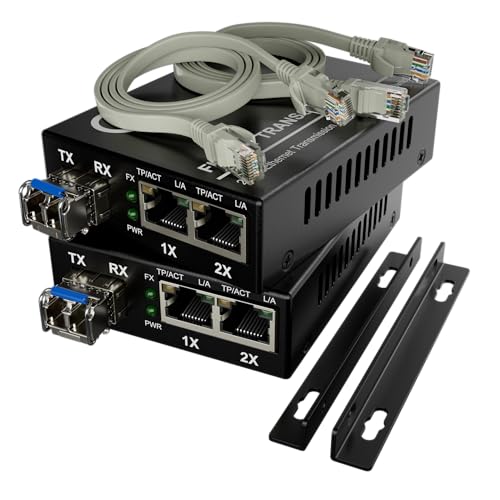
Dual-RJ45 Single-Mode Pair Kit differs from the other kits by providing two RJ45 ports on each converter, for four copper ports across the pair. Each unit has a fitted 1310 nm 1000BASE-LX SFP, and the kit uses duplex LC fiber over OS1 or OS2 single-mode cable for links up to 20 km. That port count can suit an installation that needs a second local Ethernet connection at both ends. The tradeoff is its single-mode duplex LC requirement; it is not the choice for a multimode fiber run.
Bottom line: Choose this kit when each end needs two copper Ethernet ports.
ipolex Multimode LC Pair

ipolex Multimode LC Pair is a two-converter kit with two 1000BASE-SX SFP modules, intended for multimode duplex LC fiber. Its 850 nm modules are rated for a reach up to 550 m over OM3/OM4 fiber, and the RJ45 side supports 10/100/1000 Mbps auto-negotiation. This is a fit for a building or campus link that already uses compatible multimode cable. Its reach and fiber type differ from the single-mode kits, so do not select it for an OS1/OS2 run or a distance beyond 550 m.
Bottom line: Choose this pair for a compatible multimode LC link up to 550 m.
BiDi Multimode Converter Pair

BiDi Multimode Converter Pair pairs two converters with BiDi LC transceivers and power supplies, rather than supplying ordinary duplex LC modules. The fiber port is rated at 1.25 Gbps and the multimode reach is up to 550 m; its RJ45 port negotiates 10/100/1000 Mbps and supports Cat5e or Cat6 copper cable. This kit suits a buyer whose fiber ends and transceivers are specifically compatible with the included BiDi arrangement. The main limitation is that BiDi optics must be matched correctly at the opposite end, so verify the far-end module pairing before choosing it.
Bottom line: Choose this pair only when the far end supports its BiDi transceivers.
Omada MC220L SFP Converter
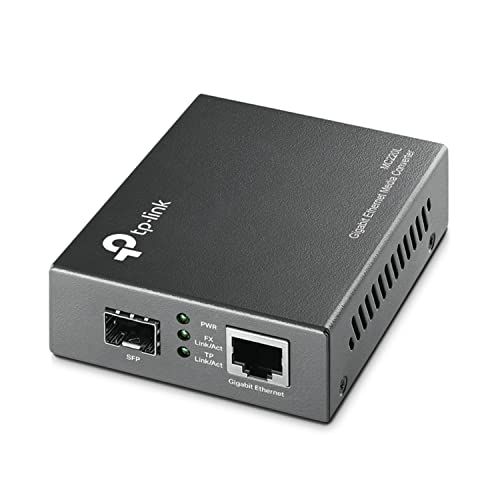
Omada MC220L SFP Converter is the flexible single-converter option: it has an SFP slot rather than a fixed pair of fiber modules, and supports single-mode or multimode SFP modules. The RJ45 side supports 10/100/1000BASE-T, auto-negotiation, half- or full-duplex operation and auto-MDI/MDIX. Its fiber distance depends on the SFP selected, with the range reaching up to 20 km for single-mode or 550 m for multimode. The limitation is that this unit does not include a paired converter or an SFP in the configuration, so it suits buyers who can supply compatible parts.
Bottom line: Choose this unit when you need to select the SFP and already have a link plan.
How to choose a fiber optic to Ethernet converter
Match the fiber type, optical standard and connector at both ends before choosing a converter. 1000BASE-SX typically uses 850 nm multimode optics, while 1000BASE-LX typically uses 1310 nm single-mode optics; a mismatch can prevent the link from coming up. Check whether the setup needs one converter or a pair, and whether each unit includes the SFP module. Most copper Ethernet links are limited to 100 m per segment, so fiber is useful when the run exceeds that distance or electrical isolation is needed. For runs over 100 m, choose fiber and optics with a rated reach that exceeds the actual route length, including slack and patch leads.
This comparison separates included modules and reach so buyers can match the far-end equipment instead of assuming any SFP will work.
Single-mode versus multimode fiber fit
Single-mode fiber is generally the better fit for longer links; multimode is commonly used for shorter building runs. 1000BASE-LX over single-mode fiber commonly supports links measured in kilometers, while 1000BASE-SX over multimode typically serves hundreds of meters, depending on the optic and fiber grade. Match the optic standard and wavelength at both ends, and confirm whether the cable uses LC connectors. Duplex LC uses separate transmit and receive strands; BiDi designs send and receive over one strand and require compatible optics at both ends. A practical rule: if the route is over 550 m, do not choose a 550 m multimode kit; select a single-mode system rated for the distance.
The table shows the SFP arrangement and stated reach for each configuration.
| Configuration | Fiber / optic | Stated reach |
|---|---|---|
| Gigabit Single-Mode LC Pair | Single-mode, LX, duplex LC | 20 km |
| Dual-RJ45 Single-Mode Pair Kit | Single-mode, LX, duplex LC | 20 km |
| ipolex Multimode LC Pair | Multimode, SX, duplex LC | 550 m |
| BiDi Multimode Converter Pair | Multimode, BiDi LC | 550 m |
| Omada MC220L SFP Converter | Depends on selected SFP | Up to 20 km single-mode or 550 m multimode |
Check SFPs, connectors and ports before setup
Confirm the SFP type, fiber mode, connector and port count at both ends before connecting a media converter. Duplex LC patch leads need their transmit and receive strands aligned to the opposing receiver; a crossed or poorly seated connection can leave the link down. BiDi optics use a matched transmit-and-receive wavelength pair, so do not treat them as interchangeable with standard duplex modules. RJ45 ports normally negotiate speed with connected Ethernet equipment, but gigabit operation requires compatible equipment and cabling. Cat5e or better supports gigabit Ethernet over the usual 100 m copper segment. For two local devices at either endpoint, count RJ45 ports per converter rather than across the pair.
Keep fiber connectors clean and capped until use; dust on an optical end face can cause loss or intermittent connectivity. Avoid looking into an active fiber connector, since infrared light may be invisible while still hazardous to the eye.
Common fiber converter setup mistakes
The most common setup mistake is mixing incompatible optics, such as single-mode modules on a multimode run or mismatched wavelengths at the far end. Use matching standards and fiber types, and check the SFP’s connector and reach rating. A second mistake is confusing one converter with a complete link: a point-to-point fiber connection usually needs compatible conversion at both ends, unless the remote equipment already has the matching optical interface. Another is exceeding the copper segment limit; keep each RJ45 run at or under 100 m, or place equipment to create another segment. If the optical link is down, check power, seated modules, connector cleanliness, fiber polarity and far-end compatibility before replacing hardware.
Frequently Asked Questions
Can one converter connect fiber directly to a router?
A converter can connect a fiber run to a router’s RJ45 port when the converter’s SFP and fiber match the far end. A point-to-point link generally needs compatible optical equipment at both endpoints, and the router connection remains subject to the usual 100 m copper Ethernet segment limit.
Do fiber media converters need to be used in pairs?
A fiber link needs compatible optical interfaces at both ends, which may be two media converters or one converter and a device with a matching SFP port. Match the optic standard, fiber type and connector; the single MC220L configuration here has an SFP slot, not a matched pair.
What is the difference between SX and LX fiber optics?
1000BASE-SX typically uses 850 nm multimode optics, while 1000BASE-LX typically uses 1310 nm single-mode optics. SX is generally for shorter links and LX for longer ones; confirm the fiber grade and module reach because the exact limit varies by optic.
How far can multimode fiber run at gigabit speed?
Gigabit multimode reach depends on the optic and fiber grade; the SX kits here specify up to 550 m. If the route exceeds 550 m, choose a compatible single-mode system rated beyond the full route length instead of stretching the multimode rating.
Can BiDi SFPs use a regular duplex LC cable?
BiDi optics are designed to transmit and receive over one fiber strand, unlike standard duplex LC optics that use separate strands. The far-end BiDi optic must be compatible with the local module, so verify the optic pairing and fiber arrangement before connecting the run.