
DeskBoard Buddy: Black Model Compared With 3 Alternatives

The black DeskBoard Buddy suits people who want a 15.75-by-7.25-inch writing surface with hidden storage and a tilted phone stand. Choose a different desktop whiteboard if you want a glass surface or wireless charging instead.
We earn a commission if you buy through links on this page. As an Amazon Associate I earn from qualifying purchases. Products are compared on manufacturer specifications, not hands-on testing.
- Best overall: DeskBoard Buddy Black – Combines a 15.75-by-7.25-inch dry-erase surface, hidden storage, and a tilted phone stand.
- Best for wireless charging: SELEAD Glass Whiteboard with Charger – Adds a wireless charging pad to a 16-by-7-inch glass desktop board.
- Best for glass writing: HURUC Glass Desktop Whiteboard – Pairs a tempered-glass surface with hidden storage and a phone and tablet stand.
| Product | Best for | Footprint | Surface | Added feature | Shop |
|---|---|---|---|---|---|
| DeskBoard Buddy Black | Hidden desk storage | 15.75 × 7.25 in | Dry erase | Phone stand | Check Price on Amazon |
| SELEAD Glass Whiteboard with Charger | Wireless charging | 16 × 7 in | Glass | Wireless charging | Check Price on Amazon |
| HURUC Glass Desktop Whiteboard | Glass and storage | — | Tempered glass | Hidden storage | Check Price on Amazon |
| Desktop Glass Whiteboard with Drawer | Adjustable drawer | 7 × 15.8 in | Glass | Removable drawer divider | Check Price on Amazon |
Desk board buddy and desktop whiteboard options
Compare each desk board by its size, surface, and the workspace feature that sets it apart.
DeskBoard Buddy Black

The DeskBoard Buddy is the exact match for shoppers seeking the named desk board, with a dry-erase surface, hidden internal storage, and a tilted phone stand. Its black body measures 15.75 by 7.25 inches and weighs 2.85 pounds. The maker says the organizer keeps to-do lists and notes visible while stationery stays inside the compartment; two dry-erase markers are included. Choose it if storing small supplies and propping up a phone matter more than having glass or wireless charging. Its features do not include a charger, so it is not the choice for charging a phone on the board.
Bottom line: Pick this if hidden stationery storage and a tilted phone stand are your priorities.
SELEAD Glass Whiteboard with Charger

The SELEAD desktop board stands apart by combining a glass writing surface with a wireless charging pad. It measures 16 by 7 inches and weighs 2.24 pounds; the maker says charging output reaches 15 watts and recommends a power adapter rated at 20 watts or more. The package includes a black dry-erase marker, eraser, and 3-foot USB Type-C cable. This is a useful alternative if charging and a slightly wider surface suit your setup. Charging requires a compatible phone, and case thickness and material can affect operation, so users who need an uncomplicated phone stand should favor a board with that feature.
Bottom line: Choose this if your phone supports wireless charging and you want the charger integrated into the board.
HURUC Glass Desktop Whiteboard
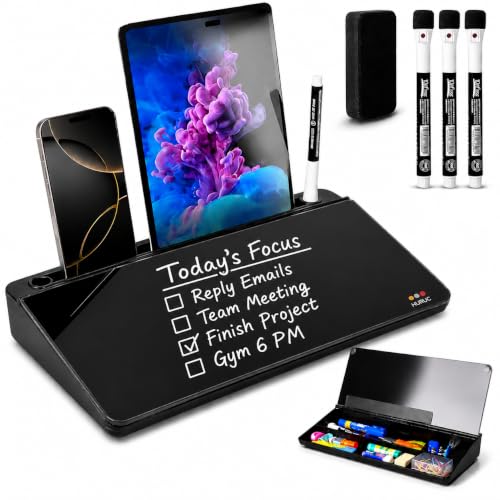
The HURUC board pairs a tempered-glass dry-erase surface with hidden storage and a phone and tablet stand. It includes three markers and a duster, giving it a larger writing accessory set than the DeskBoard Buddy’s two included markers. The maker says its smooth surface is easy to clean and positions the organizer for a tidy workspace. Consider it if glass and a tablet stand are more useful than wireless charging. The measurements do not give a reliable footprint, so confirm the board’s actual width and depth before ordering if desk space is tight.
Bottom line: Pick this for tempered glass, a tablet stand, and included cleaning accessories.
Desktop Glass Whiteboard with Drawer

The glass whiteboard with storage differs through a drawer whose divider can be removed to make room for larger desk supplies. Its size is 7 inches wide by 15.8 inches high, and the maker says the glass surface supports smooth writing and clean erasing. The board is intended for notes, reminders, and brainstorming, with a large pen among its described accessories. This option suits buyers who prefer adjustable drawer space over a phone stand or charging pad. The dimensions use height rather than the footprint convention used by the other boards, so compare the board’s actual desk orientation before choosing it.
Bottom line: Choose this if adjustable drawer storage matters more than phone features.
How to choose a desk board buddy
Start with the usable desk footprint, then choose the feature you will use most. A typical desktop whiteboard organizer combines a writing surface with a stand or storage area; these options range from 7 to 16 inches in their shorter dimensions. Measure the desk depth available in front of your keyboard and leave room for the board’s edge and any cable. Dry-erase surfaces work with compatible dry-erase markers, not permanent markers, and glass versions are smooth, nonporous writing surfaces. If you need a phone feature, distinguish a passive stand from a wireless charger: a stand holds a device, while charging additionally requires a compatible phone and power source. Under 7 inches of clear desk depth, verify the complete footprint before selecting any board.
Glass and other dry-erase surfaces
Glass desktop whiteboards offer a smooth, nonporous writing area, while the DeskBoard Buddy is described as a dry-erase board without a glass surface specified. Dry-erase marker ink is designed to wipe from compatible nonporous surfaces; permanent marker can be difficult to remove and should not be used for routine notes. Use a soft cloth or the board’s included eraser, and avoid abrasive pads that can scratch a surface or its finish. Glass boards can feel slicker than many coated boards, so keep the board stable while writing. The maker identifies glass for the SELEAD, HURUC, and drawer-style board, but only HURUC specifies tempered glass. Choose glass when its surface is your priority, not as a substitute for checking dimensions or included accessories.
Desk fit, phone stands, and charging
Check both the board footprint and device placement before committing desk space. The DeskBoard Buddy measures 15.75 by 7.25 inches, while SELEAD measures 16 by 7 inches; the HURUC dimensions provided do not establish a dependable footprint. A tilted phone stand is passive and does not require power, whereas wireless charging needs a compatible phone and a powered pad. The SELEAD maker recommends a 20-watt-or-higher adapter for its charging feature, says output is up to 15 watts, and notes that case thickness and material can affect charging. Keep charging cables routed away from keyboard movement and writing space. If charging reliability is essential, check phone compatibility and test charging without a case before relying on the pad for daily use.
Keeping a desktop whiteboard useful
Dry-erase boards work best when notes are refreshed before marker ink sits for a long period. Wipe the writing area with a soft dry cloth or the eraser, and use a cleaner intended for whiteboards if residue remains; avoid scraping or abrasive scrubbers, especially on glass. Keep markers capped between uses so their tips do not dry out, and store accessories in the compartment or drawer rather than across the writing surface. Permanent markers are a common mistake because their ink is not made for routine dry-erase cleanup. Store a board on a flat, stable desk and keep loose stationery from blocking its phone stand. For wireless charging models, keep the charging area clear of objects and use the compatible power adapter specified for that feature.
Frequently Asked Questions
Can I use any marker on a desktop whiteboard?
Use dry-erase markers made for whiteboards, rather than permanent markers. Permanent ink can be difficult to remove, particularly after it has dried.
How much desk depth does a board need?
Allow at least the board’s shorter footprint dimension plus clearance for your keyboard and hand movement. The specified options are about 7 inches deep, but verify the actual footprint when a board’s dimensions are unclear.
Will a phone case stop wireless charging?
A case can interfere with wireless charging depending on its thickness and material. The SELEAD maker advises removing the case for a better charging experience; confirm that the phone itself supports wireless charging.
How should I clean glass dry-erase boards?
Wipe glass boards with a soft cloth or their included eraser after writing. Avoid abrasive pads, which can scratch surfaces or finishes, and use dry-erase marker rather than permanent ink.
Can a desktop board hold a tablet upright?
Only choose a model with a tablet stand if you need that function. The HURUC board is described as holding phones and tablets; the DeskBoard Buddy feature is a tilted phone stand.