
GAMEPRO LED Gaming Headphones: 5 Models Compared

For multi-platform compatibility in the GAMEPRO LED gaming headphones search, GAMEPRO LED Gaming Headphones is the named model and the choice if you need PS4, PS5, Xbox, Switch, and PC support stated together. Choose another headset if you want a named 7.1 surround sound feature or specified driver size instead.
We earn a commission if you buy through links on this page. As an Amazon Associate I earn from qualifying purchases. Products are compared on manufacturer specifications, not hands-on testing.
- Best overall: GAMEPRO LED Gaming Headphones – The named model gives compatibility across PS4, PS5, Xbox, Switch, and PC.
- Best for driver specs: Jimonyer 7.1 Gaming Headset, Blue – Its features name 50 mm neodymium drivers and 7.1 surround sound.
- Best for broad device range: BENGOO G9000 Stereo Gaming Headset – Its compatibility claims include consoles, computers, tablets, and phones.
| Product | Best for | Platform compatibility | Sound feature | Microphone | Shop |
|---|---|---|---|---|---|
| GAMEPRO LED Gaming Headphones | Multi-platform gaming | PS4, PS5, Xbox, Switch, PC | Immersive sound | In-line noise-canceling mic | Check Price on Amazon |
| S.I.T.S LED Gaming Headphones | Memory foam comfort | — | High-fidelity sound claim | Adjustable noise-canceling mic | Check Price on Amazon |
| Jimonyer 7.1 Gaming Headset, Blue | Driver specifications | PC, PS5, PS4, Xbox, Switch, and more | 7.1 surround; 50 mm drivers | Noise-canceling mic | Check Price on Amazon |
| Ozeino 7.1 Gaming Headset, White | Rotating microphone | PC, PS4, PS5, Xbox, Switch, and more | 7.1 surround sound claim | 360° rotatable noise-canceling mic | Check Price on Amazon |
| BENGOO G9000 Stereo Gaming Headset | Wide device coverage | PS4, PS5, Xbox, PC, and more | 7.1 surround; 40 mm drivers | Noise-canceling mic | Check Price on Amazon |
GAMEPRO LED gaming headphones and alternatives
Compare the named headset with related models by platform claims, sound features, and microphone design.
GAMEPRO LED Gaming Headphones

GAMEPRO LED Gaming Headphones is the named GAMEPRO model and explicitly covers PS4, PS5, Xbox, Switch, and PC. The maker describes its sound as rich and immersive, and the headset includes LED lighting, plush ear cups, an adjustable headband, and an in-line microphone with a volume wheel. The noise-canceling mic is intended for teammate chat. This is the clearest match if those platforms and a simple volume control are priorities. The feature set does not give a driver size or a specific surround format, so buyers seeking either specification should compare alternatives.
Bottom line: Choose this if its five named platforms cover your setup.
S.I.T.S LED Gaming Headphones

S.I.T.S LED Gaming Headphones emphasizes memory foam ear cushions and an adjustable headband, rather than naming a particular console or computer platform. Its maker claims high-fidelity sound with clear highs and deep lows, and the adjustable noise-canceling microphone is positioned for voice chat. Customizable LED lighting and a durable build are also part of its feature set. This makes it a reasonable related option for shoppers who value cushion material and lighting. The trade-off is less clarity about device fit than the GAMEPRO model, so it is not the strongest choice when compatibility with a specific console is decisive.
Bottom line: Choose this for the memory foam cushions and adjustable mic.
Jimonyer 7.1 Gaming Headset, Blue

Jimonyer 7.1 Gaming Headset, Blue differs by naming 50 mm neodymium drivers and 7.1 surround sound, alongside RGB LED lighting and soft memory earmuffs. Its 3.5 mm audio connection is claimed to work with PC, PlayStation, Xbox, Switch, laptops, Mac, and mobile phones. The maker says the audio supports positional awareness in games. For older Xbox One controllers, an extra Microsoft adapter is required and is not included. Choose this when the driver and surround specifications matter more than the simpler in-line controls of the named GAMEPRO model; the extra adapter is a practical limitation for that older controller setup.
Bottom line: Choose this if 50 mm drivers and 7.1 sound are priorities.
Ozeino 7.1 Gaming Headset, White
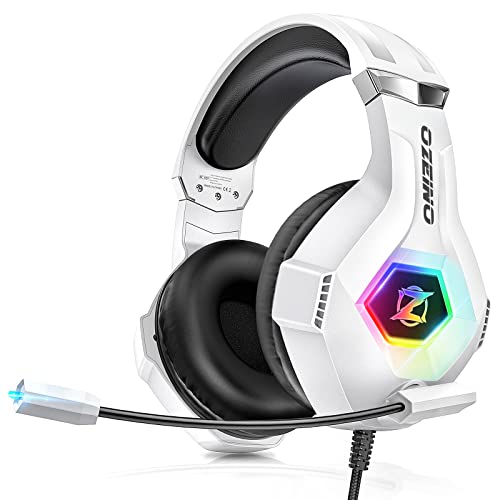
Ozeino 7.1 Gaming Headset, White stands out for its 360-degree rotatable microphone and breathable protein over-ear pads. The compatibility claim covers PC, PS4, PS5, Xbox, Switch, laptops, and mobile devices. The white finish distinguishes it visually from the black GAMEPRO and S.I.T.S models. This headset suits someone who wants a movable mic and specified pad material. The maker gives no driver size, so buyers comparing audio hardware specifications should favor a model that names one.
Bottom line: Choose this for a rotatable mic and white finish.
BENGOO G9000 Stereo Gaming Headset

BENGOO G9000 Stereo Gaming Headset specifies 40 mm magnetic neodymium drivers and names a broad range of supported devices, including consoles, PCs, tablets, and phones. Its maker claims 7.1 surround sound and describes acoustic positioning and noise isolation. LED lighting and soft memory earmuffs are also included in the feature claims. This model may fit buyers moving between gaming platforms and general mobile devices who want driver size stated. An extra Microsoft adapter is needed for an older Xbox One controller and is not included, so that controller setup requires an additional compatibility step.
Bottom line: Choose this for broad device support and a 40 mm driver size.
How to choose a gaming headset
Start with the connection and platform you actually use, then compare mic placement, ear cushions, and audio specifications. A 3.5 mm headset can work across more device types, but controller ports and adapters still affect compatibility. Wired analog headsets generally use a 3.5 mm TRRS plug for combined audio and chat; USB headsets require a compatible USB port and platform support. For console voice chat, check whether the controller or console accepts the headset’s plug and whether chat audio is supported. Choose a headset with a rotating or adjustable mic if you need to move it out of the way between calls. A named driver size helps compare hardware, but driver diameter alone does not establish sound quality.
Understanding surround sound claims
Headset surround sound may be virtual processing rather than multiple physical speakers in each ear cup. Stereo headsets use left and right channels, while virtual surround processing attempts to place sound around the listener through those channels. Platform, game, and software settings can change how positional audio works, so a 7.1 label is not by itself a guarantee of better directional cues. For a straightforward setup, prioritize confirmed compatibility and a connection type your device supports. Buyers comparing the Jimonyer and BENGOO models can also compare their driver diameters, but those figures are not directly a rating of fidelity. Check console audio settings for chat balance and output format before troubleshooting the headset.
Fit and comfort for long sessions
Ear cup shape, clamp force, headband adjustment, and pad material influence fit more directly than a general comfort claim. Circumaural headsets surround the ear; for glasses wearers, soft pads and a lower clamp force can reduce pressure at the temples. Take a brief break at least once each hour to ease pressure and listening fatigue. Keep the volume at a level where nearby speech remains audible, and pause if you notice ringing or discomfort. Memory foam and breathable materials can change the feel and heat buildup, but neither guarantees a proper fit for every head shape. If a headset presses hard against glasses or ears during a short trial, choose a different fit rather than expecting the pads to solve it.
Microphone and connection checks
A headset microphone needs to sit near the corner of the mouth, roughly 1 to 2 inches away, to capture speech without requiring excessive gain. Rotate or adjust the boom before changing software settings; placing it directly in front of the mouth can increase breath noise. A noise-canceling label does not mean every background sound disappears. For wired console setups, confirm whether the controller has a 3.5 mm headset jack and whether a legacy controller needs a separate adapter. Before a voice chat, check the system’s selected input and output devices and make a short test recording. Keep cable plugs fully seated, since a partially inserted 3.5 mm connection can cause missing chat audio or an unbalanced channel.
Frequently Asked Questions
Does a 3.5 mm headset work with every console?
No; the console or controller must support the plug and the headset’s audio and chat functions. Some older Xbox One controllers require an additional Microsoft adapter, so check the controller model before relying on a wired connection.
Are 7.1 gaming headphones always true surround sound?
No; many headset 7.1 claims refer to virtual processing over left and right ear cups. Game, platform, and software settings affect positional audio, so a 7.1 label alone does not prove better directionality.
How far should a gaming headset mic sit?
Place a boom mic about 1 to 2 inches from the corner of your mouth. Moving it slightly to the side can reduce breath noise while keeping speech clear.
Can LED gaming headphones light up without a console?
LED lighting needs a power source, and some wired headsets draw that power through USB even when audio connects through 3.5 mm. Check the headset’s power connection requirements and the device’s available ports before setup.
How often should I take a break from headphones?
A short break at least once each hour can ease pressure and listening fatigue. Keep the volume low enough to hear nearby speech and stop listening if you notice ringing or discomfort.