
Kodak Pixpro FZ55: Camera Bundles Compared

The Kodak Pixpro FZ55 with a 32GB SD card and case suits most buyers who want storage and basic carry protection included; the core camera has a 16MP sensor, 5x optical zoom, and 1080p video. Choose another configuration if color or the included accessories matter more than that bundle.
The FZ55 is a compact point-and-shoot camera: its fixed zoom lens handles framing without interchangeable lenses.
We earn a commission if you buy through links on this page. As an Amazon Associate I earn from qualifying purchases. Products are compared on manufacturer specifications, not hands-on testing.
- Best overall: Kodak Pixpro FZ55 32GB Bundle – Includes a 32GB SD card and protective case alongside the 16MP camera.
- Best for memory flexibility: Kodak Pixpro FZ55 Black – Supports Class 10 SD, SDHC, or SDXC cards up to 512GB.
- Best for pink finish: Kodak PixPro FZ55 Pastel Pink – The FZ55 is offered in pastel pink.
- Best for gray finish: Kodak Pixpro FZ55 Gray – The camera has a gray finish.
| Product | Best for | Included extras | Color | Memory support | Shop |
|---|---|---|---|---|---|
| Kodak Pixpro FZ55 32GB Bundle | Ready-to-carry kit | 32GB SD card, case | Black | 32GB card included | Check Price on Amazon |
| Kodak Pixpro FZ55 Black | Large-card support | USB adapter | Black | Up to 512GB | Check Price on Amazon |
| Kodak PixPro FZ55 Pastel Pink | Pink finish | Rechargeable battery | Pastel pink | — | Check Price on Amazon |
| Kodak Pixpro FZ55 Gray | Gray finish | Rechargeable battery | Gray | Class 10, up to 512GB | Check Price on Amazon |
Kodak Pixpro FZ55 compact cameras
The core camera specifications are similar; compare the extras and finishes to choose a configuration.
Kodak Pixpro FZ55 32GB Bundle

This FZ55 configuration stands apart by including a 32GB SD card and protective case. The camera pairs a 16MP CMOS sensor with a 5x optical zoom lens spanning 28–140mm equivalent, plus 1080p video and a 2.7-inch LCD. It suits a buyer who wants storage and a way to carry the camera together. The limitation is that the card is 32GB, rather than a larger capacity for extensive video recording; choose another card if you need more room.
Bottom line: Choose this bundle if having a memory card and case together matters.
Kodak Pixpro FZ55 Black
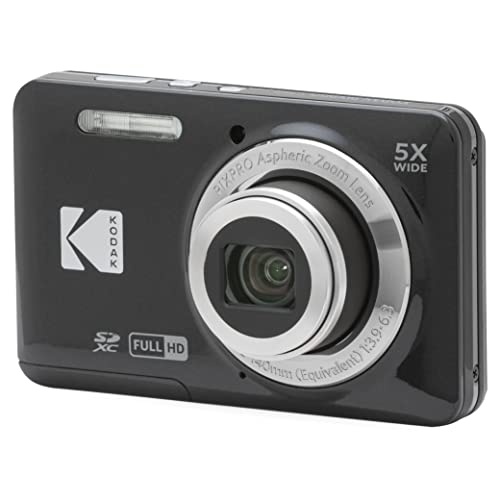
The black FZ55 is the clear choice for buyers who want the camera’s maximum supported card capacity documented: it accepts Class 10 SD, SDHC, or SDXC cards up to 512GB. Its 16MP CMOS sensor, 5x optical zoom, and 28mm wide-angle lens cover everyday stills, while 1080p video handles basic clips. The included LB-012 lithium-ion battery charges in-camera over USB; allow about 2 hours with the adapter. A card and case are not part of this configuration, so it suits buyers who already have accessories or prefer to choose them separately.
Bottom line: Pick this option if you want documented support for cards up to 512GB.
Kodak PixPro FZ55 Pastel Pink

The pastel pink finish distinguishes this FZ55 from the black and gray configurations. It retains the 16MP CMOS sensor, 5x optical zoom, 28mm wide-angle lens, and 1080p video, with face, smile, and blink detection features for automatic capture settings. The compact camera suits a buyer who values the color and wants straightforward snapshots. Its feature set does not identify a memory card or case, so buyers who need those accessories ready to go should favor a bundle that includes them.
Bottom line: Choose this one when the pastel pink finish is the deciding feature.
Kodak Pixpro FZ55 Gray

The gray FZ55 offers a neutral finish while retaining the same core camera format: a 16MP CMOS sensor, 5x optical zoom, 28mm wide-angle lens, 1080p video, and a 2.7-inch LCD. It supports Class 10 SD, SDHC, and SDXC cards up to 512GB, giving buyers latitude to select a card capacity. This version suits someone who prefers gray and wants the card compatibility. The camera does not include a card or case in the configuration, so plan to provide those separately if needed.
Bottom line: Pick the gray finish if you want the large-card compatibility.
How to choose a Kodak Pixpro FZ55 configuration
Choose by included accessories or finish first, because the core FZ55 specifications are similar across these options. A card-and-case bundle is useful when you are starting without accessories; a camera-only configuration leaves you free to select a card and carrying solution. For storage planning, 32GB is the card capacity in the bundle, while two other configurations support cards up to 512GB. Video uses more storage than still photos, so frequent 1080p recording favors a larger card; check compatibility and format the card in the camera before use.
Accessory needs
A camera case helps keep loose items from rubbing against the body during transport, but it does not replace careful handling. If you already own a compatible card, a camera-only option can avoid duplicating accessories.
Understanding the FZ55 zoom and lens
The FZ55’s 5x optical zoom runs from a 28mm wide-angle view to a 140mm-equivalent telephoto view, useful for switching between group scenes and more distant subjects. The wide end is helpful indoors or for landscapes; the longer end narrows the view and frames distant subjects more tightly. Optical zoom changes the lens framing, whereas digital zoom crops the image and can reduce detail. For sharper long-zoom shots, brace the camera or use a faster shutter setting when available, especially in dim light.
Framing rule
When a subject does not fit at the 28mm-wide end, step back if safe before using digital zoom; for distant subjects, the 140mm-equivalent end offers tighter optical framing.
Memory cards and battery charging
Use a Class 10 SD, SDHC, or SDXC card where supported; the black camera and gray configuration specify a maximum capacity of 512GB. Capacity alone does not determine recording duration, since video settings and the number of stills affect remaining space. A freshly formatted card also avoids carrying over files or file-system issues from another device. The black FZ55’s LB-012 lithium-ion battery charges in-camera over USB and takes about 2 hours with its adapter; its manufacturer recommends an initial charge of at least 4 hours to maximize battery life.
For video, check the remaining card space before a trip and carry a charged spare battery for extended recording. Keep the battery and camera dry, and stop charging if the battery becomes unusually hot or shows physical damage.
What 1080p video and a compact camera can do
Full HD 1080p records 1920 × 1080 pixels, a common resolution for family clips and simple online video. The FZ55’s 2.7-inch rear LCD provides framing and playback, while a fixed-lens point-and-shoot keeps operation simpler than a system camera with interchangeable lenses. Stabilization and automatic features can help with casual recording, but they cannot remove all motion blur or replace steady support. For a stationary talking clip, brace the camera on a stable surface and keep the subject well lit; small sensors generally benefit from bright light.
A compact camera is not a substitute for a dedicated microphone or a larger-sensor camera when audio control, low-light image quality, or lens changes are priorities.
Frequently Asked Questions
What memory card works with the Kodak Pixpro FZ55?
Use a Class 10 SD-family card; the black and gray configurations support SD, SDHC, or SDXC up to 512GB. Format a new card in-camera before recording.
How long does the Kodak Pixpro FZ55 battery take to charge?
The LB-012 battery takes about 2 hours to charge in-camera over USB with the adapter. Its manufacturer recommends charging for at least 4 hours before first use to maximize battery life.
What focal length does the FZ55 zoom cover?
The 5x optical zoom covers a 28–140mm-equivalent range. Use 28mm for wider scenes and the longer end for tighter framing of distant subjects.
Can the Kodak Pixpro FZ55 record Full HD video?
Yes, the FZ55 records 1080p Full HD video at 1920 × 1080 resolution. Leave card space for video, which uses storage more quickly than occasional still photos.
Is the Kodak Pixpro FZ55 suitable for low-light photos?
Small compact-camera sensors generally benefit from bright light, so dim indoor scenes can be challenging. Add light or steady the camera to reduce blur rather than relying on zoom.