
Vodiac VR Headset Comparison: 5 Phone Models

DESTEK V5 Smartphone VR Headset is the closest match for phone-based VR movies because it pairs a smartphone viewer with access to more than 50,000 movies and 128 selected apps. These headsets use a phone as the display; choose a different model if you need VR that works without a smartphone or want a clearly stated phone-size range.
We earn a commission if you buy through links on this page. As an Amazon Associate I earn from qualifying purchases. Products are compared on manufacturer specifications, not hands-on testing.
- Best overall: DESTEK V5 Smartphone VR Headset – Pairs a smartphone viewer with 50,000+ movies and 128 selected VR apps.
- Best for focus adjustment: 3D VR Headset with FD/OD Adjustments – Offers field-of-view and optical-distance adjustments, plus compatibility with 5.0- to 7.0-inch phones.
- Best for built-in audio: COCERKET 120° VR Headset with Headphones – Combines a 120-degree viewing angle with aspherical lenses and built-in headphones.
| Product | Best for | Phone fit | Lens adjustment | Audio | Shop |
|---|---|---|---|---|---|
| DESTEK V5 Smartphone VR Headset | Movie app access | All smartphone sizes | Anti-blue HD lenses | Controller included | Check Price on Amazon |
| 3D VR Headset with FD/OD Adjustments | Focus adjustment | 5.0–7.0 in. | FD and OD adjustment | Phone control | Check Price on Amazon |
| COCERKET VR Headset with Bluetooth Controller | Controller navigation | 4.7–7 in. | Pupil distance and focus | Bluetooth controller | Check Price on Amazon |
| Phone VR Headset with Bluetooth Controller | Adjustable strap | iPhone and Android | — | Bluetooth controller | Check Price on Amazon |
| COCERKET 120° VR Headset with Headphones | Built-in headphones | 4.7–7.2 in. | Aspherical lenses | Built-in headphones | Check Price on Amazon |
Vodiac VR Headsets for Smartphones
Compare phone compatibility, lens controls, and audio features before choosing a smartphone VR viewer.
DESTEK V5 Smartphone VR Headset

DESTEK V5 Smartphone VR Headset stands out for its included movie and app access: the maker says VORA provides more than 50,000 free VR movies and 128 selected apps. The headset has anti-blue HD lenses and a touch button, with a controller included. Controller use is limited on iOS to YouTube controls; the maker says Android is required for immersive navigation and virtual interaction. This pick suits phone owners focused on viewing content, but buyers seeking full controller interaction on an iPhone should choose another model.
Bottom line: Choose this if movie and app access matter more than full iOS controller functions.
3D VR Headset with FD/OD Adjustments

3D VR Headset with FD/OD Adjustments separates itself with adjustable field of view and optical distance, which can help align the phone display with each eye. It fits smartphones measuring 5.0 to 7.0 inches and includes a phone-connected control for music playback and volume. This model suits buyers who want optical adjustment and a defined phone-size window; those needing a wireless controller should consider a headset that explicitly includes Bluetooth control.
Bottom line: Pick this when a 5.0- to 7.0-inch phone and focus adjustments are the priorities.
COCERKET VR Headset with Bluetooth Controller

COCERKET VR Headset with Bluetooth Controller combines a Bluetooth controller with adjustable pupil distance and focus, making its controls and lens setup the main distinctions. It is specified for iPhone and Android phones from 4.7 to 7 inches and has heat-dissipation design features. The maker describes breathable sponge padding for facial fit, but the maker does not establish a wear-time or weight rating. Choose it if phone compatibility across that range and wireless control matter; buyers who want built-in headphones should compare a model that includes them.
Bottom line: Choose this for a Bluetooth controller and adjustable lenses across 4.7- to 7-inch phones.
Phone VR Headset with Bluetooth Controller
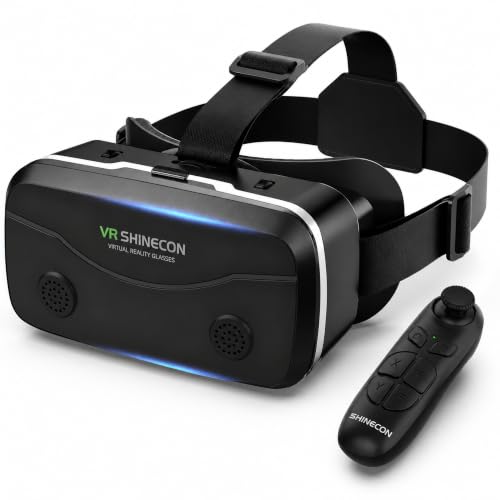
Phone VR Headset with Bluetooth Controller is distinguished by its adjustable head strap and included Bluetooth controller for compatible games and phone functions. The enclosed viewer is designed for 3D movies, VR videos, and compatible mobile games, and the maker says it works with a wide range of iPhone and Android smartphones. The maker does not establish a phone-size range or lens adjustment controls, so confirm phone fit before choosing it. This is a straightforward option for users who prioritize strap adjustment and wireless control over a specified optical setup.
Bottom line: Consider this if an adjustable strap and Bluetooth control are more important than lens specifications.
COCERKET 120° VR Headset with Headphones

COCERKET 120° VR Headset with Headphones is the only option here with built-in headphones, and it pairs them with aspherical lenses and a 120-degree viewing angle. It fits smartphones with screens from 4.7 to 7.2 inches and is intended for VR videos and mobile games. The maker describes the lenses and viewing angle as part of its immersive design, but the maker gives no adjustment range for focus or pupil distance. Choose this model when integrated audio matters; buyers who need documented lens adjustment should look at another headset.
Bottom line: Pick this when built-in headphones and a 120-degree viewing angle are the draw.
How to choose a smartphone VR headset
Start with phone fit, then match lens controls and audio to the content you plan to use. Smartphone viewers split a phone screen into two images, so VR apps and videos generally need a side-by-side format; ordinary phone video may not appear in 3D. A headset that fits the phone physically may still be uncomfortable if the display cannot be centered in front of both eyes. If your phone measures outside a model’s range, choose a headset with a compatible range rather than assuming the tray will stretch.
For adjustment, distinguish focus from interpupillary distance: focus changes the lens-to-screen alignment, while interpupillary distance changes spacing between the lenses. If you want games, verify that the app supports headset viewing and that its controls work with the included controller. Bluetooth controllers are not universal gamepads, and iOS support can be narrower than Android support.
Phone size and lens fit
Measure the phone’s screen diagonally before selecting a viewer with a range; the diagonal alone does not guarantee that a thick case will fit the phone tray. The options here specify ranges from 4.7 to 7.2 inches, while another says it fits all smartphone sizes. For a phone near a fit boundary, remove its case if needed and confirm the headset’s tray dimensions before ordering.
Lens alignment matters as much as screen size. Set the display so its center falls between the lenses, then adjust focus and interpupillary distance if the headset provides those controls. A blurred image that remains blurred after careful alignment may reflect eyesight or content quality rather than a headset defect. People with glasses should verify whether the viewer has enough clearance; no universal eyeglass-fit standard applies to phone viewers.
Phone VR headset features compared
Controller and audio choices change what a phone headset can do, but software compatibility still decides whether a control works in a particular game or video app. The comparison below separates key features without treating a controller as a guarantee of universal game support.
| Need | Feature to prioritize | Practical check |
|---|---|---|
| Movies and apps | Included content access | Confirm the apps run on your phone |
| Clearer alignment | Focus or pupil-distance adjustment | Center the phone display between lenses |
| Hands-free audio | Built-in headphones | Check phone audio routing and fit |
| Game controls | Bluetooth controller | Check each game’s controller support |
For under 5 inches of phone screen size, favor a headset with an explicitly stated minimum at or below that measurement; otherwise, check compatibility rather than relying on a general claim.
Using smartphone VR safely
Take a break after about 20 to 30 minutes of headset use, especially if you develop eyestrain, dizziness, nausea, or a headache; remove the headset if symptoms begin. VR can affect balance and spatial awareness, so use it seated or in a clear area away from stairs, furniture, pets, and other people. A phone headset does not provide room-scale tracking, even when a compatible game shows a virtual environment.
Keep phone brightness and playback volume at comfortable levels, and avoid using a headset while walking, driving, or operating equipment. Heat can build up in a phone during sustained video playback or gaming; stop if the phone becomes unusually hot. Clean lenses with a soft lens cloth rather than abrasive materials, which can scratch lens coatings.
Frequently Asked Questions
Can any phone play VR videos in a headset?
No; the phone needs compatible VR video or an app that presents split-screen imagery for the headset. A phone’s screen size must also fit the headset’s supported range, such as 4.7 to 7.2 inches for some models.
Do smartphone VR headsets work with glasses?
Some have enough room for glasses, but frame size and headset clearance determine fit. Check the space between the lenses and your glasses before use, and do not press frames against your eyes.
Why does the picture look blurry in a phone VR headset?
Misaligned screen position, incorrect focus, smudged lenses, and low-resolution video can each cause blur. Center the phone display and adjust focus if available; stop if eye strain or dizziness develops.
Will a Bluetooth controller work in every VR app?
No; controller support depends on both the phone operating system and the app. For example, the maker of one model limits its controller on iOS to YouTube controls, while full interactive functions require Android.
How long should I wear a phone VR headset at once?
Use short sessions of about 20 to 30 minutes, then take a break and check how you feel. Remove the headset promptly if you notice nausea, dizziness, eyestrain, or a headache.