
Android Bluetooth Barcode Scanners: 5 Models Compared

For an Android Bluetooth barcode scanner that reads both linear labels and 2D codes, choose Eyoyo 1D/2D Handheld Scanner; its maker includes Bluetooth, USB, and 2.4G connections. Choose a 1D model if you scan only UPC or similar linear labels, or a compact model if pocket carry matters more than broad code support.
We earn a commission if you buy through links on this page. As an Amazon Associate I earn from qualifying purchases. Products are compared on manufacturer specifications, not hands-on testing.
- Best overall: Eyoyo 1D/2D Handheld Scanner – Supports 1D and 2D codes and offers Bluetooth, 2.4G wireless, and USB connections.
- Best for pocket carry: Eyoyo Mini 1D Scanner – The 1D scanner weighs 1.2 ounces and supports Bluetooth, 2.4G wireless, and USB.
- Best for QR codes: NETUM 2D-C750 Mini 1D/2D Scanner – Supports 1D and 2D codes, with Bluetooth HID, SPP, and BLE modes.
| Product | Best for | Code types | Connection modes | Weight | Shop |
|---|---|---|---|---|---|
| Eyoyo 1D/2D Handheld Scanner | Flexible workstations | 1D and 2D | Bluetooth, 2.4G, USB | 10.6 oz | Check Price on Amazon |
| PecuMecu TM-10B 1D/2D Scanner | Broad code support | 1D and 2D | Bluetooth, 2.4G, USB | — | Check Price on Amazon |
| NETUM 2D-C750 Mini 1D/2D Scanner | Bluetooth mode options | 1D and 2D | Bluetooth, 2.4G, USB | 6.7 oz | Check Price on Amazon |
| Eyoyo Mini 1D Scanner | Lightweight 1D scanning | 1D | Bluetooth, 2.4G, USB | 1.2 oz | Check Price on Amazon |
| Eyoyo Clip-On Mini 2D Scanner | Clip-on portability | 2D QR | Bluetooth | 5.6 oz | Check Price on Amazon |
Android Bluetooth Barcode Scanners
Compare code support and connection options first, then choose a form factor that suits your scanning setup.
Eyoyo 1D/2D Handheld Scanner

For a workstation that needs more than Bluetooth, this Eyoyo combines 1D and 2D scanning with Bluetooth, 2.4G wireless, and USB wired modes. The included 4.9-foot cable can suit a desk or counter, while the compatibility includes Android phones and tablets. The maker says its imager scans omnidirectionally, so users need not line up the scanner with a barcode. Its larger handheld form and 10.6-ounce weight make it less suited to pocket carry than the mini options; choose it when code variety and wired flexibility matter more.
Bottom line: Pick this for a mixed-code setup that may switch between wireless and USB.
PecuMecu TM-10B 1D/2D Scanner
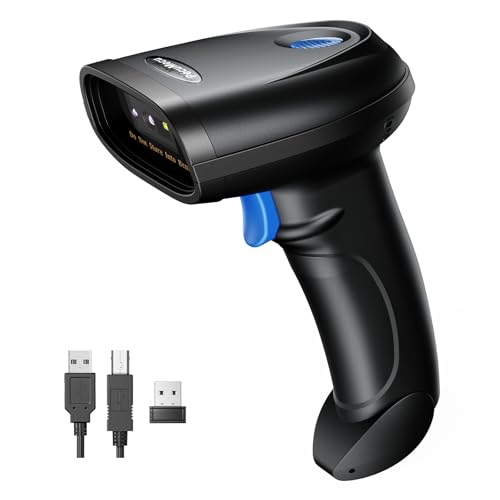
The PecuMecu TM-10B names a particularly broad mix of 1D and 2D formats, including QR Code, Data Matrix, Micro PDF417, Aztec, and Hanxin. It also switches among Bluetooth, 2.4G wireless, and USB wired modes, and its compatibility includes Android. The maker gives wireless ranges of up to 230 feet over 2.4G and 65 feet over Bluetooth without barriers. The limitation is important for some checkout users: it is not compatible with Square. Choose another model if Square compatibility is required.
Bottom line: Pick this when its supported code formats fit your workflow and Square is not required.
NETUM 2D-C750 Mini 1D/2D Scanner
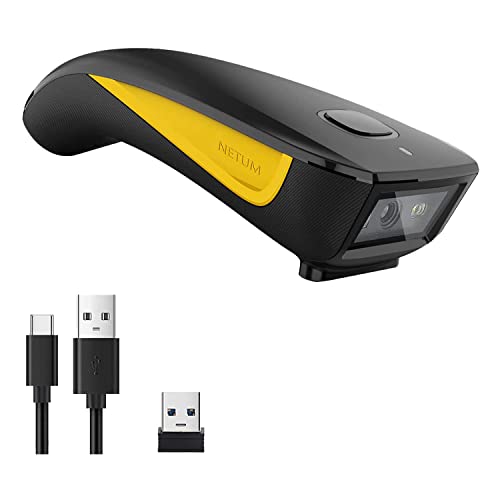
NETUM distinguishes itself with three Bluetooth modes—HID, SPP, and BLE—alongside 2.4G dongle and USB options. Its compatibility includes Android, and it reads 1D and 2D barcodes. HID is useful when a scanner should enter characters like a keyboard; SPP or BLE can suit an app designed to communicate with a scanner, but confirm the app supports the selected mode. The weight is about 6.7 ounces, heavier than the 1.2-ounce Eyoyo mini. Choose it when Bluetooth mode flexibility matters more than the lightest carry.
Bottom line: Pick this if your Android app or workflow calls for a specific Bluetooth mode.
Eyoyo Mini 1D Scanner

At 1.2 ounces, this Eyoyo is the lightest option here, but it reads 1D barcodes rather than QR codes or other 2D formats. Its small size and Bluetooth, 2.4G wireless, and USB wired modes suit portable work with linear labels; Android is among the compatible platforms. The maker lists common formats such as UPC/EAN, Code 39, and Code 128, plus wireless ranges of up to 164 feet over Bluetooth and 98 feet over 2.4G without barriers. Pick another scanner if your labels include QR codes.
Bottom line: Pick this for lightweight scanning when every required code is 1D.
Eyoyo Clip-On Mini 2D Scanner
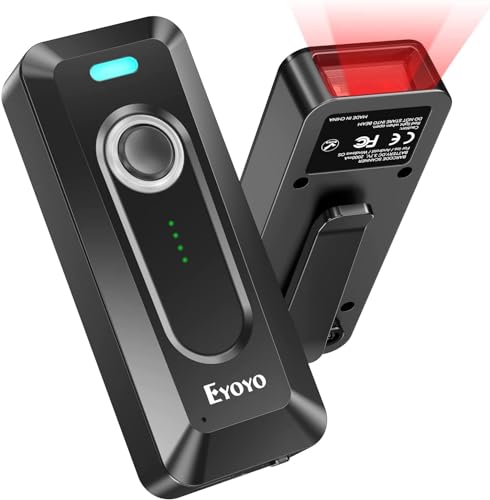
The clip-on design sets this Eyoyo apart for portable inventory work: it can attach to clothing or a belt rather than ride loose in a pocket. Its name and features identify it as a 2D QR Bluetooth scanner compatible with Android phones and tablets. The maker says the 2,000 mAh battery supports up to 20 hours of continuous scanning after a full charge. Unlike the models with three connection modes, this product’s features focus on Bluetooth, so choose another option if you need USB or 2.4G connectivity.
Bottom line: Pick this when a clip and stated battery runtime matter more than multiple connection modes.
How to choose an Android Bluetooth barcode scanner
Choose by barcode format first: a 1D-only scanner is for linear codes such as UPC/EAN, while 2D scanners add formats such as QR Code and Data Matrix. If any item label is a QR code, select a 2D model rather than assuming a 1D reader will handle it. Next, match the connection to the Android workflow: Bluetooth HID generally sends scanned characters as keyboard input, while SPP or BLE may require an app that supports scanner communication. Multi-mode models can add USB or a 2.4G receiver for non-phone workstations. Before buying, check the barcode formats and connection mode required by the app you plan to use.
| Need | Choose |
|---|---|
| UPC/EAN labels only | 1D scanner |
| QR or Data Matrix labels | 2D scanner |
| Scanner app requires SPP or BLE | Model with that Bluetooth mode |
| Phone and desk use | Model with Bluetooth plus USB or 2.4G |
Bluetooth modes and Android pairing
Bluetooth HID mode commonly makes a scanner behave like a keyboard: pair it with Android, open the target field, and a scan enters text at the cursor. SPP and BLE are different connection paths and usually need the receiving app to support the scanner’s communication mode. Pairing alone does not ensure scans reach the right place; verify the Android device shows the scanner as connected and test in the intended app before a shift. Keep the phone within the maker’s range, since barriers can reduce wireless reach. If the scanner is paired but characters do not appear, check the app’s mode requirements and whether the cursor is in an editable field.
1D and 2D barcode support
One-dimensional barcodes encode data along a linear pattern; common examples include UPC/EAN and Code 128. Two-dimensional formats such as QR Code and Data Matrix store data in a grid, so the scanner must explicitly support 2D decoding. Select 2D if even one required label uses a QR code, and check the named formats rather than relying only on a general “2D” label. A broader format list can matter in mixed inventory, but a scanner’s compatibility with an app or point-of-sale system is a separate question. Confirm both the format and the required connection mode when your workflow depends on a particular app.
Portable scanning, battery, and safe handling
Weight and attachment style determine how a portable scanner is carried: the options range from 1.2 ounces for a pocket-sized model to about 10.6 ounces for a larger handheld unit, while one has a clothing clip. Battery capacity and runtime are useful only when they match the work pattern; one maker gives up to 20 hours of continuous scanning for its 2,000 mAh clip-on model. Keep rechargeable scanners away from water and excessive heat, and do not use a damaged charging cable. For long shifts, charge before work and keep a wired mode or backup scanner available if the chosen device’s battery is depleted.
Frequently Asked Questions
Will a Bluetooth barcode scanner work with Android apps?
Many Android apps can receive scans from a Bluetooth HID scanner as keyboard input, provided the app has a text field ready. SPP or BLE connections require the app to support that scanner mode, so check the app’s connection requirements before choosing.
Can a 1D barcode scanner read QR codes?
No; a 1D scanner is intended for linear formats such as UPC/EAN, while QR codes require 2D decoding. If any required label is a QR code, choose a model that explicitly supports 2D formats.
Why does my Android phone pair but not receive scans?
A paired scanner may be using a mode the app does not support, or the app may not have an active text field. Test HID in a text field first; use SPP or BLE only when the receiving app supports that mode.
Does Bluetooth scanner range stay the same indoors?
No; walls and other obstacles can reduce wireless range compared with an unobstructed path. Keep the phone near the scanner during a test in the actual work area rather than relying only on a maximum range.
Do I need a 2.4G receiver for Android?
Not when Bluetooth is the connection your Android device and app support. A 2.4G receiver can be useful for a compatible computer or workstation, but check that the receiving device has a suitable USB port.