
Lehwey Portable CD Player: Car and Home Models Compared

For a Lehwey portable CD player, choose Lehwey External Car CD Player if you need a car-connected unit and your stereo supports external USB audio with at least 5V/1A power. Choose Lehwey Desktop CD Player for a home setup with built-in speakers and multiple playback modes.
Drivers whose stereos lack compatible USB audio should consider an AUX or FM connection option instead; home listeners who want a compact car-oriented device should look elsewhere.
We earn a commission if you buy through links on this page. As an Amazon Associate I earn from qualifying purchases. Products are compared on manufacturer specifications, not hands-on testing.
- Best overall: Lehwey External Car CD Player – It is designed for car use and offers USB, AUX and FM connection modes, subject to the vehicle’s compatibility.
- Best for home listening: Lehwey Desktop CD Player – Built-in dual stereo speakers and Bluetooth modes suit a desktop setup.
- Best for USB-C connections: USB/USB-C External CD Player – Its USB/USB-C connections work with compatible car stereos and computers.
| Product | Best for | Connection modes | Playback formats | Intended setup | Shop |
|---|---|---|---|---|---|
| Lehwey External Car CD Player | Car stereo use | USB, AUX, FM | WAV via USB mode | Vehicle stereo | Check Price on Amazon |
| Lehwey Desktop CD Player | Home listening | CD, Bluetooth, FM, USB, AUX, SPDIF | CD, CD-R, CD-RM, CD-G, MP3, WMA, WAV | Desktop or room | Check Price on Amazon |
| USB/USB-C External CD Player | USB-C setups | USB, USB-C, Bluetooth | WAV | Car, computer, TV | Check Price on Amazon |
| POSSPO Jupiter USB CD Player | USB car setups | USB, AUX with decoder | — | Car, PC | Check Price on Amazon |
| ENVYCLOUD Portable Car CD Player | Compact placement | USB, AUX | — | Car, laptop, TV, computer | Check Price on Amazon |
Lehwey Portable CD Players and Alternatives
Match the player’s connection method to the stereo or room where you plan to listen.
Lehwey External Car CD Player
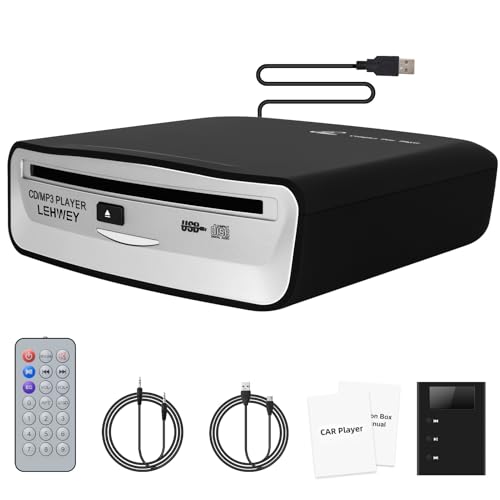
For car use, this Lehwey model stands apart with three connection paths: USB, AUX and FM. USB mode requires a compatible stereo with external USB audio support and WAV playback; the vehicle USB port must provide at least 5V/1A. AUX and FM modes use the included decoder, with AUX also requiring a 3.5mm input. The player has an anti-skip design and resume playback memory. It suits drivers without a built-in CD drive, but it is a poor fit for a stereo that lacks the required audio support or inputs.
Bottom line: Pick this for a compatible car stereo when you want USB, AUX and FM options.
Lehwey Desktop CD Player

For home listening, this Lehwey model differs from the car-focused option by including dual stereo speakers. Its modes include CD playback, Bluetooth receiving and transmitting, FM radio, USB, AUX and SPDIF. The feature set names CD, CD-R, CD-RM, CD-G, MP3, WMA and WAV support. It suits a desk or room where built-in speakers are useful, and Bluetooth can connect compatible devices or audio equipment. The tradeoff is that the feature set is oriented toward home playback rather than a vehicle-specific USB audio connection.
Bottom line: Choose this for a desktop or room setup where built-in speakers matter.
USB/USB-C External CD Player

Compared with the Lehwey car unit, this external player explicitly includes both USB and USB-C connections and is also presented for computer and smart-TV use. The feature set specifies compatible Android and factory car stereos that support WAV playback, plus anti-skip protection and resume playback. It suits a buyer whose setup accepts one of those connections and whose stereo supports the required audio playback. The limitation is compatibility: a plug fitting the port does not establish that a stereo can play audio from the device, so confirm the stereo supports WAV playback over its data port.
Bottom line: Pick this if your compatible setup specifically needs USB-C.
POSSPO Jupiter USB CD Player

The POSSPO Jupiter is a car-oriented alternative with a USB connection and an included USB extension cable, unlike the Lehwey model’s three advertised connection modes. The maker says USB connects directly to the car stereo without a decoder, while AUX uses a decoder for sound. Its cable can help with placement around a center console, dashboard or glove box. This option suits a vehicle with a USB port and a stereo that recognizes the player as a USB drive. It is less suitable if you need FM transmission or if the stereo cannot browse tracks from an external USB device.
Bottom line: Choose this for a car stereo that can browse a connected USB drive.
ENVYCLOUD Portable Car CD Player
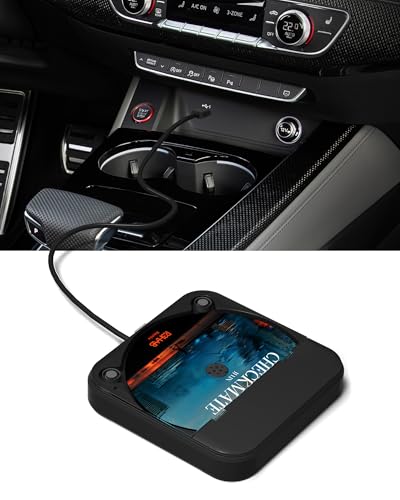
The ENVYCLOUD is a compact car-oriented alternative that also names laptop, TV and computer connections, while the Lehwey car player adds an FM option. Its feature set describes USB and AUX connections and touchscreen and steering-wheel controls when connected to a car system. That makes it a candidate for a compatible setup where those controls matter. It is not the right choice if you need FM as a connection mode, and its broad compatibility claims do not establish that every vehicle stereo will work. Confirm that your car system accepts audio from an external CD player before choosing it.
Bottom line: Consider this for a compatible system where compact placement is a priority.
How to choose a portable CD player for a car
Start with the stereo’s input capability, not just the connector shape: a USB port may charge a device or read storage without accepting audio from an external CD player. For Lehwey External Car CD Player, the car’s stereo must support external USB audio and WAV playback, and the port must supply at least 5V/1A. An AUX connection needs a 3.5mm input; an FM connection needs a clear matching frequency. If your stereo supports only one of these paths, choose a player and mode that match it. Check the stereo manual for supported audio sources and file formats before ordering. A USB-to-USB-C adapter changes the connector, not the stereo’s ability to decode or play the audio.
Car CD player connection types compared
USB, AUX and FM carry audio in different ways, so select the input your stereo can actually use. USB playback depends on the stereo recognizing the connected player and supported audio format; AUX sends analog audio through a 3.5mm input. FM sends audio over a chosen radio frequency, where nearby broadcasts can interfere. Use this guide to narrow the connection before comparing other features.
| Connection | What the stereo needs | Best fit |
|---|---|---|
| USB | External USB audio support and compatible playback | Stereo with supported data audio |
| AUX | 3.5mm AUX input | Stereo with an auxiliary input |
| FM | Radio tuner and a clear matching frequency | Stereo without USB audio or AUX |
For under-dash or console placement, leave enough slack for the cable without routing it across pedals, the steering column or airbag deployment areas.
Portable CD player fit for a desk or room
A home player with built-in speakers avoids the need for a separate stereo, while a car-specific external unit assumes another audio system will play the sound. CD discs are 4.7 inches across, so a surface should be stable and larger than the disc footprint to allow access to the player. Format support matters: a standard audio CD differs from a data disc containing MP3 or WMA files, and the player must support the disc and file format used. Bluetooth receiving and transmitting are distinct functions; confirm which direction your setup needs, such as sending player audio to a speaker. Keep the player away from edges and vibration-prone surfaces.
CD playback and driving safety
Set up a car CD player while parked, then secure both the player and its cables before driving. Driver distraction is a safety risk, so avoid reaching for a disc, remote or stereo controls while the vehicle is moving; have a passenger handle playback changes. Anti-skip design can help reduce interruptions, but it does not guarantee uninterrupted audio on rough roads. Keep cables clear of pedals and do not place a player where it could obstruct the driver’s view, steering, controls or airbag area. If the stereo’s USB port cannot provide the required power or audio support, use a supported connection path rather than assuming a different cable will solve the issue.
Frequently Asked Questions
Will a car USB port play audio from a CD player?
Only if the stereo supports external USB audio and the player’s audio format. For Lehwey External Car CD Player, the vehicle USB port also needs to provide at least 5V/1A.
What does FM mode need in a car CD player?
FM mode needs a radio tuner and a clear matching frequency on the stereo. Nearby stations can cause interference, so choose an unused frequency where you drive.
Can I use an AUX input with an external CD player?
Yes, when the stereo has a 3.5mm AUX input and the player supports AUX output. Connect while parked and keep the cable away from pedals and controls.
What size are standard CDs?
A standard full-size CD measures 4.7 inches across. Check that the player accepts the disc type you use, since audio CDs and data discs with MP3 files are not interchangeable in every player.
Is anti-skip protection a guarantee on bumpy roads?
No. Anti-skip mechanisms are intended to reduce interruptions, but rough roads and strong vibration can still affect playback.