
Vehicle Blackbox Car Camera: 3 Dash Cams Compared

For a focused forward view, paipaicam S09 4K Dash Cam is the strongest fit because it records at 4K and includes a 64GB card. Choose LOFOV 4-Channel 1080p Dash Cam for four-direction coverage or 1080p Dual Front-and-Inside Dash Cam for front-and-cabin recording; those layouts suit drivers who need more than a view of the road ahead.
We earn a commission if you buy through links on this page. As an Amazon Associate I earn from qualifying purchases. Products are compared on manufacturer specifications, not hands-on testing.
- Best overall: paipaicam S09 4K Dash Cam – Its single front lens records in 4K, and a 64GB card is included.
- Best for all-side coverage: LOFOV 4-Channel 1080p Dash Cam – Four 1080p lenses record front, rear, left and right views simultaneously.
- Best for cabin coverage: 1080p Dual Front-and-Inside Dash Cam – Its dual-camera setup records the road ahead and the car interior at the same time.
| Product | Best for | Camera channels | Resolution | Card included | Shop |
|---|---|---|---|---|---|
| paipaicam S09 4K Dash Cam | Forward road view | 1 | 4K 2160p | 64GB | Check Price on Amazon |
| LOFOV 4-Channel 1080p Dash Cam | All-side coverage | 4 | 1080p | 64GB | Check Price on Amazon |
| 1080p Dual Front-and-Inside Dash Cam | Cabin recording | 2 | 1080p | No | Check Price on Amazon |
Vehicle Blackbox Car Cameras
Compare these dash cams by camera direction, resolution and included storage before choosing a recording layout.
paipaicam S09 4K Dash Cam

For a dedicated forward view, this single-lens model stands apart with 4K 2160p recording and an included 64GB card. It also has built-in Wi-Fi, an app, hidden installation and a 24-hour parking-monitor feature. The maker says it captures road details day and night; actual evidence quality still depends on conditions such as lighting, lens placement and a clean windshield. This layout suits drivers who prioritize a higher-resolution view ahead. Its single lens does not provide the cabin, side or rear coverage offered by multi-camera dash cams.
Bottom line: Pick this if forward-facing 4K coverage matters more than recording other sides of the vehicle.
LOFOV 4-Channel 1080p Dash Cam

Four simultaneous views set this camera apart: front, rear, left and right lenses each record in 1080p, and the front three lenses adjust for framing. A 2.4-inch IPS display shows all four feeds, and a 64GB SD card is included. This arrangement suits drivers who want broad coverage around the vehicle rather than a higher-resolution single forward view. The tradeoff is four 1080p views rather than the 4K forward recording of paipaicam S09 4K Dash Cam. Position and angle each lens so the vehicle’s surroundings—not an obstructed view—fill the frame.
Bottom line: Choose it when recording the front, rear and both sides is the priority.
1080p Dual Front-and-Inside Dash Cam
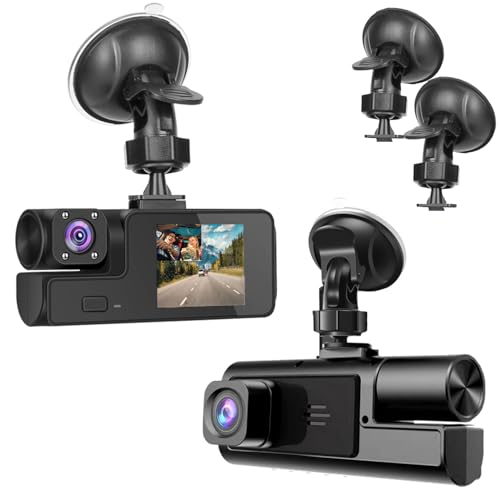
Front-and-cabin recording is the distinction here: the dual-camera setup captures the road and the vehicle interior at the same time in 1080p. The maker says its 170-degree wide-angle view, WDR, night vision, loop recording and G-sensor support driving and incident recording; the G-sensor locks video after a detected sudden shake or collision. The windshield-mounted camera uses a suction cup and plugs into a cigarette-lighter socket. A card is not included, so this option requires a separately sourced compatible card. It does not offer the four-direction coverage of LOFOV 4-Channel 1080p Dash Cam or the 4K front recording of paipaicam S09 4K Dash Cam.
Bottom line: Choose it if you need a forward view and cabin recording in one setup.
How to choose a vehicle blackbox car camera
Choose a dash cam by deciding which directions need recording before comparing resolution. A single forward-facing camera concentrates on the road ahead, a dual front-and-cabin setup adds interior footage, and four channels can cover front, rear and both sides. More views can mean more framing and storage considerations; a 64GB card is included with two of these options, while one comes without a card. Resolution is not a guarantee that every plate will be readable: motion, glare, distance and night lighting all affect useful detail. If a camera’s main purpose is recording an incident ahead, select a front-facing view; if cabin events matter, favor an inward-facing lens.
Where to mount a dash cam
Mount a dash cam high on the windshield without blocking the driver’s forward view. Keep the lens clear of windshield tint, mirror housings and wiper-swept areas that can interfere with visibility or image quality. A centered position near the rear-view mirror is a common starting point, but check the view from the driver’s seat and local windshield rules before fixing the mount. Suction-cup mounts need a clean, dry glass surface; dust and residue can weaken the seal. Route the power lead so it cannot hang into the driver’s sightline or interfere with pedals, airbags or controls. For multi-lens cameras, aim each adjustable lens separately after mounting.
Dash cam recording and storage basics
Loop recording lets a dash cam reuse storage by overwriting older footage, while a G-sensor can lock a clip after a detected impact so it is not overwritten. These functions do different jobs: a locked clip can still occupy card space, so check protected footage and preserve important files elsewhere. Card capacity and recording duration depend on resolution, number of active channels and file settings; four simultaneous views can consume space faster than one. Use a card compatible with the camera and format it in the device when setting it up. A camera’s included card capacity does not establish how many hours of footage it will retain.
Dash cam layout and coverage
Camera layout determines what a dash cam can capture, while resolution describes pixel dimensions for each recorded view. Use this comparison to match coverage to the event you want documented; a camera aimed at one area cannot record an unseen direction.
| Layout | Coverage focus | Consider it when |
|---|---|---|
| Single front lens | Road ahead | Forward footage is the main need |
| Dual front and-inside | Road and cabin | Interior recording also matters |
| Four channels | Front, rear, left and right | Broader vehicle coverage is desired |
Choose a camera with the directions you need rather than assuming a higher resolution adds wider coverage. Before driving, confirm the intended views appear on the display or in the saved clips.
Frequently Asked Questions
Does a dash cam record while the car is parked?
Parking recording requires a camera with a parking-monitor feature and a way to power it while the vehicle is off. The paipaicam S09 includes a 24-hour parking-monitor feature, but confirm its power setup before relying on parked recording.
How much storage does a dash cam need?
Storage use rises with resolution and the number of active camera channels. These options include either 64GB or no card; recording duration cannot be inferred from capacity alone because settings and overwrite behavior also matter.
Can a four-channel dash cam record the cabin?
A four-channel camera can record the cabin if one lens is aimed inward. The LOFOV camera has four lenses and describes front, rear, left and right coverage, with the front three lenses adjustable.
What does a dash cam G-sensor do?
A G-sensor detects sudden motion such as a shake or collision and can lock the related clip against overwriting. Locked footage may use card space, so preserve important clips and periodically review protected files.
Where should a dash cam sit on the windshield?
Place the camera high enough to capture the road while keeping the driver’s view unobstructed. Check the sightline from the driver’s seat, avoid interfering with airbags or controls, and verify local windshield-mounting rules.