
Behringer U Phoria UM2 USB Audio Interface Compared

The Behringer U-PHORIA UM2 bundle is the closest match because it includes the UM2 interface plus headphones and an XLR cable. The standalone UMC22 is a related Behringer interface, while the other choices are alternatives or broader recording bundles.
Choose the UM2 bundle if you want those accessories included; choose a different interface if you need the specific input or software features described for an alternative.
We earn a commission if you buy through links on this page. As an Amazon Associate I earn from qualifying purchases. Products are compared on manufacturer specifications, not hands-on testing.
- Best overall: Behringer U-PHORIA UM2 Bundle – It includes the UM2 interface, closed-back headphones, and a 10-foot XLR cable.
- Best for basic monitoring: M-Audio M-Track Solo – It has a combo XLR/line input, an instrument input, and RCA outputs.
- Best for higher-resolution recording: MAONO PS22 Lite – It supports 24-bit/192 kHz recording and includes loopback and routing software.
| Product | Best for | Inputs | Resolution | Included extras | Shop |
|---|---|---|---|---|---|
| Behringer U-PHORIA UM2 Bundle | UM2 starter setup | 2×2 interface | 48 kHz | Headphones, 10-ft XLR cable | Check Price on Amazon |
| Behringer UMC22 2×2 Interface | Behringer alternative | 2×2 interface | 48 kHz | — | Check Price on Amazon |
| M-Audio M-Track Solo | Instrument input | Combo XLR/line + line/instrument | 48 kHz | Software suite | Check Price on Amazon |
| MAONO PS22 Lite | Higher-resolution capture | XLR + guitar input | 24-bit/192 kHz | Loopback, routing software | Check Price on Amazon |
Behringer U Phoria UM2 USB Audio Interface Options
Compare the closest UM2 match with related interfaces and recording bundles by inputs, recording resolution, and included accessories.
Behringer U-PHORIA UM2 Bundle

The Behringer U-PHORIA UM2 bundle is the only option here that names the UM2 itself, and adds closed-back monitoring headphones and a 10-foot XLR cable. The interface offers a mic preamp, 48 kHz audio resolution, and direct monitoring for recording vocals, podcasts, streaming, or voiceovers. It suits someone starting with an interface and basic recording accessories in one package. The tradeoff is that the other products include features the bundle does not claim, such as 24-bit/192 kHz capture or a specified instrument input, so choose based on the connections and recording specs you need.
Bottom line: Pick this if the UM2 model and included headphones and cable are the priorities.
Behringer UMC22 2×2 Interface

The Behringer UMC22 is a related 2×2 interface rather than the requested UM2, with a 48 kHz specification and a Midas mic preamplifier. Choose it if you want a standalone Behringer interface for computer-based recording rather than the UM2 bundle. Its product name identifies the model difference, and it does not include the headphones and XLR cable called out for the UM2 package.
Bottom line: Choose this if a related standalone Behringer interface fits better than the UM2 bundle.
M-Audio M-Track Solo
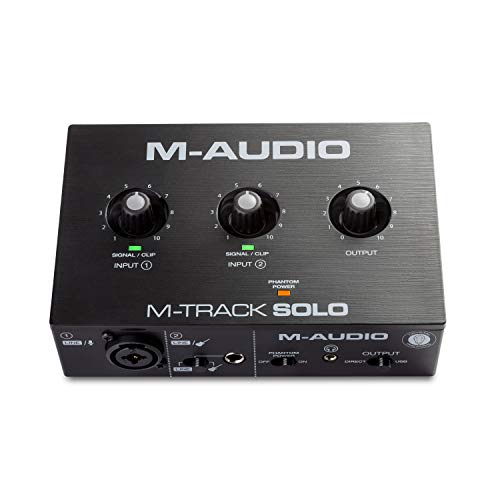
The M-Audio M-Track Solo differs with one combo XLR/line input and a separate line/instrument input, plus stereo RCA outputs and a 1/8-inch headphone output. Its USB/Direct switch supports zero-latency monitoring, and the product specifies 48 kHz audio resolution. This is a useful alternative for someone recording a microphone and an instrument through separate inputs or wanting RCA monitoring connections. It is not a UM2, and its input arrangement—not bundled UM2 accessories—is the main reason to consider it.
Bottom line: Pick this when its separate instrument input and monitoring connections match your setup.
MAONO PS22 Lite

The MAONO PS22 Lite stands apart with 24-bit/192 kHz recording, a low-noise preamp offering up to 56 dB of gain, and 48V phantom power. The product also calls out loopback, an ASIO driver, and routing software for PC and Mac use. Those features make it a better fit for creators prioritizing the recording resolution and software routing options over matching the UM2 model. It is a different interface, so check that its input arrangement suits your microphone and guitar setup before choosing it.
Bottom line: Choose this for the high-resolution recording and routing features.
How to choose a USB audio interface
Start by counting the sources you need to record at the same time: a microphone and a guitar generally require two usable inputs. A combo XLR/line socket accepts a microphone or line-level source, while a dedicated instrument input is intended for a direct guitar or bass connection. For microphone use, check whether the interface supports 48V phantom power if your condenser microphone requires it; do not enable phantom power for equipment that does not support it. A 48 kHz recording rate is common for basic music and spoken-word projects, while higher sample rates create larger files and require compatible software and computer settings.
Choose monitoring based on your workflow. Direct monitoring routes input to headphones without waiting for the computer’s recording buffer, which reduces perceived latency. An interface’s headphone output and speaker outputs are separate connection needs, so confirm both if you monitor on headphones and studio speakers.
UM2 bundles and related interface types
The UM2 bundle combines the named interface with headphones and an XLR cable, while the other options shift the emphasis to different input arrangements or recording features. The UMC22 is a related Behringer 2×2 model, not the UM2. The M-Track Solo specifies a combo input plus a separate line/instrument input, and the PS22 Lite specifies 24-bit/192 kHz recording with loopback and routing software.
The table separates the options by the practical distinction that matters during setup: the interface or package type.
| Option | What distinguishes it | Useful when |
|---|---|---|
| UM2 bundle | Headphones and XLR cable included | You need those accessories |
| UMC22 | Behringer 2×2 interface, 48 kHz | You want a related Behringer model |
| M-Track Solo | Combo input plus line/instrument input | You record mic and instrument sources |
| PS22 Lite | 24-bit/192 kHz, loopback, routing software | You want those stated recording features |
Inputs, phantom power, and monitoring
For a one-microphone setup, one XLR input is enough; simultaneous microphone and guitar recording needs a second usable input or a different recording plan. Condenser microphones commonly need 48V phantom power, but dynamic microphones typically do not. Activate phantom power only when the connected microphone requires it, and avoid plugging or unplugging an XLR mic while phantom power is on.
Monitoring can also affect the recording workflow. A direct-monitor switch or feature sends the input signal to headphones before computer processing, reducing the delay caused by the audio buffer. If you need loudspeaker monitoring, check the output connector type as well as headphone availability; RCA outputs and headphone jacks connect to different equipment.
Sample rate and recording setup
A 48 kHz sample rate is a practical default for many music, podcast, and video projects because it is widely supported by recording software. The PS22 Lite’s 24-bit/192 kHz capability offers a higher maximum recording format, but it does not by itself guarantee a better-sounding recording; microphone choice, room noise, and gain setup also matter. Set the interface and DAW to the same sample rate before recording to avoid mismatched-session problems.
Keep input gain below clipping: digital peaks that hit 0 dBFS can distort, so leave headroom rather than aiming for a full-scale meter. For voice, recording peaks around -12 to -6 dBFS is a useful starting target, then adjust based on delivery and background noise. Use headphones while checking microphone placement to catch room noise before a take.
Frequently Asked Questions
Do I need phantom power for a USB interface?
A condenser microphone often needs 48V phantom power, while most dynamic microphones do not. Turn it on only when the microphone requires it, and avoid connecting or disconnecting an XLR microphone while phantom power is active.
What sample rate should I use for podcast recording?
A 48 kHz sample rate is a common choice for podcast and video work. Match the interface and recording software settings, since mismatched rates can complicate a session.
How many inputs do I need for vocals and guitar?
Recording a vocalist and a guitar at the same time generally calls for two usable inputs. Confirm that one input accepts a microphone and another supports an instrument-level signal if you want to record both directly.
How can I reduce headphone delay while recording?
Use direct monitoring when the interface provides it, because it routes the live input without waiting for computer processing. A smaller software buffer can also reduce delay, but may increase the computer’s processing load.
What recording level should I aim for?
Keep digital peaks below 0 dBFS to avoid clipping. Peaks around -12 to -6 dBFS are a practical starting point for voice recording, with adjustments for the speaker and room noise.