
VR Shinecon VR Glasses: 5 Smartphone Headsets Compared

VR Shinecon VR glasses are smartphone headsets for viewing compatible games and video, and the adjustable strap and 360° playback support make VR SHINECON Smartphone VR Glasses the best starting point. Choose a different model if you need a remote or a headset with a phone-size range.
Phone-based VR uses your smartphone as the screen and computing device, so the headset alone does not provide apps or content.
We earn a commission if you buy through links on this page. As an Amazon Associate I earn from qualifying purchases. Products are compared on manufacturer specifications, not hands-on testing.
- Best overall: VR SHINECON Smartphone VR Glasses – Supports 360° video and VR games, with an adjustable head strap.
- Best for larger phones: VR SHINECON Headset with Remote – Its phone range extends to 6.8 inches.
- Best for remote control: VR Headset with Remote Controller – Includes a remote controller and supports 4.7- to 6-inch phones.
| Product | Best for | Color | Weight (lb) | Shop |
|---|---|---|---|---|
| VR SHINECON Smartphone VR Glasses | 360° video | Black | 0.75 lb | Check Price on Amazon |
| VR SHINECON Headset with Remote | Larger phones | Clear | 0.992 lb | Check Price on Amazon |
| VR Headset with Remote Controller | Remote control | VR Headset with Remote | 1.254 lb | Check Price on Amazon |
| Adjustable 4.5-7-Inch VR Glasses | Pupil adjustment | Black | 0.397 lb | Check Price on Amazon |
| VR SHINECON Phone VR Goggles | Simple VR viewing | Black | 0.86 lb | Check Price on Amazon |
VR Shinecon VR Glasses and Similar Smartphone Headsets
Compare phone fit and headset features before choosing a smartphone VR viewer.
VR SHINECON Smartphone VR Glasses

For 360° video and VR-supported games, this VR SHINECON headset offers a straightforward feature set with an adjustable head strap. It is intended to work with a smartphone, which supplies the screen and runs the compatible app or video. The adjustable strap is useful when fit needs tailoring across head sizes. Its phone-size range and remote-control support are not established here, so confirm the phone fit before ordering if your device is near the tray’s limits. Pick it for its content support rather than for a specific phone-size claim.
Bottom line: Choose this if 360° video support and an adjustable strap are your priorities.
VR SHINECON Headset with Remote
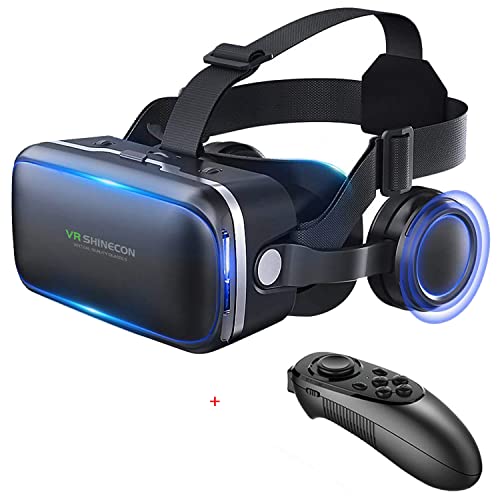
This VR SHINECON headset distinguishes itself with a phone range reaching 6.8 inches and a remote control. It is intended for viewing TV, movies and video games on a compatible iOS or Android phone. A diagonal range helps narrow compatibility, but a phone’s width, case and camera placement can also affect whether it seats correctly in a headset. Its key limitation is that the feature fields do not establish how the remote works with particular apps, so choose it for the broader stated screen range and verify app control needs.
Bottom line: Choose this if your phone is larger than 6 inches and no more than 6.8 inches.
VR Headset with Remote Controller

It is designed for iPhone and Android phones with screens from 4.7 to 6 inches, while the smartphone supplies the applications and movie content. That means it is a viewer rather than a standalone VR system; the product text also cautions that some third-party apps may not work with it. Buyers who want the simplest phone-size match should compare their device against the range and consider whether their chosen app supports remote input.
Bottom line: Choose this if your phone fits the range and you want a Bluetooth remote.
Adjustable 4.5-7-Inch VR Glasses

This headset covers the widest explicit phone-size range among these options, from 4.5 to 7 inches, and names pupil-distance adjustment as a feature. The 360° panoramic viewing is aimed at movies and games on a compatible phone. Pupil-distance adjustment can help align the lenses with the viewer’s eyes, but it does not establish that a particular phone will fit the tray. The maker mentions myopia users, but does not establish a prescription lens or medical benefit; choose it for the adjustments and confirm physical phone fit.
Bottom line: Choose this if you want pupil-distance adjustment and a broad stated phone range.
VR SHINECON Phone VR Goggles

This VR SHINECON model is identified as phone-compatible VR goggles, making it an option for buyers who want the brand’s basic smartphone-viewer format. Its compact stated dimensions are 8.74 inches long, 8.07 inches wide and 3.9 inches high. The product name establishes phone use but not a specific screen-size range, remote or optical adjustment, so buyers who need one of those features should favor a model that names it. Confirm your phone fits the headset before ordering, especially if it is unusually large or used with a case.
Bottom line: Choose this if you want VR SHINECON phone goggles and can confirm your phone fits.
How to Choose Smartphone VR Glasses
Choose a phone VR headset first by whether your smartphone fits, then by the controls and adjustments you need. These viewers hold a phone in front of two lenses; the phone supplies the display, sensors and app, so a headset is not a standalone console. VR apps commonly need head tracking from a phone gyroscope and a split-screen stereoscopic mode, and app support can vary by phone and operating system. A remote is useful only when the app recognizes its input. If you want hands-free control, prioritize a model that explicitly includes a remote, but verify compatibility with the app you plan to use.
Phone screen diagonal is a starting point, not a full fit guarantee: width, case thickness and camera position can also interfere with the holder. Remove a bulky case if the phone does not seat securely.
Phone Size and Headset Fit
Match your phone’s screen diagonal to the headset’s range, then check the phone’s physical dimensions against the holder before buying. A range such as 4.7-6 inches is a diagonal measurement, not a promise that every phone with that diagonal fits. Cases add thickness, while buttons or camera bumps can prevent the phone from sitting flat. For models without a range, confirm the fit before ordering, especially for a phone over 6 inches. Lens alignment matters too: center each eye over its lens and adjust pupil distance when the headset provides that control. A poor fit can blur the split image even when the phone fits.
Smartphone VR Headset Features Compared
Phone-size coverage, remote control and optical adjustment separate these smartphone VR glasses. The table shows which specifications name those features; a dash means the feature is not included in the comparison.
| Need | Option | What to know |
|---|---|---|
| 360° video and adjustable strap | VR SHINECON Smartphone VR Glasses | Features include 360° playback support and an adjustable strap. |
| Phone range up to 6.8 inches | VR SHINECON Headset with Remote | States 4.7- to 6.8-inch phone compatibility and a remote. |
| Phone range up to 7 inches | Adjustable 4.5-7-Inch VR Glasses | States 4.5- to 7-inch compatibility and pupil-distance adjustment. |
| Bluetooth remote | VR Headset with Remote Controller | States 4.7- to 6-inch phone compatibility. |
Choose by the need that is hardest to compromise on, then confirm the exact phone and app combination.
Safe Use of Phone VR Glasses
Use phone VR while seated or standing still, and stop immediately if you feel dizzy, nauseated or disoriented. Do not wear a headset while walking, near stairs, cycling or driving; the phone view blocks awareness of real surroundings. VR can cause eyestrain or motion discomfort, particularly when head movement does not match what the app displays. Start with a short session, take a break if symptoms arise, and keep children supervised around the headset and its straps. A clear image also depends on correct lens alignment and a secure phone holder, so adjust the fit before starting a game or video.
Frequently Asked Questions
Does a VR Shinecon headset work without a phone?
No, these smartphone viewers use the phone as the display and run content through phone apps. The headset does not replace a standalone VR system.
What phone size fits a VR headset?
Use the headset’s screen-diagonal range as the first check; listed models include ranges from 4.5-7 inches and 4.7-6 inches. A phone’s width, case thickness and camera placement can still affect fit.
Do phone VR glasses need special apps?
Yes, the phone needs compatible VR content, typically an app with a split-screen stereoscopic viewing mode. Apps differ in phone and remote-control support, so verify your chosen app before relying on a controller.
How should I avoid motion sickness in phone VR?
Start with a short session while seated, and stop if dizziness, nausea or eyestrain begins. Smooth head tracking and breaks can reduce discomfort, but no headset guarantees that symptoms will not occur.