
Charger Cord for Kindle Fire: 4 Options Compared

For a charger cord for Kindle Fire, choose 10W Adapter with Dual-Tip Cable if you need both a wall adapter and cables for Micro-USB and USB-C devices. If you only need a replacement cable, choose a cable that matches your tablet’s charging port; Superer 5-Foot Micro-USB Cable is Micro-USB, while 6-Foot USB-C Cable and 2-Pack USB-C Charging Cords are USB-C.
We earn a commission if you buy through links on this page. As an Amazon Associate I earn from qualifying purchases. Products are compared on manufacturer specifications, not hands-on testing.
- Best overall: 10W Adapter with Dual-Tip Cable – Includes a 10W wall adapter and 6-foot cables with Micro-USB and USB-C tips.
- Best for a two-device setup: 2-Pack USB-C Charging Cords – Includes two 3-foot USB-C cables.
- Best for Micro-USB devices: Superer 5-Foot Micro-USB Cable – A 5-foot Micro-USB cable with broad compatibility across older Kindle Fire models.
| Product | Best for | Connector | Cable length | Bundle | Shop |
|---|---|---|---|---|---|
| 10W Adapter with Dual-Tip Cable | Adapter and cable | Micro-USB and USB-C | 6 ft | Adapter and cable | Check Price on Amazon |
| 2-Pack USB-C Charging Cords | Two USB-C devices | USB-C | 3 ft | 2 cables | Check Price on Amazon |
| Superer 5-Foot Micro-USB Cable | Older Micro-USB Fire | Micro-USB | 5 ft | 1 cable | Check Price on Amazon |
| 6-Foot USB-C Cable | Long USB-C cable | USB-C | 6 ft | 1 cable | Check Price on Amazon |
Charger Cords for Kindle Fire
Match the connector to your tablet first, then compare cable length and whether you need an adapter or extra cable.
10W Adapter with Dual-Tip Cable

Unlike the cable-only choices, this set pairs a 10W USB power adapter with a 6-foot braided cable that has Micro-USB and USB-C tips. The maker says it works with older and newer Fire tablets and Kindle e-readers, including Fire Max 11 and Kindle Colorsoft; the adapter accepts 100–240V input. It suits a household with devices using both connector types or someone replacing the adapter and cord together. One limitation is that a single cable’s two tips do not charge two devices at once, so choose a separate cable if simultaneous charging is needed.
Bottom line: Choose this if you need an adapter and a cable that accommodates either port type.
2-Pack USB-C Charging Cords

The two-cable bundle is the only option here with a pair of USB-C cords, useful for keeping one at a second charging spot or as a spare. Each cable is 3 feet long, and the maker cites charging up to 3A; compatibility examples include Kindle Colorsoft, Scribe, Paperwhite Signature Edition, Fire Max 11, and several Fire HD models. It suits newer devices with USB-C ports when a shorter cord is convenient. The package does not include a wall adapter, and its 3-foot reach may be limiting when an outlet is farther away.
Bottom line: Choose this for two USB-C cords or a shorter replacement cable.
Superer 5-Foot Micro-USB Cable

For an older Fire tablet with a Micro-USB port, this 5-foot cable is a single-cable option rather than a USB-C replacement or adapter bundle. The maker lists compatibility with Fire 7 models from 2017 and 2019, Fire HD 8 models from 2015–2018, and Fire HD 10 models from 2015 and 2017, alongside several Kindle readers and other devices. It suits buyers who need a cord for a legacy port and value a mid-length cable. It will not fit a USB-C charging port, so verify the tablet’s port before choosing it.
Bottom line: Choose this for a compatible older Fire tablet with a Micro-USB port.
6-Foot USB-C Cable
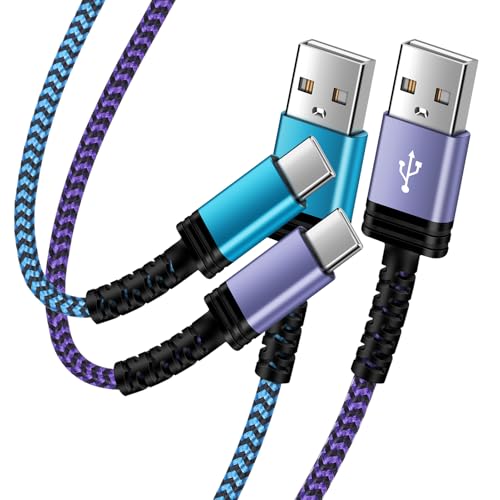
This cable-only option gives USB-C users a longer 6-foot reach without bundling a wall adapter. The maker cites charging up to 3A and data transfer up to 480 Mbps, and describes an IC chip intended to protect against electrical faults such as over-current and overheating. Compatibility examples include Fire HD tablets and Paperwhite readers. It suits a USB-C device when outlet placement calls for extra length. The product name and features give conflicting cable lengths, so confirm the intended length before ordering.
Bottom line: Choose this for a USB-C device when you want a longer cable and already have an adapter.
How to match a Kindle Fire charging port
Match the cable tip to the tablet’s charging port: older Fire tablets commonly use Micro-USB, while newer models use USB-C. USB-C connectors are oval and reversible; Micro-USB is smaller and has a tapered, asymmetric shape. Check the port on the tablet itself rather than relying only on its model family, since model generations can differ. A USB-C cable will not fit a Micro-USB port, and forcing a mismatched plug can damage the connector.
For the products here, Superer 5-Foot Micro-USB Cable is Micro-USB only, 6-Foot USB-C Cable and 2-Pack USB-C Charging Cords are USB-C, and 10W Adapter with Dual-Tip Cable includes both tip types. When replacing a cable, use this rule: if the tablet’s port is not an exact match for the cable tip, do not choose that cable.
Choosing cable length and bundle type
Cable length matters most when the outlet is not close to the tablet. A 3-foot cord works best when the device can sit near the power source; a 5- or 6-foot cord offers more placement flexibility. Avoid stretching a cable tightly across a walkway or placing a device where it can be pulled off a table.
Choose a cable-only option if you already have a compatible USB wall adapter. Choose an adapter-and-cable set if you need both parts, and consider a multi-cable bundle when separate charging spots matter.
| Need | Choose |
|---|---|
| Micro-USB tablet | Micro-USB cable or dual-tip cable |
| USB-C tablet | USB-C cable or dual-tip cable |
| Wall adapter included | Adapter-and-cable set |
| Two separate cords | Two-cable pack |
Charging wattage and cable safety
Charging speed depends on the tablet, adapter, and cable working together; a cable’s current capacity alone does not guarantee a faster charge. The adapter in 10W Adapter with Dual-Tip Cable is 10W, while 6-Foot USB-C Cable and 2-Pack USB-C Charging Cords cite up to 3A. Use a wall adapter intended for the device and stop using a cord with exposed wires, a loose plug, or heat damage.
Keep charging cables away from beds, blankets, and other materials that can trap heat, and do not cover a charging device. For family use, route cords where children cannot pull a tablet or adapter down.
When to replace a charging cord
Replace a cable when its connector is bent, loose, frayed, or intermittently disconnects; damaged insulation can expose conductors and create an electrical hazard. A cord that fits the port but disconnects when moved may have a worn connector, while a tablet that does not charge can also have an adapter or device-port problem.
Inspect the plug and the first few inches of cable periodically, where bending stress is greatest. Unplug by gripping the connector rather than pulling the cord, and avoid sharp bends around furniture edges. If the tablet or adapter becomes unusually hot, disconnect power and check for damage before using the setup again.
Frequently Asked Questions
How can I tell whether my Fire tablet uses USB-C?
USB-C ports are oval and accept a reversible plug; Micro-USB ports have a smaller, tapered opening and the plug fits only one way. Inspect the tablet’s charging port before selecting a replacement cable.
Can one cable charge Micro-USB and USB-C tablets?
A dual-tip cable can accommodate either connector type, but only one tip is used at a time. The cable in 10W Adapter with Dual-Tip Cable has Micro-USB and USB-C tips; it cannot charge two tablets simultaneously.
Does a higher-amp cable make a tablet charge faster?
Not by itself: charging speed depends on the tablet and compatible power adapter as well as the cable. 6-Foot USB-C Cable and 2-Pack USB-C Charging Cords cite up to 3A, but that figure alone does not determine charging speed.
How much extra cable length should I get?
Choose a cable that reaches the outlet without being pulled taut or crossing a walkway. The options here range from 3 to 6 feet, so measure the route from the outlet to the device’s usual position.
Is it safe to use a frayed tablet charging cable?
No; exposed wires or damaged insulation can create an electrical hazard. Stop using a frayed cable, and disconnect power if the cord, plug, or adapter becomes unusually hot.