
Sawgrass SG500 Refillable Ink Cartridges: 4 Options

For most Sawgrass SG500 owners seeking refillable ink cartridges, UPink SG500/SG1000 Empty Cartridge Set is the closest match because it is an empty four-color set with an updated chip. Choose CCXTZC GC41 SG500/SG1000 Cartridge Set if you want an empty cartridge set with a chip but do not need the same firmware-specific compatibility claim.
Butinkfly SG500/SG1000 4-Pack and ChemU SG500/SG1000 4-Color Ink Set are filled sublimation ink sets, not empty refillable cartridges, so they suit buyers who want ink included instead.
We earn a commission if you buy through links on this page. As an Amazon Associate I earn from qualifying purchases. Products are compared on manufacturer specifications, not hands-on testing.
- Best overall: UPink SG500/SG1000 Empty Cartridge Set – An empty four-color set with an updated chip; its maker says the chip works with firmware 4.0.3 and earlier versions.
- Best for reusable cartridges: CCXTZC GC41 SG500/SG1000 Cartridge Set – An empty cartridge set with a chip, designed for repeated refilling in SG500 and SG1000 printers.
- Best for ink included: Butinkfly SG500/SG1000 4-Pack – A complete four-color set containing 140 ml of sublimation ink for SG500 and SG1000 printers.
| Product | Best for | Cartridge type | Ink included | Shop |
|---|---|---|---|---|
| UPink SG500/SG1000 Empty Cartridge Set | Firmware 4.0.3 | Empty, refillable | No | Check Price on Amazon |
| Butinkfly SG500/SG1000 4-Pack | Ink included | Filled ink cartridges | 140 ml | Check Price on Amazon |
| CCXTZC GC41 SG500/SG1000 Cartridge Set | Repeated refills | Empty, refillable | No | Check Price on Amazon |
| ChemU SG500/SG1000 4-Color Ink Set | Filled cartridges | Filled ink cartridges | 140 ml | Check Price on Amazon |
Sawgrass SG500 Refillable Ink Cartridges
Compare empty refillable sets with filled alternatives, and match chip compatibility to your printer before choosing.
UPink SG500/SG1000 Empty Cartridge Set

UPink SG500/SG1000 Empty Cartridge Set is the most specific match for SG500 owners who want empty refillable cartridges and a chip. The four-color set contains one black, cyan, magenta, and yellow cartridge. The maker says its updated chip works with firmware 4.0.3 and earlier versions, and says the printer initially shows a full ink level. These cartridges arrive without ink, so fill them with compatible sublimation ink before printing. The chip may need replacement if the printer later reports depleted ink; that matters to buyers who expect a cartridge to work indefinitely without chip maintenance.
Bottom line: Choose this set if you want empty four-color cartridges and your printer uses a supported firmware version.
Butinkfly SG500/SG1000 4-Pack
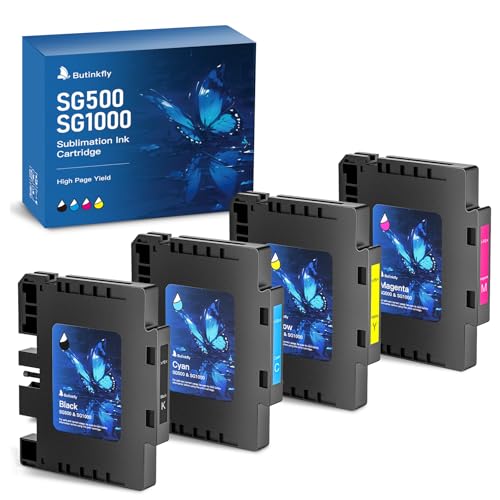
Butinkfly SG500/SG1000 4-Pack differs from the refillable options because it is a filled sublimation ink set rather than an empty cartridge set. It contains four cartridges—black, cyan, magenta, and yellow—with 35 ml in each, for 140 ml total. The maker says the set is compatible with SG500 and SG1000 printers, Sawgrass Print Manager, and firmware upgrades, with backward compatibility to firmware 3.09. This choice suits buyers who want ink supplied with the cartridges. It is not the right match if your priority is buying empty cartridges to fill yourself.
Bottom line: Pick this if you want a filled four-color sublimation ink set, not empty refillable cartridges.
CCXTZC GC41 SG500/SG1000 Cartridge Set

CCXTZC GC41 SG500/SG1000 Cartridge Set is an empty refillable set with a chip for SG500 and SG1000 printers. Its purpose is repeated use: fill the cartridges with compatible sublimation ink, then reuse them rather than replacing a filled set each time. The maker says the cartridges are designed to maintain ink flow and printer function when used with compatible sublimation inks. This option suits hobbyists or small businesses prioritizing reusable cartridges. The specifications do not establish a firmware version or chip replacement behavior, so verify chip compatibility with your printer before ordering if firmware support is a deciding factor.
Bottom line: Choose this if repeated refilling matters more than a firmware-specific chip claim.
ChemU SG500/SG1000 4-Color Ink Set

ChemU SG500/SG1000 4-Color Ink Set is a filled sublimation ink set for SG500 and SG1000 printers, rather than an empty refillable cartridge set. It includes black, cyan, magenta, and yellow cartridges, each with 35 ml of ink. The maker says the updated chip supports version 4.03 and earlier supported versions, while future untested firmware compatibility is not guaranteed. That makes firmware version an important decision point for buyers choosing this ready-filled alternative. Since the cartridges contain ink, they do not suit someone specifically looking for empty cartridges to refill.
Bottom line: Pick this if you want 140 ml of ink included and your printer uses a supported version.
How to choose SG500 refillable cartridges
Choose an empty cartridge set only if you already have compatible sublimation ink and are prepared to refill it; empty cartridges cannot print until filled. Check the cartridge’s printer fit first, then confirm that its chip supports your printer’s firmware. Firmware and chip recognition can affect whether a printer accepts a cartridge, so a model match alone is not enough when a maker gives a version limit. Use sublimation ink for sublimation printing; ordinary inkjet ink is not interchangeable for the transfer process. If you need ink in the box, choose a filled set instead of an empty refillable one.
Empty cartridges versus filled ink sets
Empty refillable cartridges and filled sublimation cartridges serve different needs: empty cartridges provide a reusable container, while filled cartridges supply ink immediately. Sublimation printing uses heat to transfer dye from printed transfer paper onto polyester fabric or a polymer-coated blank; the substrate must be suitable for that process. A filled set’s ink capacity is useful for estimating how much ink is supplied, but actual output varies with image coverage and print settings. Use this table to identify which type aligns with your immediate need.
| Need | Cartridge choice | Before printing |
|---|---|---|
| Refill cartridges yourself | Empty refillable | Fill with compatible sublimation ink |
| Ink supplied with cartridges | Filled set | Confirm printer and chip compatibility |
Check chip and firmware fit
Verify chip support against the printer’s firmware before choosing a cartridge, especially when a maker names a specific version. A cartridge can physically fit yet still fail printer recognition if its chip is not supported. The products here make different chip claims: one names firmware 4.0.3 and earlier, while another names version 4.03 and earlier supported versions and cautions that future untested versions are not guaranteed. Confirm your current firmware and any applicable chip-reset or replacement requirements before ordering; this is especially important if you are switching from filled cartridges to refilled ones.
Prepare sublimation prints and blanks
Sublimation dye transfers with heat and pressure, so use transfer paper and blanks made for sublimation rather than assuming any fabric or hard surface will work. Polyester fabric and polymer-coated blanks are typical substrates; cotton alone does not retain sublimation dye like polyester. Follow the blank maker’s time, temperature, and pressure settings because coatings and materials vary. Keep sublimation ink away from skin and food-contact surfaces, and avoid inhaling mist or handling it near children or pets. A common mistake is changing ink type without accounting for the cartridge contents and print workflow; empty cartridges should be filled with the ink intended for the printer and project.
Frequently Asked Questions
Do empty refillable cartridges come with sublimation ink?
No: the empty UPink and CCXTZC sets are cartridges to fill, not ready-to-print ink supplies. The filled four-color alternatives contain 35 ml per cartridge, or 140 ml total.
Why does a refillable cartridge need a chip?
The chip enables printer recognition and ink-level reporting, so compatible cartridge fit alone may not be sufficient. One maker says its SG500/SG1000 chip initially shows a full ink level and may need replacement after an ink-depleted message.
What materials work with sublimation ink?
Polyester fabric and polymer-coated blanks are typical sublimation substrates because heat transfers dye into their polymer layer. Cotton alone is not a suitable substitute for polyester in standard sublimation transfer.
Should I update printer firmware before changing cartridges?
Check cartridge chip support before changing firmware; one SG500/SG1000 ink set names version 4.03 and earlier supported versions and does not guarantee future untested compatibility. Record the printer’s current firmware and confirm support for that version before selecting a chip-equipped cartridge.