
Mobile Phone External Ringers: 3 Models Compared

For most people, earpanda Bluetooth External Phone Ringer is the strongest fit because its maker says it reaches 120 dB and offers adjustable brightness and five ringtones. Choose 2-Pack Bluetooth Phone Ringer Amplifier instead if you want two alert units around the home; Cell Phone Ringer Amplifier and Flasher may suit you if answering and ending calls from the unit matters.
A mobile phone external ringer pairs with a phone over Bluetooth and adds a nearby sound or light alert. These models are not interchangeable with a landline ringer, and an alert depends on the phone staying paired and Bluetooth being enabled.
We earn a commission if you buy through links on this page. As an Amazon Associate I earn from qualifying purchases. Products are compared on manufacturer specifications, not hands-on testing.
- Best overall: earpanda Bluetooth External Phone Ringer – Its maker says it reaches 120 dB and offers five ringtone choices plus adjustable LED brightness.
- Best for multiple rooms: 2-Pack Bluetooth Phone Ringer Amplifier – The maker says the two-unit system covers up to 3,000 square feet.
- Best for call controls: Cell Phone Ringer Amplifier and Flasher – Its maker says the unit can answer and end calls as well as provide sound and flashing alerts.
| Product | Best for | Maximum sound | Claimed range | Alert features | Shop |
|---|---|---|---|---|---|
| earpanda Bluetooth External Phone Ringer | Adjustable alerts | 120 dB | 150 ft | 5 tones; adjustable LEDs | Check Price on Amazon |
| 2-Pack Bluetooth Phone Ringer Amplifier | Multiple rooms | 120 dB | — | 2 units; LED lights | Check Price on Amazon |
| Cell Phone Ringer Amplifier and Flasher | Call controls | 116 dB | 164 ft | Answer/end calls; flashing alerts | Check Price on Amazon |
Mobile Phone External Ringers
Compare the claimed sound level, connection range and alert features to match a unit to your phone and rooms.
earpanda Bluetooth External Phone Ringer
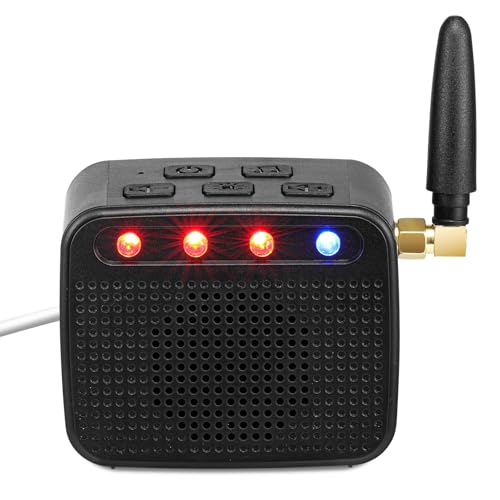
earpanda Bluetooth External Phone Ringer stands out for adjustable alert choices: its maker says the sound reaches 120 dB, with five ringtone options and adjustable brightness across four LED strobes. It is a Bluetooth cell phone alert, not a landline ringer, and its auto-reconnect feature is intended to restore the connection after it drops. The compact unit measures 2.68 by 1.42 by 2.28 inches and weighs 0.17 pound. This is a good fit when you want to tune sound and light separately; the limitation is that it is one unit, so it does not provide the two-location setup of 2-Pack Bluetooth Phone Ringer Amplifier.
Bottom line: Choose it if you want several ringtone and light-setting options in one unit.
2-Pack Bluetooth Phone Ringer Amplifier

2-Pack Bluetooth Phone Ringer Amplifier is the only option here supplied as a pair, making it the clearest choice for placing alerts in two parts of a home. Its maker says the system covers up to 3,000 square feet and provides adjustable sound up to 120 dB alongside LED strobe lights. Bluetooth compatibility is claimed for iPhone, Samsung Galaxy, Android phones and Bluetooth flip phones, with no app required. The units measure 2.7 by 2.3 by 1.4 inches. The coverage figure is a maker claim, not a guarantee for every floor plan; walls and distance can affect a wireless connection.
Bottom line: Pick it if two alert locations matter more than having different ringtone choices.
Cell Phone Ringer Amplifier and Flasher

Cell Phone Ringer Amplifier and Flasher separates itself with call controls: its maker says the unit can answer and end calls, in addition to playing a ringtone and flashing red and blue lights. The maker gives a maximum sound level of 116 dB and Bluetooth range of 164 feet. Setup requires assembling the antenna, connecting the Type-C power cable and pairing with the phone as “Reminder-A1.” It is designed for cell phones rather than landlines. Choose it if the ability to handle calls at the ringer is useful; its sound-level claim is lower than the 120 dB claims for earpanda Bluetooth External Phone Ringer and 2-Pack Bluetooth Phone Ringer Amplifier.
Bottom line: Choose it if answering or ending calls at the alert unit is a priority.
How to choose a mobile phone external ringer
Start with the alert type and the number of places where you need to hear or see a call. Bluetooth ringers pair with a mobile phone and use a speaker, lights, or both; confirm that your phone supports Bluetooth before choosing one. A single unit is suited to one listening area, while a multi-unit set can put alerts in separate rooms. Sound output is measured in decibels, but a louder rating alone does not ensure that a tone will be audible through a closed door or background noise. If you need alerts in two rooms, choose a multi-unit system; if you need different light or ringtone settings, prioritize a model that offers those controls. Keep the phone within the product’s claimed connection range.
Bluetooth range and room placement
Bluetooth range falls when distance, walls and other obstructions separate a phone from its alert unit. Manufacturers commonly give maximum range figures under favorable conditions, so treat a claimed range as a ceiling rather than a room-by-room guarantee. For a practical placement test, pair the phone where it will normally stay, then check an incoming call from the alert location with doors closed. If the connection drops at that location, move the unit closer or use a second unit. Do not assume a square-foot coverage claim predicts Bluetooth performance in a home with multiple floors, thick walls or interference. Keep the phone’s Bluetooth on, and check that the ringer reconnects after the phone leaves and returns to range.
Sound and visual alerts compared
Sound alerts suit people who can hear a ringtone in the intended room; flashing lights add a visual cue when sound is not enough or the phone is muted. Decibel figures should be compared cautiously because the distance and conditions used for measurement affect perceived loudness. Place a ringer where its sound and lights are visible or audible from the areas you use, rather than behind furniture or inside a closed cabinet. The table summarizes the main alert trade-offs in this group.
| Need | Feature to prioritize |
|---|---|
| Sound choices | Multiple tones and adjustable volume |
| Visual notification | Flashing lights with brightness adjustment |
| Two locations | A set with two alert units |
Pairing and common setup mistakes
Pair the phone and external ringer before relying on it for calls, then test an incoming call with the phone in its usual location. Bluetooth accessories generally need the phone’s Bluetooth radio enabled and a successful pairing; a phone set to mute or with call notifications restricted may not behave as expected. Keep the ringer powered as intended and avoid assuming that a prior pairing will always reconnect after settings change or the phone is replaced. One practical check is to test after restarting the phone and again from the farthest room where you expect alerts. If the unit does not reconnect, verify the selected Bluetooth device and pair it again using the maker’s setup steps.
Frequently Asked Questions
Will a Bluetooth phone ringer work with a landline?
A Bluetooth phone ringer is designed to connect to a mobile phone, not a landline telephone jack. Landline ringers use a different connection, so choose a device specifically designed for the kind of phone line you have.
Does the phone need to stay within Bluetooth range?
Yes, the phone must remain close enough for its Bluetooth connection to the ringer. A claimed maximum range is a best-case figure; walls and floors can shorten the usable distance, so test from the phone’s usual location.
Can an external ringer alert me when my phone is muted?
Some Bluetooth alert units use their own speaker or flashing lights, but phone settings and notification behavior can affect whether calls trigger them. Test a call with the phone in the same sound and notification mode you plan to use.
Where should I place a phone ringer in a home?
Place it in the room where you need the alert, in the open and within Bluetooth range of the phone. If a closed door or wall blocks the connection or alert, move the unit or use a second unit for that location.
How do I know whether a ringer has paired?
Check the phone’s Bluetooth settings for the ringer’s device name and make a test call while the phone is nearby. Repeat the test after moving the phone to its usual spot, because successful pairing at close range does not prove the connection will hold across rooms.