
Galaxy A23 Wireless Charging: Receiver Options Compared

The Galaxy A23 needs a USB-C Qi receiver adapter for wireless charging because the phone does not have built-in Qi; pair a compatible receiver with a Qi pad. Choose a different setup if you want wired charging, which avoids the extra receiver and its slower charging.
We earn a commission if you buy through links on this page. As an Amazon Associate I earn from qualifying purchases. Products are compared on manufacturer specifications, not hands-on testing.
- Best overall: IVY QI USB-C Receiver Adapter – The adapter specifically names the Galaxy A23 among its compatible USB-C phones.
- Best for receiver and pad: Type-C Receiver, 7.5W – The receiver package specifies a 7.5W maximum output and names the Galaxy A23.
- Best for pad kit: PRO 15W Max Wireless Pad Kit – The included USB-C cable and pad are advertised for Galaxy A23 charging up to 15W.
| Product | Best for | Type | Output | Shop |
|---|---|---|---|---|
| IVY QI USB-C Receiver Adapter | Slim receiver adapter | USB-C receiver | — | Check Price on Amazon |
| Type-C Receiver, 7.5W | Receiver with output | USB-C receiver | 7.5W max | Check Price on Amazon |
| PRO 15W Max Wireless Pad Kit | Pad and cable kit | Charging pad | Up to 15W | Check Price on Amazon |
| Folding Stand with USB-C Receiver | Hands-free stand charging | Receiver and stand | 69W claimed | Check Price on Amazon |
Galaxy A23 Wireless Charging Options
The Galaxy A23 requires a receiver adapter to use a wireless charging pad; compare fit, output and what each option includes.
IVY QI USB-C Receiver Adapter

The IVY QI adapter is the slim receiver option here, with the Galaxy A23 included in its compatibility list. Its USB-C plug connects to the phone’s port, while its receiver layer sits against the back and works with a Qi charging pad. The maker says its charging efficiency exceeds 72% and cites a built-in protective IC chip. It may work with most soft cases, but the maker cautions against metal or thick cases; buyers who keep a rugged case on should choose another approach.
Bottom line: Pick this if the phone uses a thin, nonmetal case and you want a receiver adapter.
Type-C Receiver, 7.5W

The 7.5W receiver gives a defined output ceiling, unlike the other receiver adapter in this group. Its USB-C design names the Galaxy A23 among compatible models and is intended to be aligned with the center of a wireless pad. The maker says charging takes longer than direct wall charging and notes some heat is normal during wireless charging. This choice suits buyers who can accept slower charging; a thick, metal or armor case may block operation, so case compatibility matters.
Bottom line: Choose this when a 7.5W maximum and explicit A23 fit are priorities.
PRO 15W Max Wireless Pad Kit

The PRO option is a charging pad kit rather than a receiver, with a 5-foot USB-C cable included. Its maker advertises a 5–15W output range and names the Galaxy A23 as compatible. Because the A23 needs a receiver to accept Qi charging, this pad alone does not complete the setup; pair it with a compatible USB-C receiver. This is a better fit for someone who wants the pad and cable together, but not for a buyer expecting a complete receiver-and-pad bundle.
Bottom line: Pick this for a pad-and-cable kit if you already have a compatible receiver.
Folding Stand with USB-C Receiver
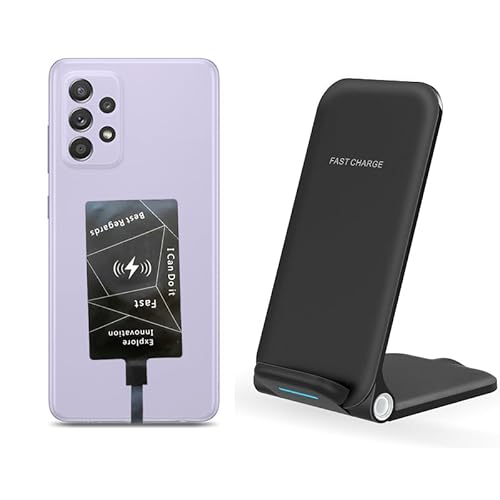
The folding stand is the only option built for vertical or horizontal phone placement, which can suit video calls or viewing while charging. Its receiver is described as USB-C and the package names the Galaxy A23. The product claims a 69W range, an unusually high figure for a phone receiver; do not assume that means the A23 will charge at that rate. This setup suits buyers who value a stand, while anyone shopping primarily by verified charging speed should favor a receiver with a clearer output specification.
Bottom line: Choose this for the folding stand orientation, not on the basis of its claimed wattage.
How Galaxy A23 wireless charging works
The Galaxy A23 requires a receiver because the phone does not have native Qi charging. A USB-C receiver plugs into the charging port and lays over the phone’s back; a Qi pad then transfers power through the receiver. The receiver and pad must both support Qi, and the receiver must match the phone’s USB-C port. This adds hardware at the port and can slow charging compared with plugging in directly. Wireless charging also produces heat; keep the phone and pad uncovered rather than charging beneath bedding or other insulating material.
Choosing a receiver and charging pad
Choose a receiver whose compatibility explicitly includes the Galaxy A23, then match it with a Qi pad. A 7.5W receiver is a modest output choice; the separate pad kit advertises up to 15W but requires a receiver to complete the setup. Pad maximums do not override a receiver’s or phone’s limits. Set the receiver near the center of the pad because misalignment can reduce charging or stop it. For a simple desk setup, choose a flat pad; choose a stand only if upright viewing is useful and its receiver fit is clear.
| Need | Choose |
|---|---|
| Named A23 receiver fit | USB-C receiver listing A23 compatibility |
| Stated receiver output | 7.5W receiver |
| Pad and cable together | 15W-max pad kit plus a separate receiver |
| Upright viewing | Folding stand receiver setup |
Case fit and charging alignment
Case thickness and materials affect wireless charging because the receiver needs to sit close to the pad’s charging coil. Metal or armor cases can block the signal, and a thick case can add too much distance; remove the case if charging is unreliable. Soft, thin cases are more promising, but the receiver makers still limit their compatibility claims. Center the receiver-equipped phone on the pad, since coil alignment affects power transfer. For a stand, check that the receiver flap stays flat behind the phone and does not prevent stable placement.
Heat, speed and safer charging habits
Wireless charging normally creates some warmth, but stop charging if the phone becomes uncomfortably hot, and move it to an open, cool surface. A receiver setup typically charges more slowly than a direct wall connection, and a pad’s advertised maximum is not a guaranteed phone charging rate. Avoid charging under blankets or in direct sun, and do not place metal objects between the phone and pad. If charging repeatedly starts and stops, first remove a thick or metal case, reseat the receiver, and recenter the phone before assuming the pad is faulty.
Frequently Asked Questions
Does the Galaxy A23 have built-in wireless charging?
No, the Galaxy A23 requires an external USB-C Qi receiver to charge from a wireless pad. The receiver and pad must both be Qi-compatible.
Can the Galaxy A23 charge wirelessly through a case?
A thin soft case may work, but thick, metal or armor cases can interrupt charging. Remove the case if charging fails or repeatedly starts and stops.
How fast can a Galaxy A23 wireless receiver charge?
The receiver option with a defined output specifies up to 7.5W, while another pad advertises up to 15W. The effective rate depends on receiver, pad, alignment and phone limits, so direct wall charging can be faster.
Why does my Galaxy A23 receiver get warm?
Some warmth is normal during wireless charging because energy transfer produces heat. Keep the phone uncovered on a firm surface, and stop charging if it becomes uncomfortably hot.
Where should I place the Galaxy A23 on a Qi pad?
Center the receiver-equipped phone over the pad’s charging area. Misalignment can reduce power or interrupt charging, so adjust its position if the charge does not start.