
Floppy Disc to USB Converter: 5 Drives Compared

A 3.5-inch USB floppy disk drive is the right floppy disc to USB converter when you need to read or write standard diskettes on a computer with a compatible USB port. 3.5-Inch USB-A/C Floppy Drive is the straightforward Windows option, while GODBPNYMU USB-C Floppy Drive is the choice to consider if you need the Mac support its maker claims.
Choose another model if its connector or operating-system compatibility does not match your computer; these drives are for 3.5-inch disks, not other floppy formats.
We earn a commission if you buy through links on this page. As an Amazon Associate I earn from qualifying purchases. Products are compared on manufacturer specifications, not hands-on testing.
- Best overall: 3.5-Inch USB-A/C Floppy Drive – It pairs USB-A/C connectivity with 1.44 MB capacity and broad Windows version support.
- Best for Mac: GODBPNYMU USB-C Floppy Drive – Its maker claims compatibility with Mac OS as well as Windows and Linux.
- Best for slim design: Brushed USB-A/C Floppy Drive – At 0.63 inch thick, it is the thinnest model with USB-A/C connectivity and 1.44 MB capacity.
| Product | Best for | Connector | Disk capacity | Operating systems | Shop |
|---|---|---|---|---|---|
| 3.5-Inch USB-A/C Floppy Drive | Windows USB-A/C | USB-A/C | 1.44 MB | Windows 11/10/8/7/2000/XP | Check Price on Amazon |
| Brushed USB-A/C Floppy Drive | Slim USB-A/C drive | USB-A/C | 1.44 MB | Windows 11/10/8/7/2000/XP | Check Price on Amazon |
| Brushed USB-C Floppy Drive | Windows 11/10 | USB-C | — | Windows 11/10 | Check Price on Amazon |
| RAAYOO USB-A/C Floppy Drive | Windows desktop | USB-A/C | 1.44 MB | Windows 11/10/8/7/XP/2000 | Check Price on Amazon |
| GODBPNYMU USB-C Floppy Drive | Mac and Linux | USB-C | 1.44 MB | Windows, Mac OS, Linux | Check Price on Amazon |
Floppy Disc to USB Converter Drives
Compare connector options, disk capacity, and computer compatibility before choosing a 3.5-inch reader.
3.5-Inch USB-A/C Floppy Drive
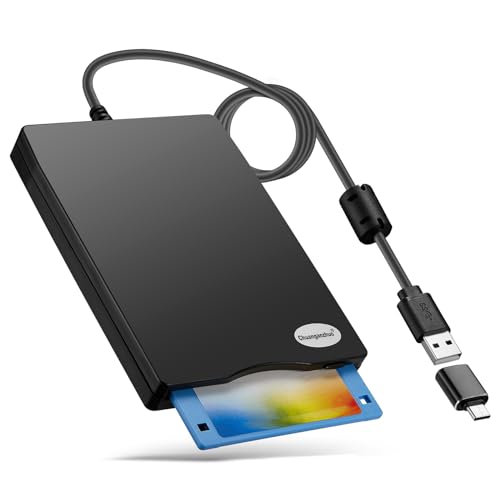
3.5-Inch USB-A/C Floppy Drive combines USB-A/C connectors with 1.44 MB disk capacity, making it a useful fit for Windows computers with either port. Its maker says the drive is plug and play and supports reading and writing 3.5-inch floppy disks. At 5.46 inches long and 3.9 inches wide, it is a compact external option for occasional transfers. The main limitation is operating-system fit: the maker excludes Mac and Chrome, so choose another model if either is your computer’s platform.
Bottom line: Choose this if you need a 1.44 MB reader for a compatible Windows computer.
Brushed USB-A/C Floppy Drive

At 0.63 inch thick, Brushed USB-A/C Floppy Drive is the slimmest option here with USB-A/C connectors and 1.44 MB capacity. The maker says it needs no extra driver program and supports reading and writing floppy disks on compatible Windows systems. Its 5.51-by-4-inch footprint is a little larger than 3.5-Inch USB-A/C Floppy Drive, despite the thinner profile. The limitation is that Mac is excluded, so this is best for a Windows setup rather than a mixed-platform household.
Bottom line: Pick this if a thin profile matters and your computer runs a supported Windows version.
Brushed USB-C Floppy Drive

Brushed USB-C Floppy Drive is the USB-C choice for a Windows 11 or Windows 10 computer, with a brushed panel and a thickness of 0.67 inch. Its maker describes it as an external 3.5-inch drive for reading and writing diskettes, so it serves the same basic transfer role as the USB-A/C models. The key tradeoff is narrower stated operating-system compatibility; choose a different drive if you need older Windows support or Mac compatibility.
Bottom line: Choose this for a USB-C Windows 11 or 10 computer.
RAAYOO USB-A/C Floppy Drive

RAAYOO USB-A/C Floppy Drive pairs USB-A/C connectivity and 1.44 MB capacity with support for Windows 2000 through Windows 11, including versions that can matter on older PCs. Its maker says it can read and write 3.5-inch floppy disks, and the drive measures 5.5 by 4 inches with a 0.65-inch height. The limitation is platform support: Mac and Linux compatibility are not claimed, so choose it for a supported Windows machine.
Bottom line: Pick this for a Windows PC that needs USB-A/C and older-version support.
GODBPNYMU USB-C Floppy Drive

GODBPNYMU USB-C Floppy Drive stands apart by claiming compatibility with Mac OS and Linux as well as Windows, and it includes a carrying bag. The maker says the external USB-C drive is plug and play and supports 1.44 MB floppy disks. It measures about 5.51 inches long, 4.02 inches wide, and 0.63 inch high. Its maker advises connecting directly to a computer’s USB port rather than through a hub or docking station, so this is less convenient if your setup depends on a hub.
Bottom line: Choose this if you need the maker-claimed Mac or Linux compatibility and have a direct USB-C port.
How a floppy disc to USB converter works
A USB floppy drive reads a diskette through a physical 3.5-inch drive mechanism and exposes its files to the computer through USB. Standard high-density 3.5-inch PC diskettes hold 1.44 MB, far less than even a basic modern document, so copying files off the disk is usually the practical goal. The USB connector supplies the computer connection; it does not change the disk format or expand the disk’s capacity. After inserting a disk, use the computer’s file manager to copy files to current storage. A blank or unreadable disk can reflect media damage, format differences, or drive compatibility, not just a connector problem.
How to choose a USB floppy drive
Choose by matching the connector and operating system first, then confirm the disk format. USB-A is the common rectangular port, while USB-C is the smaller reversible port; a model with both connectors can suit more computers without an adapter. A typical high-density 3.5-inch disk is 1.44 MB, but this does not mean every floppy format is supported. The comparison below connects common needs to the deciding feature. If the computer has only USB-C, choose a USB-C model; if it has USB-A and the drive offers USB-A, that connection works without a port adapter. Confirm operating-system support before buying, particularly for Mac or Linux use.
| Need | Choose by |
|---|---|
| Modern computer with USB-C only | USB-C connector |
| Computer with USB-A | USB-A connector or dual USB-A/C |
| Mac or Linux computer | Explicit platform compatibility |
| Standard 3.5-inch PC disk | 1.44 MB capacity support |
Floppy disk fit and format basics
A 3.5-inch drive accepts 3.5-inch diskettes, not the older 5.25-inch floppy format. The usual 1.44 MB figure refers to high-density 3.5-inch PC disks; lower-density disks and disks formatted for a different computer or file system may behave differently. The disk’s metal shutter should move freely and its casing should not be cracked, because a damaged disk can jam or fail to read. Avoid forcing a disk into the slot. If the disk is physically damaged or the data is unusually valuable, stop repeated attempts and seek data-recovery advice rather than risking further damage.
Safe handling and file transfer
Keep floppy disks away from strong magnetic fields, dust, moisture, and heat, and handle them by their outer casing rather than touching the magnetic surface. A USB floppy drive is a read/write device, so avoid formatting a disk or saving over files when the goal is preservation. Copy important files to more than one modern storage location and open the copied files to confirm they transferred. Floppy media is old and can fail without warning; a drive cannot recover data from damaged magnetic surfaces merely by connecting through USB. If using a hub causes recognition or power problems, connect the drive directly to the computer.
Frequently Asked Questions
Can a USB floppy drive read 5.25-inch disks?
No, a 3.5-inch USB floppy drive accepts 3.5-inch diskettes, not 5.25-inch disks. The disk size and drive mechanism must match.
How much data fits on a standard floppy disk?
A standard high-density 3.5-inch PC floppy holds 1.44 MB. Lower-density disks have different capacities, so check the disk format before transferring files.
Can I use a floppy drive through a USB hub?
A hub can cause recognition or power issues with some external drives. Connect the drive directly to a computer port if it fails to appear through a hub.
Will a USB floppy drive work with Mac computers?
Mac compatibility depends on the particular drive; some makers explicitly exclude Mac while others claim Mac OS support. Check the model’s operating-system compatibility before choosing it.
Should I format a disk before copying files?
No, formatting can erase files on the disk. To preserve data, copy the existing files first and avoid formatting or saving over the original.