
MacBook Air 13 Sleeve: Four Fits Compared

For a close-fitting 13-inch MacBook Air sleeve, choose Comfyable 13-Inch Faux Leather Sleeve for its 12.88-inch interior length and felt lining; the other options offer more padding or accessory storage. Pick another style if you want room for accessories or added impact protection, since this slim cover is designed to fit tightly.
We earn a commission if you buy through links on this page. As an Amazon Associate I earn from qualifying purchases. Products are compared on manufacturer specifications, not hands-on testing.
- Best overall: Comfyable 13-Inch Faux Leather Sleeve – Its snug 12.88-inch interior and felt lining are tailored to a close-fitting 13-inch MacBook Air.
- Best for accessory storage: 13.3-Inch Water-Resistant Sleeve with Pocket – A front zip pocket is sized for small accessories and documents.
- Best for impact padding: tomtoc 360° 13-Inch Protective Sleeve – CornerArmor features, resilient edges, and high-density padding add cushioning.
| Product | Best for | Interior dimensions | Material | Storage or padding | Shop |
|---|---|---|---|---|---|
| Comfyable 13-Inch Faux Leather Sleeve | Snug MacBook fit | 12.88 × 9 × 0.32 in | Faux leather, felt lining | Flat bottom pad | Check Price on Amazon |
| 13.3-Inch Water-Resistant Sleeve with Pocket | Accessory storage | 13.5 × 9.4 × 0.85 in | Water-resistant Oxford fabric | Front zip pocket | Check Price on Amazon |
| tomtoc 360° 13-Inch Protective Sleeve | Padded protection | Fits 13-inch MacBook Air | Recycled fabric, soft lining | CornerArmor, high-density padding | Check Price on Amazon |
| MOSISO 13.3-Inch Polyester Sleeve | Slim pocket carry | 13.58 × 10.04 in | Polyester, foam padding | Front pocket | Check Price on Amazon |
MacBook Air 13 Sleeves
Compare the fit, construction, and carrying features to choose the sleeve that suits your MacBook Air and what you carry with it.
Comfyable 13-Inch Faux Leather Sleeve

Comfyable 13-Inch Faux Leather Sleeve is the closest-fitting option here: its interior measures 12.88 × 9 × 0.32 inches, and the maker says it is designed to fit tightly. The sleeve has a faux-leather exterior and soft felt facing the computer; it can also lie flat as a bottom pad while you use the laptop. Its slim profile suits someone who wants a simple cover rather than a carryall. The limitation is the tight fit: buyers who prefer extra room or need a pocket for a charger should choose a roomier sleeve.
Bottom line: Choose this for a close fit and a slim, pocket-free cover.
13.3-Inch Water-Resistant Sleeve with Pocket

13.3-Inch Water-Resistant Sleeve with Pocket stands out for combining a larger 13.5 × 9.4 × 0.85-inch interior with a front zip pocket. The maker says the Oxford fabric is water-resistant and designed to obstruct splashes and rain; the pocket can hold accessories such as a charger, mouse, cable, or documents. That extra room and storage suit commuters carrying more than the laptop alone. The trade-off is a bulkier shape than a slim, close-fitting cover, so measure the MacBook and account for the sleeve’s internal depth before choosing it.
Bottom line: Choose this if you want a front pocket for small accessories.
tomtoc 360° 13-Inch Protective Sleeve
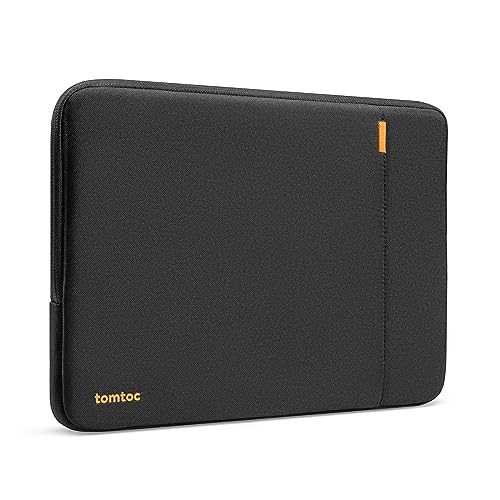
tomtoc 360° 13-Inch Protective Sleeve differs from the slimmer covers with CornerArmor technology, resilient edges, and high-density soft padding. The maker says the sleeve passed a military-standard drop test; it also uses spill-resistant recycled fabric and YKK zippers. Its design suits someone prioritizing cushioning and a soft lining over a flat, minimal cover. The product name gives MacBook Air model compatibility, but the dimensions are overall exterior measurements rather than an interior fit measurement. Confirm that your specific laptop model fits before selecting this sleeve.
Bottom line: Choose this if added corner and edge cushioning matters most.
MOSISO 13.3-Inch Polyester Sleeve

MOSISO 13.3-Inch Polyester Sleeve pairs a polyester exterior with foam padding and a vertical front pocket for items such as a mouse, earbuds, pens, or notepad. Its interior length and height are 13.58 × 10.04 inches, making it roomier than the snug felt sleeve; the maker describes the design as slim enough to slide into a backpack or briefcase. The trade-off is that the source gives no interior depth, so buyers who need a precise fit should check that measurement before choosing it. The pocket offers convenient separation for small items.
Bottom line: Choose this for a polyester sleeve with a front accessory pocket.
How to choose a MacBook Air 13 sleeve
Start with the laptop’s exact model and dimensions, then compare them with the sleeve’s interior measurements; a 13-inch label alone does not guarantee a fit. A sleeve should hold the computer without forcing it in, while leaving little room for it to slide around. For a close cover, Comfyable 13-Inch Faux Leather Sleeve provides interior measurements and a snug-fit design; for pocket storage, 13.3-Inch Water-Resistant Sleeve with Pocket and MOSISO 13.3-Inch Polyester Sleeve add front compartments. Sleeve protection also varies: fabric and foam cushion differently from reinforced corners and dense padding. Choose based on your main risk—scratches during daily carrying, splashes, or bumps—and don’t assume a water-resistant fabric is waterproof.
Understanding sleeve dimensions and fit
Interior dimensions determine whether a laptop fits; exterior dimensions tell you how much room the sleeve may take in a backpack. Measure the laptop’s length, width, and closed thickness, then compare all three with the sleeve interior when available. Leave enough clearance to insert and remove it without scraping corners, but avoid excess space that lets the computer shift. A 13.3-inch sleeve may accommodate a 13-inch laptop, yet model generations can differ in body dimensions. If a sleeve gives only exterior dimensions or omits one interior measurement, confirm that missing fit dimension before ordering rather than relying on the screen-size label.
Padding, water resistance, and pocket trade-offs
Foam, felt, and reinforced corners serve different roles: felt helps cushion the surfaces, foam adds a padded layer, and reinforced corners target impact-prone edges. tomtoc 360° 13-Inch Protective Sleeve combines resilient edges and high-density padding, while MOSISO 13.3-Inch Polyester Sleeve includes polyester foam padding; the amount of protection is not interchangeable with a drop-test claim. Water-resistant fabric can help with incidental splashes, but it does not make a sleeve suitable for submersion or heavy rain. Front pockets are useful for cables and small accessories, but placing hard objects alongside a laptop can press against its screen. Carry sharp or bulky items separately when possible.
Common mistakes when choosing a laptop sleeve
The most common mistake is choosing by screen size alone instead of comparing the device’s closed dimensions with the sleeve’s interior. Another is assuming that “protective” means crushproof: a sleeve provides limited cushioning and is not a substitute for careful handling. A zippered pocket can carry accessories, but a charger or mouse pressed against the laptop may create pressure points. Keep liquids sealed and separate from electronics even with water-resistant material. For a precise fit, favor a sleeve with interior length, width, and depth; if any dimension is missing, verify the laptop compatibility for your exact model before buying.
Frequently Asked Questions
How should a MacBook Air sleeve fit?
A sleeve should hold the closed laptop securely without forcing it in or letting it slide freely. Compare the computer’s length, width, and thickness with the sleeve’s interior dimensions.
Does a 13.3-inch sleeve fit every 13-inch MacBook Air?
No; screen size labels do not guarantee identical laptop body dimensions. Check the exact model’s length, width, and thickness against the sleeve interior.
Can a water-resistant laptop sleeve get wet?
Water-resistant fabric can help with splashes, but it is not a guarantee against soaking or submersion. Keep the sleeve out of heavy rain and separate liquids from the laptop.
Is a laptop sleeve enough protection for drops?
A sleeve cushions some bumps, but protection depends on its padding and construction and does not make a laptop drop-proof. Reinforced corners and dense padding target impact more directly than a flat cover.
Should I carry a charger in the sleeve pocket?
A pocket can carry a charger, but hard accessories pressed against a laptop can create pressure on its case or screen. Put bulky or sharp items in a separate compartment when possible.