
Optical Audio to RCA: 4 Converters Compared

For a direct optical-to-RCA connection, AUTOUTLET 7-ft Optical-to-RCA Cable suits most buyers because its 7-foot cable ends in RCA male connectors. Choose PROZOR Optical/Coaxial DAC with RCA and 3.5mm instead if you also need coaxial input or a 3.5mm output, and choose eSynic USB-Powered 192 kHz Optical-to-RCA if USB power and an aluminum shell matter to your setup.
An optical-to-RCA converter uses a DAC to change digital audio into analog stereo output; the source device must send a format the converter can decode.
We earn a commission if you buy through links on this page. As an Amazon Associate I earn from qualifying purchases. Products are compared on manufacturer specifications, not hands-on testing.
- Best overall: AUTOUTLET 7-ft Optical-to-RCA Cable – Its 7-foot cable connects optical audio directly to RCA inputs.
- Best for extra outputs: PROZOR Optical/Coaxial DAC with RCA and 3.5mm – It supports coaxial or optical input and simultaneous RCA and 3.5mm output.
- Best for USB power: eSynic USB-Powered 192 kHz Optical-to-RCA – It specifies USB power, a 24-bit DAC and PCM-only operation.
| Product | Best for | Analog outputs | Shop |
|---|---|---|---|
| AUTOUTLET 7-ft Optical-to-RCA Cable | Direct RCA connection | RCA male | Check Price on Amazon |
| YGiTK 192 kHz Optical-to-RCA DAC | Optical stereo setup | RCA male | Check Price on Amazon |
| PROZOR Optical/Coaxial DAC with RCA and 3.5mm | Flexible connections | RCA and 3.5mm | Check Price on Amazon |
| eSynic USB-Powered 192 kHz Optical-to-RCA | USB-powered setup | RCA L/R | Check Price on Amazon |
Optical Audio to RCA Converters
Compare the connection options and setup requirements before matching a converter to your audio source and stereo equipment.
AUTOUTLET 7-ft Optical-to-RCA Cable

Unlike the other options, this converter uses a 7-foot cable with RCA male connectors for a direct run from an optical source to an amplifier or other RCA input. AUTOUTLET says its DAC processes audio at 24-bit/192 kHz and includes an amplifier chip and dual-channel operational amplifier. That cable format suits a setup where the RCA device has female inputs and a separate box-and-cable arrangement is inconvenient. The tradeoff is that its built-in RCA plugs may not fit a receiver that expects a separate RCA cable, and the features do not identify a power connection.
Bottom line: Choose this for a direct 7-foot optical-to-RCA cable connection.
YGiTK 192 kHz Optical-to-RCA DAC

YGiTK is another direct optical-to-RCA male-cord option, with a digital optical cable; unlike the PROZOR, it is not described as accepting coaxial input or adding a 3.5mm jack. The maker says its 192 kHz DAC has an audio amplification chipset that raises RCA output level. That makes it a fit for a source with optical output and a stereo amplifier with RCA inputs.
Bottom line: Pick this for an optical source and stereo amplifier with RCA inputs.
PROZOR Optical/Coaxial DAC with RCA and 3.5mm
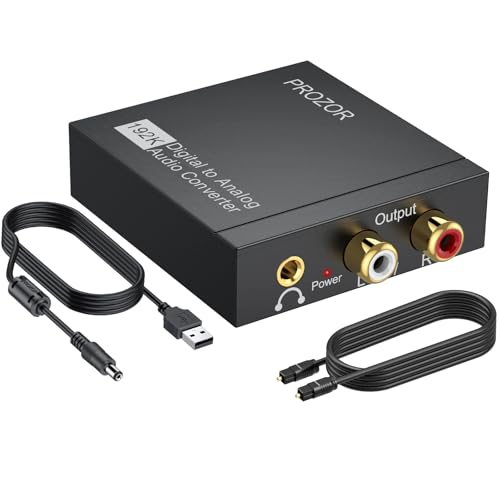
PROZOR stands apart with both coaxial and Toslink/SPDIF digital inputs plus RCA and 3.5mm analog outputs operating simultaneously. The maker says it supports uncompressed two-channel LPCM or PCM, with sampling rates from 32 to 192 kHz and 24-bit incoming SPDIF. Set the source to PCM or LPCM; the converter does not decode 5.1 audio, and its optical port is an input rather than an output. This option suits a setup that needs more connection choices, but its broader input support is unnecessary if you only need a simple optical-to-RCA path.
Bottom line: Choose it when coaxial input or a 3.5mm output is useful.
eSynic USB-Powered 192 kHz Optical-to-RCA

eSynic specifies USB power and an aluminum shell, distinguishing it from the direct cable options. The maker says its built-in DAC supports 24-bit/192 kHz audio, and requires the source to output PCM; Dolby and DTS are not supported. Optical is input-only, so this is for converting a TV, Blu-ray player or console’s optical output to left/right RCA stereo, not the reverse. Its PCM requirement matters if your source is configured for surround or another unsupported format. Choose it when USB power is available near the converter and the source can be set to PCM.
Bottom line: Pick it for a USB-powered setup with a PCM-configurable source.
How to choose an optical audio to RCA converter
Match the converter to the source output, the amplifier input and the digital format before comparing sampling rates. Optical Toslink carries digital audio over fiber; a DAC converts that signal to analog left/right RCA for an amplifier or powered speakers. Many basic converters accept PCM stereo rather than Dolby Digital or DTS, so check the source audio setting and select PCM when required. Choose a model with coaxial input only if the source actually has a coaxial digital output. For a simple TV-to-stereo connection, pick optical input and RCA output; if you need headphone or auxiliary input compatibility, look for a 3.5mm output too.
PCM format and channel compatibility
PCM is the key compatibility check for these converters: a stereo DAC generally cannot decode a Dolby or DTS bitstream. Set the TV or source to PCM or LPCM when that option is available; if you leave surround bitstream enabled, the converter may produce no sound or distorted audio. Two-channel PCM is the relevant mode for left/right RCA output, while a converter supporting 5.1 decoding is a different product category. Sampling rates are also source-dependent: a converter’s maximum rate does not force a TV or console to output that rate. Confirm the source sends a supported signal and use stereo output settings when routing to a two-channel amplifier.
Match the outputs to your stereo equipment
Choose RCA output for an amplifier or receiver with left and right RCA line inputs, and check whether the converter has sockets or cable-end plugs before planning the connection. A 3.5mm stereo output can connect to equipment with an auxiliary input, while coaxial digital input helps only when the source has that output. An optical input cannot serve as an optical output; direction matters because these converters change digital input into analog output. Keep the audio path simple: source optical output, converter, then amplifier input. If connecting several devices, a converter alone is not a switch, so the source-selection plan must account for the receiver or another switching device.
Power and setup checks
Check how the converter receives power and whether a USB power source will be within reach; signal cables do not necessarily provide operating power. Connect the optical cable in the direction marked input, remove any protective tip caps, and avoid sharply bending the fiber cable. Select the corresponding amplifier input and configure the source for PCM stereo if the DAC requires it. A common mistake is treating a product’s sampling-rate ceiling as proof that every audio format works; rate and format are separate compatibility checks. Before final setup, verify the source’s audio-output menu and the amplifier’s selected input, since either setting can prevent sound even when the cables are connected correctly.
Frequently Asked Questions
Can an optical audio converter send sound to RCA speakers?
Yes, an optical-to-RCA DAC converts a compatible digital signal into analog left and right audio for an amplifier or powered speakers with RCA inputs. Passive speakers need an amplifier between the converter and the speakers.
Why is there no sound from my optical to RCA converter?
A common cause is a source sending Dolby or DTS instead of PCM stereo. Set the TV or source audio output to PCM/LPCM and select the matching input on the amplifier.
Does a 192 kHz DAC improve every TV audio signal?
No; 192 kHz is a converter’s supported sampling-rate ceiling, not a guarantee that the source sends 192 kHz audio. The source format and rate must be supported by both devices.
Can I use an optical to RCA converter in reverse?
No, an optical-to-RCA converter changes optical digital input into analog RCA output. Reversing the signal path requires a converter designed for RCA input and optical output.
Do optical audio cables need special handling?
Yes, avoid tight bends and do not force the connector into its port. Remove protective caps before connecting and keep them for storage to protect the cable ends.