
Corsair 120mm AirGuide Fans: Three Options Compared

For a three-fan set with daisy-chain wiring and up to 72.8 CFM airflow per fan, choose CORSAIR RS120 ARGB Triple Pack; the two LINK models instead reach 2,400 RPM and offer 69.9 CFM. Pick another option if you need just one fan or want the iCUE LINK connection system.
AirGuide fans use anti-vortex vanes to direct airflow toward components, which can be useful in a case or on a radiator.
We earn a commission if you buy through links on this page. As an Amazon Associate I earn from qualifying purchases. Products are compared on manufacturer specifications, not hands-on testing.
- Best overall: CORSAIR RS120 ARGB Triple Pack – Triple pack, daisy-chain connections, and up to 72.8 CFM airflow per fan.
- Best for LINK setup: CORSAIR iCUE LINK LX120 RGB Triple Pack – Triple pack includes the iCUE LINK System Hub and has dual-loop RGB lighting.
- Best for one-fan builds: CORSAIR iCUE LINK LX120 RGB Single Fan – Single 120mm fan for expanding a compatible iCUE LINK system.
| Product | Best for | Pack size | Max speed | Airflow | Shop |
|---|---|---|---|---|---|
| CORSAIR RS120 ARGB Triple Pack | Daisy-chain builds | 3 fans | 2,100 RPM | 72.8 CFM | Check Price on Amazon |
| CORSAIR iCUE LINK LX120 RGB Triple Pack | LINK triple pack | 3 fans | 2,400 RPM | 69.9 CFM | Check Price on Amazon |
| CORSAIR iCUE LINK LX120 RGB Single Fan | Single-fan expansion | 1 fan | 2,400 RPM | 69.9 CFM | Check Price on Amazon |
Corsair 120mm AirGuide Fans
Compare pack size, maximum PWM speed, airflow, and connection needs to find a fan set that fits your build.
CORSAIR RS120 ARGB Triple Pack
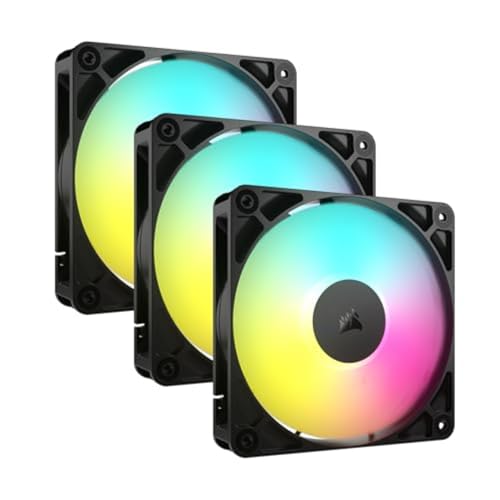
CORSAIR RS120 ARGB Triple Pack is the three-fan option with daisy-chain connections: all three can use one 4-pin PWM connector and one +5V ARGB connector. Each fan has eight LEDs, and the fans reach up to 2,100 RPM and 72.8 CFM. CORSAIR says AirGuide anti-vortex vanes concentrate airflow toward components, including when mounted on a radiator or heatsink.
This set suits builders who want coordinated lighting and fewer motherboard connections. The trade-off is a lower maximum speed than the LINK models, so consider those if their additional speed and LINK system are a better match.
Bottom line: Choose it for a three-fan daisy-chain setup and the highest airflow figure among these options.
CORSAIR iCUE LINK LX120 RGB Triple Pack
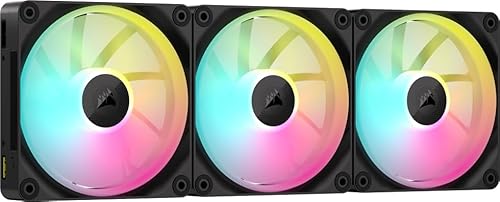
CORSAIR iCUE LINK LX120 RGB Triple Pack stands out by including the iCUE LINK System Hub with its triple-fan set. Its bridge connectors link the fans directly to one another, while a single cable connects them to the hub. Each fan has 18 LEDs across inner and outer light loops, reaches up to 2,400 RPM, and delivers 69.9 CFM with 5.22 mm H2O static pressure. CORSAIR says AirGuide vanes direct airflow toward components.
This pack fits a build using the LINK system that needs three RGB fans. The hub-based connection is a different setup from the RS daisy-chain arrangement, so choose it only if that system suits your build.
Bottom line: Pick it for a three-fan iCUE LINK setup with an included hub and dual-loop lighting.
CORSAIR iCUE LINK LX120 RGB Single Fan

CORSAIR iCUE LINK LX120 RGB Single Fan provides one LX120 fan rather than the triple pack, while retaining the same 2,400 RPM maximum, 69.9 CFM airflow, 5.22 mm H2O static pressure, and dual-loop lighting with 18 LEDs. Its bridge connectors link to other fans in an iCUE LINK system, but the System Hub is sold separately. CORSAIR says AirGuide vanes direct airflow toward components.
This is suited to adding one fan to an existing LINK setup or filling a single 120mm mount. The hub requirement makes it less convenient if you need a complete LINK system; choose the triple pack if you need three fans and a hub.
Bottom line: Choose it to add one LX120 fan when your iCUE LINK system is already in place.
How to choose a Corsair 120mm AirGuide fan
Start with pack size and connection style, then compare airflow and speed. AirGuide vanes are intended to guide airflow toward components, and the LINK fans also give a static-pressure figure for radiator use.
A standard 120mm fan has a 120 × 120 mm frame and is commonly 25 mm thick. Before choosing a pack, count your open mounts and check that the case, radiator, or heatsink can accept that thickness. Also confirm the fan’s power and lighting connections match your motherboard or controller; a +5V ARGB plug is not interchangeable with a 12V RGB header.
| Need | Option | Key distinction |
|---|---|---|
| Three fans, daisy-chain wiring | CORSAIR RS120 ARGB Triple Pack | One PWM and one +5V ARGB connector for the set |
| Three fans, LINK system | CORSAIR iCUE LINK LX120 RGB Triple Pack | Includes LINK System Hub |
| One LINK fan | CORSAIR iCUE LINK LX120 RGB Single Fan | Hub sold separately |
Airflow and static pressure for case or radiator use
Airflow in CFM describes the volume of air a fan can move, while static pressure in mm H2O indicates its ability to push air against resistance. Radiator fins and dense heatsinks restrict flow more than an open case grille, so static pressure can help when comparing fans for those mounts. Case intake or exhaust often has less obstruction, making airflow and fan placement useful considerations.
These are not interchangeable performance numbers: the RS pack provides an airflow figure but no static-pressure figure in the specifications, while both LX120 options include 5.22 mm H2O. CORSAIR says AirGuide vanes concentrate airflow toward components when mounted to a radiator or heatsink. For a radiator, check its clearance and mounting pattern before ordering; a typical 120mm fan uses 105mm-spaced mounting holes.
Check fan fit and connections before installing
A 120mm label describes the frame width, not every clearance needed inside a PC. A typical fan frame is 120 × 120 × 25 mm, and screws commonly sit 105 mm apart; radiator thickness, nearby cables, and heatsinks can still block a fit. Measure the available space and allow room for wiring before selecting a fan pack.
Match the wiring to the control hardware: PWM speed control uses a 4-pin fan connection, while addressable lighting uses a +5V ARGB connection. Never plug a +5V ARGB connector into a 12V RGB header, since the voltage mismatch can damage lighting components. The LINK fans use their own bridge-and-hub system, and the single-fan pack requires a separately purchased hub.
Set fan direction and speed for useful airflow
Most PC fans move air from the open intake side toward the side with support struts, but the frame’s airflow arrows are the reliable indicator. Plan the case layout so front or bottom fans bring air in and rear or top fans exhaust it; avoid placing every fan in the same direction without considering the case’s airflow path.
PWM fans let a motherboard or controller vary speed according to temperature, so a higher maximum RPM is headroom rather than a required running speed. Begin with a gradual fan curve and adjust if temperatures rise under load or fan noise is distracting. Keep cables clear of the blades, and shut down and unplug the PC before installation or repositioning.
Frequently Asked Questions
What does AirGuide technology do in a PC fan?
AirGuide uses anti-vortex vanes to direct airflow toward components. The use includes mounting the fan on a radiator or heatsink, where directed airflow can target the cooling surface.
Are these Corsair AirGuide fans 120mm wide?
Yes, these are 120mm fans. A typical 120mm PC fan frame measures 120 × 120 mm and is commonly 25 mm thick, so verify clearance for the fan and its cable.
Can I use a 120mm fan on a radiator?
A 120mm fan can fit a radiator designed for that fan size, but check mounting-hole spacing and combined thickness first. A common 120mm mounting pattern has 105mm spacing between screw holes.
What is the difference between CFM and static pressure?
CFM measures airflow volume, while static pressure in mm H2O describes force against resistance. Radiator fins and dense heatsinks restrict airflow, so pressure is useful to consider for those mounts.
Can I connect a 5V ARGB fan to a 12V RGB header?
No; +5V ARGB and 12V RGB are different connection types. Check the header labels before connecting lighting, because the wrong voltage can damage lighting components.
Does the single LX120 fan include its hub?
No, the single-fan LX120 requires an iCUE LINK System Hub sold separately. The LX120 triple pack includes a hub, so choose based on whether your system already has one.