
USB-C IR Remote for Android: 5 Adapters Compared

For an Android phone with USB-C, the OCRUSTAR is the broadest fit here because its maker says the adapter works with iOS and Android and covers many home-device types. Choose another adapter if you specifically want a 10-meter range or a code learning feature; confirm Android and app compatibility for your phone before ordering.
We earn a commission if you buy through links on this page. As an Amazon Associate I earn from qualifying purchases. Products are compared on manufacturer specifications, not hands-on testing.
- Best overall: OCRUSTAR USB-C IR Blaster – Its maker says the USB-C adapter supports iOS and Android and lists a wide range of device types.
- Best for stated range: R09 Mini USB-C IR Adapter – The maker claims wireless control up to 10 meters.
- Best for code learning: USB-C Android IR Adapter with Code Learning – The maker says the app can learn from an original remote when a device code is missing.
| Product | Best for | Phone/port compatibility | Claimed range | Dimensions | Shop |
|---|---|---|---|---|---|
| OCRUSTAR USB-C IR Blaster | Broad device support | iOS and Android; USB-C | — | — | Check Price on Amazon |
| R09 Mini USB-C IR Adapter | Range-conscious buyers | Android; USB-C | 10 m | 1.22 × 0.45 × 0.24 in | Check Price on Amazon |
| Universal USB-C IR Controller with Keychain | Keychain carry | Android with USB-C; Lightning for Apple | 10 m | — | Check Price on Amazon |
| USB-C Android IR Adapter with Code Learning | Missing device codes | Android; USB-C OTG | — | 0.39 × 0.39 × 0.39 in | Check Price on Amazon |
| Mini Type-C Smart IR Controller | Compact adapter | Android; Type-C | — | — | Check Price on Amazon |
USB-C IR Remotes for Android
Compare the port and phone claims, range claims, and standout setup features before choosing an adapter.
OCRUSTAR USB-C IR Blaster

The OCRUSTAR stands out for its broad device list and stated iOS and Android support through its USB-C plug. The maker says its app can control televisions, set-top boxes, air conditioners, projectors, disc players, fans, and other infrared devices, and names brands including Samsung, Sony, Panasonic, and TCL. Its black adapter weighs about 0.02 pounds. It suits buyers seeking one compact adapter for varied home equipment. The specifications give no transmission range, so buyers who need a defined operating distance should choose a model with a range instead.
Bottom line: Pick this if support across many kinds of home devices matters more than a range.
R09 Mini USB-C IR Adapter

The R09 is the only option here with dimensions and a 10-meter control distance. Its maker describes it as an Android USB-C adapter that works through a downloadable app and lists TVs, DVD players, set-top boxes, air conditioners, projectors, lights, and fans among compatible device types. At about 1.22 inches long, it is small enough to attach to a keychain, according to the specifications. The maker excludes iPhone 15 USB-C compatibility, so this is a less flexible pick for households that also need Apple phone support.
Bottom line: Choose it if the 10-meter range and measured compact size are useful.
Universal USB-C IR Controller with Keychain
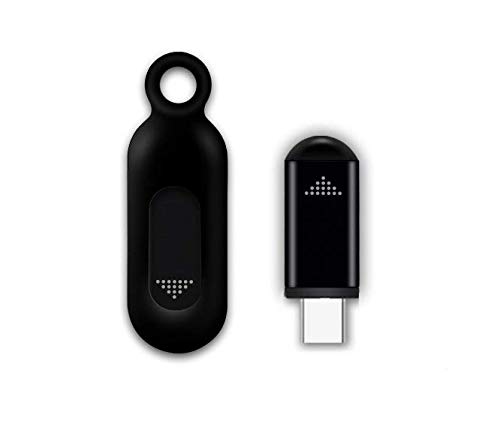
The keychain and silicone case distinguish this adapter from the other options. Its maker claims a 10-meter transmission distance and describes a phone app called uniTV Remote for setup; the specifications say Lightning is for Apple devices and USB-C is for Android devices. The maker also names brands such as Samsung, Vizio, LG, Sony, Sharp, and Roku. This suits someone who values a carry case and keychain attachment. The specifications do not give its dimensions, so anyone prioritizing exact pocket fit should compare a model with measurements.
Bottom line: Pick it for the included keychain-style carry setup and stated range.
USB-C Android IR Adapter with Code Learning

The standout feature of this adapter is its code learning option: its maker says the Android app can learn from an original remote when the corresponding device is not found. The maker also claims a library of more than 270,000 infrared codes and names appliances such as TVs, fans, projectors, air conditioners, and water heaters. Its dimensions are about 0.39 inches on each side. This is a useful fit when an older or less common device may need learning, but the specifications provide no control distance for buyers who need a defined range.
Bottom line: Choose it when code learning may help with a less common infrared device.
Mini Type-C Smart IR Controller

It describes a fifth-generation chip, a wider control angle, and operation without Bluetooth; the app is still required for remote control. Listed uses include air conditioners, televisions, set-top boxes, and projectors, and the product comes with a silicone cover. This is aimed at buyers who value small size and a cover.
Bottom line: Pick it if the maker’s compact-design emphasis and silicone cover suit your needs.
How to choose an Android USB-C IR remote
Start with phone support, then check which devices the app can control. USB-C describes the connector, not guaranteed compatibility: the adapter, Android phone, and companion app all need to work together. Some Android accessories also rely on USB OTG support, so check that your phone supports OTG before choosing an OTG adapter. Infrared is a direct, short-range signal rather than a Wi-Fi command; aim the phone adapter toward the appliance’s receiver and keep obstacles out of the path. If the phone must control equipment from another room, a plug-in IR adapter may not be the right category. A distance helps compare products, but room layout and aim can affect practical control.
IR line of sight and control distance
Infrared remotes generally need a clear path to the device’s IR receiver. Place the phone so the adapter points toward that receiver; a cabinet door, wall, or object between them can block commands. A quoted range is a maker claim, not a guarantee through obstacles, so position the phone within the specified distance and test the angle in the intended room. Among these choices, two makers claim a range of 10 meters, while other options provide no numerical range in their specifications. For equipment hidden inside a closed cabinet, check whether the appliance has an exposed IR receiver or use a different control approach rather than expecting the phone adapter to transmit through the obstruction.
USB-C infrared adapter features compared
The main distinctions are phone support, stated range, and setup tools. Use this comparison to match the adapter feature to the problem you need to solve; compatibility claims still need to match your exact phone and appliance.
| Need | What to look for | Options here |
|---|---|---|
| Known control distance | A numerical range claim | R09 and keychain model claim 10 m |
| Unlisted device code | Learning from an original remote | USB-C adapter with code learning |
| Apple phone support too | Explicit iOS or Lightning support | OCRUSTAR; keychain model names Lightning for Apple |
Infrared code libraries and brand lists can help, but a long list does not ensure every appliance model is supported. Match the appliance type and the exact phone port before relying on a feature.
App setup and common compatibility mistakes
These adapters depend on a phone app, so app access is part of the setup rather than an optional extra. Confirm that the app is available for your Android version and that the phone recognizes the USB-C accessory; a connector that physically fits may still fail if the phone or app does not support it. Keep the adapter aligned with the appliance’s IR receiver when sending a command, and test a basic power command before relying on advanced functions. For code learning models, keep the original remote available and point it at the phone adapter during learning. Do not assume that a Roku, TV, or other device is controllable by infrared merely because it is named in a broad compatibility claim; verify that the specific model has IR control.
Frequently Asked Questions
Do USB-C IR remotes work with every Android phone?
No; USB-C fit alone does not establish compatibility. Confirm that the phone supports the accessory and its required app, and check OTG support if the adapter requires it.
Can an infrared phone adapter control devices through walls?
Usually no, because infrared commands need a clear path to the device receiver. Keep the adapter aimed at the receiver and avoid walls or closed cabinet doors between them.
How far can a USB-C IR blaster reach?
Range depends on the adapter and conditions, so use a maker’s distance as a reference rather than a guarantee. Two adapters here claim 10 meters, and clear aim is still important.
Can an IR adapter control a Roku device?
Only if the particular Roku device accepts infrared commands and the app supports its commands. Confirm the model’s control method before relying on a general brand-compatibility claim.
What does code learning do on an IR adapter?
Code learning lets an adapter copy a command from an original infrared remote when a matching code is unavailable. Keep the original remote and follow the app’s pairing steps for that function.