
TV Monitor for Hard of Sight: 4 Options Compared

The Samsung 32-inch M5 is the closest match for a TV monitor for hard of sight because its name specifies Vision Accessibility Tools and it includes streaming TV. Choose a compact display instead if portability or a camera/security setup matters more than a larger screen.
For low-vision viewing, screen size alone is not enough: text size, contrast, viewing distance and available accessibility controls also affect legibility.
We earn a commission if you buy through links on this page. As an Amazon Associate I earn from qualifying purchases. Products are compared on manufacturer specifications, not hands-on testing.
- Best overall: Samsung M5 M50F 32-Inch Smart Monitor – Its 32-inch screen and Vision Accessibility Tools make it the closest match to the request.
- Best for portable inputs: Hikity 10.1-Inch Portable Monitor – It has HDMI, VGA and AV inputs in a 10.1-inch portable format.
- Best for backup cameras: podofo 10.1-Inch Multi-Input Monitor – It supports automatic switching to a backup-camera picture.
| Product | Best for | Screen size | Resolution | Inputs or TV features | Shop |
|---|---|---|---|---|---|
| Samsung M5 M50F 32-Inch Smart Monitor | Streaming and accessibility | 32 inches | FHD | Streaming TV; multiple ports | Check Price on Amazon |
| Hikity 10.1-Inch Portable Monitor | Portable HDMI display | 10.1 inches | — | HDMI, VGA, AV | Check Price on Amazon |
| podofo 10.1-Inch Multi-Input Monitor | Camera and security | 10.1 inches | 1024 × 600 | VGA, AVI, HDMI, BNC | Check Price on Amazon |
| Tyler 9-Inch Portable TV | Battery-powered TV | 9 inches | — | Digital TV tuner; USB, SD, AV | Check Price on Amazon |
TV Monitors for Hard of Sight
Compare the screen sizes and intended setups, then verify accessibility controls and connection needs before choosing.
Samsung M5 M50F 32-Inch Smart Monitor

The Samsung M5 stands apart with Vision Accessibility Tools named among its features, alongside streaming TV in a 32-inch format. Samsung says viewers can access streaming apps and free Samsung TV Plus channels directly from the monitor; the feature set also names HDR10, speakers and Gaming Hub. Its larger screen may suit a fixed desk or room setup better than the compact alternatives. The specifications do not identify which accessibility controls are included, so buyers who need a particular magnification or contrast option should confirm that control before choosing.
Bottom line: Choose this if a larger streaming screen and built-in accessibility tools are priorities.
Hikity 10.1-Inch Portable Monitor
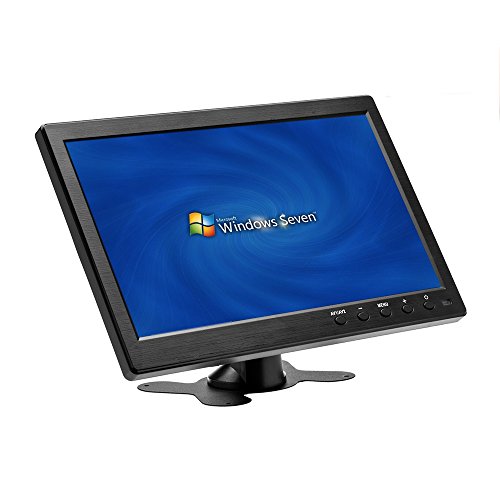
The Hikity is a small portable display rather than a full-size streaming monitor, with HDMI, VGA and AV inputs for devices such as a computer, camera or DVR. Its IPS panel and adjustable brightness and contrast are useful considerations when setting a screen for visibility, though the 10.1-inch size limits how much content can appear at once. The features mention remote control and built-in speakers. This choice suits a compact secondary display; it is a less direct fit for someone who needs a larger screen or verified dedicated low-vision controls.
Bottom line: Choose this for a compact device display when portability matters more than screen area.
podofo 10.1-Inch Multi-Input Monitor
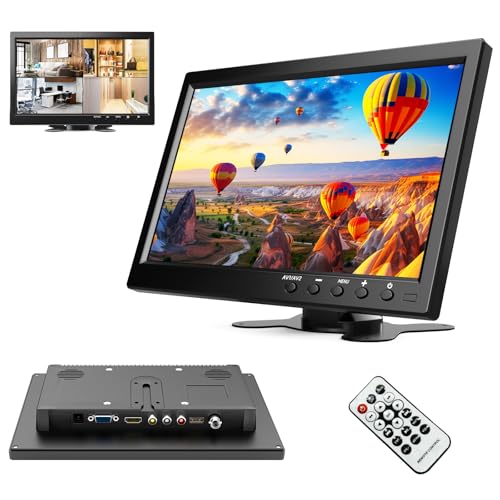
The podofo is tailored more toward camera and vehicle setups than living-room television, with a 10.1-inch screen, built-in speaker and support for several video inputs. Its features give a resolution of 1024 × 600 and say it can automatically switch to the backup-camera picture when reversing. The adjustable stand and rotating screen may help position it for a particular viewing angle.
Bottom line: Choose this for a backup-camera or security display where automatic video switching is useful.
Tyler 9-Inch Portable TV

The Tyler is the only compact option here whose features specifically name a digital TV tuner and rechargeable battery, making it suitable for portable TV viewing rather than monitor connections alone. Its feature set also names USB and SD playback, dual AV inputs, a headphone jack, remote control and a built-in stand. The 9-inch screen is the smallest in this comparison, so it is a poor fit when larger text or a broad viewing area is the priority. The maker says playback can last 4 hours or more; actual runtime may depend on use.
Bottom line: Choose this for portable TV viewing when battery operation is important.
How to Choose a TV Monitor for Hard of Sight
Start with the viewing task and the controls you need, not the screen size alone. Larger screens can make content physically larger at the same viewing distance, but text size and contrast settings determine whether menus and captions are comfortable to read. For computer use, operating-system magnification and scaling can enlarge interface elements; for TV viewing, check whether the device offers accessible menus, caption settings and any specific zoom or contrast options you rely on. A useful decision rule is to prioritize a screen at least 32 inches for a fixed-room TV setup when the alternatives are 9 to 10.1 inches, but confirm that its controls meet your particular needs. Positioning also matters: reduce glare and set the screen near eye level to avoid awkward viewing angles.
Screen Size and Viewing Distance
Screen size does not guarantee legibility; distance and the size of the on-screen text change how large details appear to the viewer. A 9- or 10.1-inch display is designed for close viewing or portable setups, while a 32-inch monitor offers more screen area for a desk or room. As a practical starting point, move a screen closer if small text is difficult to see, then adjust magnification or text size when available; avoid placing a small portable screen across a room. Choose the display by where it will sit and who will view it, and confirm the stand or mounting arrangement supports a comfortable angle. Glare from windows and lamps can wash out contrast, so reposition the screen or lighting before assuming the panel itself is the problem.
TV Tuners, Streaming and Monitor Inputs
A TV tuner, streaming apps and monitor inputs serve different purposes. A tuner receives broadcast television, streaming software accesses online video, and HDMI, VGA or AV inputs connect external devices; a screen may have one function without the others. The Tyler features name a digital TV tuner, the Samsung names streaming TV, and the compact Hikity and podofo list multiple video-input types. For a direct device connection, match the output on the source to an input on the display and check the required cable and signal format before purchase. A smart monitor is not necessarily a broadcast TV, and an input-equipped monitor does not automatically provide streaming. This distinction prevents choosing a screen that cannot receive the content source you actually use.
| Viewing need | Feature to prioritize | Example type |
|---|---|---|
| Room-based streaming | Streaming apps and larger screen | Smart monitor |
| Portable live TV | TV tuner and battery | Portable TV |
| Camera or computer feed | Matching video inputs | Compact monitor |
Positioning and Setup for Clearer Viewing
Set up the display to reduce glare and keep the viewing angle comfortable before changing other settings. Reflections from windows or overhead lights lower perceived contrast, while an off-angle screen can make colors and details harder to distinguish. Place the display so the viewer can face it directly, and test the intended seat or standing position rather than judging from beside the screen. For a computer-connected monitor, increase system text scaling or magnification as needed and check that key controls remain visible; larger interface elements can mean less content fits onscreen. For TV content, captions and audio can provide additional access, but the available controls vary by source and model. Confirm the exact accessibility option needed before relying on a device for that specific function.
Frequently Asked Questions
Does a larger monitor always make text easier to read?
No; viewing distance and text scaling matter alongside screen size. A 32-inch display offers more screen area than 9- or 10.1-inch models, but small menus may still require magnification or larger text.
Can I use a monitor as a television without a tuner?
A monitor can show TV content from an external streaming device or other compatible source without a built-in tuner. Match the source output to the monitor input, such as HDMI, and verify the source provides the channels or apps you want.
What screen size works for close-up viewing?
Compact displays around 9 to 10.1 inches suit close-up or portable viewing, while a 32-inch screen provides more area for a fixed room. Choose based on viewing distance and whether the text or menus can be enlarged.
How can I reduce glare on a monitor?
Move the display or light source so windows and lamps do not reflect directly into the screen. Testing the screen from the actual viewing seat helps reveal reflections that are easy to miss when standing beside it.
Which accessibility features should I verify before choosing?
Confirm the specific control you need, such as text magnification, high contrast or accessible menus. Feature names alone do not establish that a device includes a particular control, so check the exact option before committing.