
Best Creamy Mechanical Keyboard: 5 Models Compared

For most people, AULA F75 75% Wireless Keyboard is the best creamy mechanical keyboard here because its 75% layout pairs hot-swap support with three connection modes. Choose HUO JI E-Yooso Z-99 99-Key Keyboard if you want a compact layout that keeps a number pad, or RK Royal Kludge R98 Pro if tactile feedback matters more than wireless use.
We earn a commission if you buy through links on this page. As an Amazon Associate I earn from qualifying purchases. Products are compared on manufacturer specifications, not hands-on testing.
- Best overall: AULA F75 75% Wireless Keyboard – Its 75% layout combines hot-swap support with Bluetooth, 2.4 GHz wireless and USB wired connections.
- Best for number pad space: HUO JI E-Yooso Z-99 99-Key Keyboard – The 99-key, 96% layout keeps full keyboard functionality in a reduced footprint.
- Best for tactile typing: RK Royal Kludge R98 Pro – Its pre-lubed beige switches are tactile, with distinct keystroke feedback.
| Product | Best for | Layout | Connection | Switch feel | Shop |
|---|---|---|---|---|---|
| AULA F75 75% Wireless Keyboard | Wireless flexibility | 75% | Bluetooth, 2.4 GHz, USB | Linear | Check Price on Amazon |
| HUO JI E-Yooso Z-99 99-Key Keyboard | Compact number pad | 99 keys, 96% | Wired USB-C to USB-A | Linear | Check Price on Amazon |
| RK Royal Kludge R98 Pro | Tactile feedback | 98 keys | Wired | Tactile | Check Price on Amazon |
| Keymatic WK98 Foundation | Screen-equipped setup | 98% | Tri-mode | — | Check Price on Amazon |
| Womier SK80 75% Kanagawa | Display and gasket feel | 75% | Wired | — | Check Price on Amazon |
Creamy mechanical keyboards
Compare each keyboard’s layout, connection options and switch feel to match your desk and typing preferences.
AULA F75 75% Wireless Keyboard
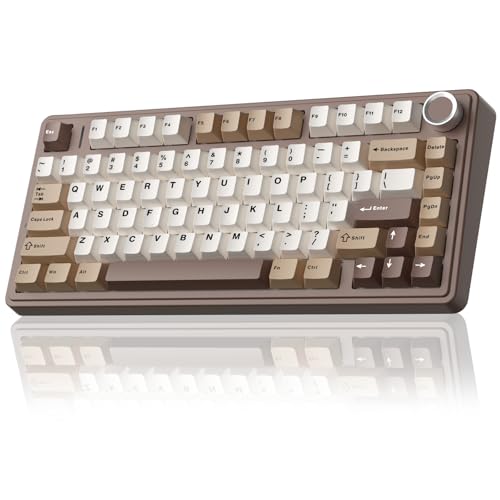
AULA F75 75% Wireless Keyboard stands out for combining a compact 75% layout with three connection modes, while the other exact-fit choices here are wired or do not give a connection-mode count. It supports Bluetooth 5.0, 2.4 GHz wireless and USB wired use, and can connect to as many as five devices. The hot-swap base accepts 3-pin or 5-pin switches, so switch changes do not require soldering.
Choose it for a mixed-device desk or if you want to change switches later. Its layout is smaller than a 96% or 98-key board, so buyers who rely on a dedicated number pad should pick a larger layout.
Bottom line: Pick this if you want compact size with multiple connection options.
HUO JI E-Yooso Z-99 99-Key Keyboard
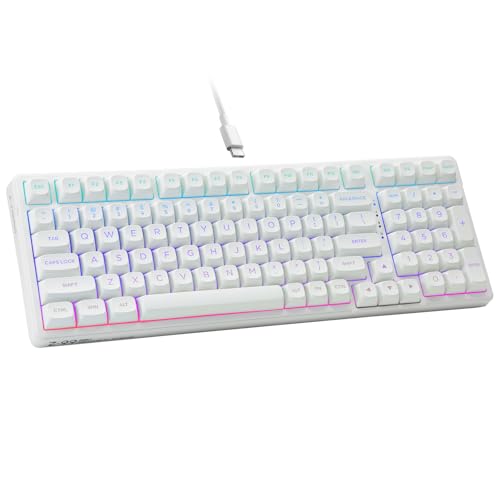
HUO JI E-Yooso Z-99 99-Key Keyboard is the wired choice for keeping a number pad in a reduced footprint: its 99-key, 96% layout measures 15.5 by 5.5 inches. The pluggable USB-C-to-USB-A cable is 5.25 feet long, and the hot-swap PCB accepts 3-pin and 5-pin switches without soldering. Its pre-lubed linear switches provide a smooth, consistent switch style rather than tactile feedback.
This board suits workstations where number entry matters but desk space is limited. It requires a cable connection, so choose a tri-mode board instead if you need to move among wireless devices.
Bottom line: Choose this for a compact wired layout that retains the number pad.
RK Royal Kludge R98 Pro

RK Royal Kludge R98 Pro differs from the linear-switch options by using pre-lubed beige tactile switches, which provide clearer keystroke feedback. Its 98-key layout retains a number pad, arrow keys and most functions, while the gasket mount and five layers of sound-absorbing foam shape its typing feel. MDA-profile PBT keycaps and a volume knob add distinct features beyond the shared hot-swap capability.
It supports 3-pin and 5-pin switch swaps. Consider it if tactile feedback and a number pad are priorities; its wired connection is a limitation for anyone who wants cable-free switching between devices.
Bottom line: Pick this for tactile switches, a number pad and a volume knob.
Keymatic WK98 Foundation

Keymatic WK98 Foundation is the screen-focused option, pairing a 98% layout with a display that can show music rhythm and keyboard settings. It has tri-mode connectivity and hot-swappable switches, plus 20 RGB lighting modes and 9 additional settings indicated in its feature summary. The pink finish and jelly MOA profile keycaps make it the most style-led option among these boards.
Choose it if an interactive display and wireless modes suit your setup. Switch feel is not identifiable from the product name and features, so buyers who want a particular linear or tactile response should confirm that before choosing.
Bottom line: Choose this for a tri-mode board with a customizable display.
Womier SK80 75% Kanagawa

Womier SK80 75% Kanagawa combines a 75% layout with a color multimedia screen that can show a custom GIF and keyboard status, making the display its main distinction from the other compact board. Its gasket-mounted build includes an EVA positioning plate and bottom filling, and the product features identify pre-lubed stabilizers. The Kanagawa theme and Cherry-profile keycaps give it a different visual and keycap style from the MOA-profile option.
This wired keyboard suits someone who wants a compact board with a screen and a gasket construction. It does not offer the tri-mode connection options described for some alternatives, so it is less suitable for cable-free device switching.
Bottom line: Pick this for a compact wired keyboard with a display and gasket build.
How to choose a creamy mechanical keyboard
Start with layout and connection, then decide whether you prefer linear or tactile switches. A 75% board saves space by omitting a dedicated number pad, while 96% and 98-key layouts keep one in a more compact footprint than a full-size keyboard. Linear switches move without a tactile bump; tactile switches add a noticeable bump during a keypress. For frequent number entry, choose a layout with a number pad; for a tighter desk, a 75% layout is the practical starting point.
Connection matters if you use multiple devices: a tri-mode board can combine Bluetooth, 2.4 GHz wireless and USB, while wired models need a cable. Hot-swap support lets you replace compatible switches without soldering. Check switch pin compatibility before buying replacements, especially when the board specifies 3-pin or 5-pin support.
Keyboard layouts and desk fit
Choose a layout by the keys you actually use, not by the percentage alone. A 75% board is the compact option here; a 96% or 98-key layout retains a number pad for spreadsheets and data entry. Measure the usable desk width and depth before selecting a board, including room for a mouse and cable routing. The 99-key option measures 15.5 by 5.5 inches, so compare those dimensions with your available surface.
Key count does not guarantee that every key is in the same place across layouts. Compact boards may shift navigation keys or compress spacing. If muscle memory or a particular key position is important, verify the layout diagram and physical dimensions before ordering.
Linear, tactile and hot-swap switches
Linear switches suit typists who prefer a consistent keypress without a tactile bump; tactile switches add a distinct feedback point. The boards compared here include both switch styles, so match feel to preference rather than treating creamy sound as a switch specification. Pre-lubed switches or stabilizers may contribute to smoother motion, while a gasket mount and foam are separate construction features that affect the overall typing character.
Hot-swap sockets make switch replacement easier, but compatibility still matters. A 3-pin or 5-pin socket description tells you which switch formats the board accepts; check the pin configuration and switch dimensions before swapping. Unplug a wired keyboard or turn a wireless model off before removing switches, and use a puller rather than prying against the plate.
What affects creamy keyboard sound
Keyboard sound comes from several parts working together: switches, stabilizers, keycaps, plate, case and desk surface. Foam layers and gasket mounting can change resonance and key feel, but they do not guarantee one sound in every setup. A hard desk, keycap profile and switch type can alter the result, so sound preference is best judged with the exact build and switch combination in mind.
Do not assume that every keyboard called creamy has the same acoustic construction. Look for build features such as gasket mounting, foam or pre-lubed components, then weigh them against layout and connection needs. For a hot-swap board, replacement switches can change sound and feel, but only use compatible parts and avoid forcing a switch into its socket.
Frequently Asked Questions
What does creamy mean for a mechanical keyboard?
Creamy is a sound-and-feel description, not a standardized switch type or layout. Gasket mounts, foam, switches, stabilizers and keycaps all influence the result, so the same label does not ensure identical sound.
Are linear switches quieter than tactile switches?
Linear switches lack the tactile bump, but switch type alone does not determine keyboard volume. Case construction, stabilizers, keycaps and desk surface can change the sound substantially.
Can hot-swap keyboards use any mechanical switch?
No; match the switch to the board’s socket and pin support. A board that supports 3-pin and 5-pin switches accepts those formats, but switch dimensions and compatibility still matter.
Is a 75% keyboard suitable for office work?
A 75% keyboard can suit office work if you do not need a dedicated number pad. People entering numbers often may prefer a 96% or 98-key layout that retains one.
How should I clean a mechanical keyboard safely?
Unplug a wired keyboard or turn a wireless keyboard off before cleaning, and remove loose debris with the board tilted. For deeper cleaning, remove keycaps only with a suitable puller and let parts dry completely before reconnecting.