
Power Outage Notification Device Without WiFi Compared

Power Pal is the closest fit for a power outage notification device without WiFi because it monitors power without connected devices and sends text or email alerts without an app. The other options require 2.4 GHz WiFi, so choose them only if that network is available at the monitored location.
Before relying on remote alerts, confirm how the device connects to send messages when WiFi is unavailable; monitoring power locally does not by itself guarantee off-site notifications.
We earn a commission if you buy through links on this page. As an Amazon Associate I earn from qualifying purchases. Products are compared on manufacturer specifications, not hands-on testing.
- Best overall: Power Pal Power Monitoring Device – It monitors power without connected devices and offers text or email notifications with no app setup.
- Best for audible alerts: Risinglink WiFi Power Outage Alarm – It adds an audible alarm and alerts when power returns, but requires 2.4 GHz WiFi.
- Best for two outlets: Power Failure Alarm WiFi, Two-Socket – It has two sockets and free app notifications, but requires WiFi and SMS/email may require a subscription.
| Product | Best for | Alert methods | WiFi requirement | App requirement | Shop |
|---|---|---|---|---|---|
| Power Pal Power Monitoring Device | Standalone monitoring | Text or email | — | No app required | Check Price on Amazon |
| Risinglink WiFi Power Outage Alarm | Audible alerts | SMS, email, audible | 2.4 GHz required | No app required | Check Price on Amazon |
| Power Failure Alarm WiFi, Two-Socket | Two-socket loads | App; SMS/email subscription | 2.4 GHz required | App required | Check Price on Amazon |
| Power Pal MAX WiFi Power Outage Monitor | Higher electrical rating | Text or email | WiFi in name | No app required | Check Price on Amazon |
| MySpool Power Failure Alarm | Power and internet | SMS, email, push | 2.4 GHz required | App implied | Check Price on Amazon |
Power outage notification devices without WiFi
Compare the closest standalone-style option with WiFi-dependent alternatives, and verify the network path needed for remote alerts.
Power Pal Power Monitoring Device

Power Pal is the only option here described as monitoring power with or without connected devices. It plugs into a standard outlet and can send text or email notifications without app setup or notification fees. That makes it the closest match for a location where no other connected device is available. The specifications do not establish what network carries remote notifications, so confirm that connection before depending on alerts when WiFi is absent. Its compact design may suit crowded receptacles, but check that it leaves enough room for any neighboring plug.
Bottom line: Choose it for app-free monitoring, after confirming how messages reach you without WiFi.
Risinglink WiFi Power Outage Alarm

Risinglink adds an audible alarm and a power-restoration alert, making it more informative when both failure and return matter. The device sends SMS or email directly and requires a 2.4 GHz WiFi network; it will not work with a 5 GHz-only network. It is a poor fit for a site without WiFi, even though it needs no hub, app, subscription, or monthly fee. Check the router band at the monitored location before choosing it, and consider whether a local sound is useful or disruptive in that space.
Bottom line: Choose it when audible and restoration alerts matter and 2.4 GHz WiFi is available.
Power Failure Alarm WiFi, Two-Socket

The two-socket design distinguishes this alarm from the single-plug monitors, and its app can remotely mute the device alarm and adjust its sound and timing. It requires 2.4 GHz WiFi, and the product says SMS and email settings in the app require a subscription; free app notifications are the included alert route. That makes it unsuitable when WiFi is unavailable or text alerts are essential without a recurring fee. It may fit a freezer or sump-pump setup with nearby WiFi, but check that the outlet arrangement works for both plugs.
Bottom line: Choose it for two-socket monitoring and app control where WiFi is present.
Power Pal MAX WiFi Power Outage Monitor
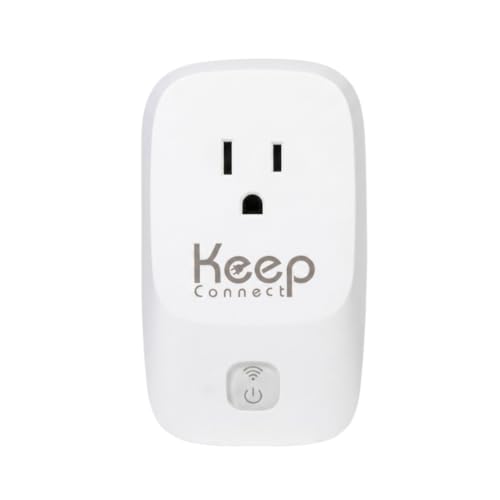
Power Pal MAX is differentiated by its 15A rating and precision power metering, rather than the standard Power Pal’s simple monitoring emphasis. Its text and email alerts and no-app setup may look suitable for remote power monitoring, but the model name identifies it as WiFi and the features do not establish operation without WiFi. Confirm its connection requirements before use where a router is unavailable. The 15A figure is the relevant rating to compare against the intended load; do not treat a higher rating as permission to exceed the outlet or appliance limits.
Bottom line: Choose it when its 15A rating and metering matter and its connection method fits the site.
MySpool Power Failure Alarm

MySpool monitors internet service as well as AC power, with separate controls for power-on, power-off, internet-on, and internet-off alerts. It requires 2.4 GHz WiFi, so the internet monitoring feature does not make it a no-WiFi solution. The product also offers SMS, email, and push notifications without a subscription or hub. This is better suited to a connected remote property, office, or server location where both types of outage matter; it is more functionality than needed if the only goal is to detect loss of electrical power.
Bottom line: Choose it when separate power and internet alerts are useful and 2.4 GHz WiFi is available.
How to choose a power outage notification device
Choose by the path an alert takes, not just by whether the device detects a power cut. Text and email require an off-site communication route, while a built-in audible alarm can warn someone in the same building but cannot reach you remotely. A device that monitors without connected equipment is not automatically independent of WiFi for messaging. For a site with no router, shortlist products that explicitly document cellular or another non-WiFi alert path; if that path is unclear, confirm it before relying on the device. A practical rule: if nobody is within earshot during an outage, do not count an audible alarm as your only alert. Also check whether power-restoration alerts are important, since they can confirm that service has returned.
WiFi requirements and remote alerts
WiFi-dependent monitors need a compatible network at the monitored location, and a 2.4 GHz-only requirement excludes a 5 GHz-only network. Power outage alerts also depend on the communication route staying available during the event; the specifications here do not establish backup power or a separate cellular connection. For remote sites, confirm both network compatibility and what happens if the router loses power. A useful decision rule is simple: if the location has no functioning 2.4 GHz WiFi, do not select a model that requires it. If the router is present, check whether the alert method you need—push notification, SMS, email, or sound—is included without a subscription.
Power outage alerts by device type
Standalone-style monitors, WiFi alarms, and combined power-and-internet monitors serve different alert needs. The table separates their capabilities from network dependency; verify unclear connection requirements before depending on remote notifications.
| Device type | Useful when | Key constraint |
|---|---|---|
| Standalone-style power monitor | Monitoring without connected equipment | Confirm remote message connection |
| WiFi outage alarm | WiFi, text/email, or audible alerts are available | Compatible 2.4 GHz network may be required |
| Power and internet monitor | Both utility power and internet state matter | WiFi is needed for its network monitoring |
Buyers should match the device to the failure they need to know about. A power monitor detects electrical loss; an internet outage detector watches connectivity too, which is useful only if the network status is part of the problem.
Safe use around appliances and outlets
Use an outage monitor within the electrical rating of its outlet and the connected equipment; a 15A rating does not override a lower-rated receptacle or appliance limit. Keep plugs fully seated and avoid blocking a second receptacle if the device’s shape crowds the outlet. For a freezer, sump pump, or other critical load, the notification device reports a condition but does not keep the appliance running or preserve contents. Test the alert route after setup, including whether remote messages arrive when the monitored location loses power. If the equipment is on a GFCI-protected circuit, a tripped GFCI can cut power even when the building supply is otherwise on.
Frequently Asked Questions
Can a power outage device send texts without WiFi?
Some devices may use a communication path other than WiFi, but text alerts alone do not establish which path is used. Confirm that the device documents remote messaging without WiFi before relying on it at an offline location.
Will a WiFi outage alarm work on 5 GHz?
A model requiring 2.4 GHz will not work on a 5 GHz-only network. Check that the monitored location has a compatible 2.4 GHz network before setup.
What is the difference between power and internet alerts?
A power alert reports loss or return of electrical supply, while an internet alert reports network connectivity changes. A device that checks internet service still needs a working compatible network connection to perform that monitoring.
Does an audible alarm alert me when I am away?
An audible alarm can be heard only within its sound range and cannot by itself notify someone off-site. For remote awareness, confirm an SMS, email, or app alert route and whether it works during a power interruption.
Can an outage monitor keep a freezer running?
No; an outage monitor detects or reports a power condition rather than supplying backup electricity. A freezer needs a separate backup power source if continued operation during an outage is required.