
Bluetooth Phone Camera Remote Control: 5 Options Compared

Wireless Remote with Zoom and Camera Switch suits the widest range of remote-camera tasks because it adds zoom and front/rear camera switching to shutter control. Choose zttopo Wireless Camera Remote (2 Pack) instead if you want a simple remote with a 30-foot range, or AOQIYUE Wireless Remote Shutter (3 Pack) if its maker-claimed 50-foot range matters more than extra controls.
We earn a commission if you buy through links on this page. As an Amazon Associate I earn from qualifying purchases. Products are compared on manufacturer specifications, not hands-on testing.
- Best overall: Wireless Remote with Zoom and Camera Switch – Adds zoom and front/rear camera switching alongside shutter control.
- Best for longer reach: AOQIYUE Wireless Remote Shutter (3 Pack) – Its maker claims operation up to 50 feet.
- Best for simple selfies: zttopo Wireless Camera Remote (2 Pack) – A compact two-pack remote with a 30-foot operating range.
| Product | Best for | Pack count | Claimed range | Extra controls | Shop |
|---|---|---|---|---|---|
| Wireless Remote with Zoom and Camera Switch | Extra camera controls | — | — | Zoom; camera switch | Check Price on Amazon |
| AOQIYUE Wireless Remote Shutter (3 Pack) | Longer claimed range | 3 | Up to 50 ft | Shutter | Check Price on Amazon |
| zttopo Wireless Camera Remote (2 Pack) | Simple two-pack use | 2 | Up to 30 ft | Photo; video | Check Price on Amazon |
| CamKix Bluetooth Camera Shutter Remote | Phone and tablet use | — | Up to 30 ft | Shutter | Check Price on Amazon |
| Xenvo Shutterbug Bluetooth Remote | On-off control | — | — | Photo; video | Check Price on Amazon |
Bluetooth Phone Camera Remote Controls
Compare the range, pack size and control features before choosing a remote for your phone or tablet.
Wireless Remote with Zoom and Camera Switch

Zoom and front/rear camera switching set this remote apart from the simpler shutter clickers. Its feature set also includes shutter control for photos and video, plus video scrolling and page-turning functions. The maker says iPhone and iPad users must enable zoom in Accessibility settings to use the zoom feature. This model suits creators who want more than a remote shutter, but the extra controls may be unnecessary if you only need a button to trigger a selfie. Confirm that the camera app you plan to use supports the functions you want.
Bottom line: Choose this if zoom and camera switching matter as much as remote shutter control.
AOQIYUE Wireless Remote Shutter (3 Pack)

The three-pack and maker-claimed 50-foot range distinguish this option from the other basic remotes. Each small remote pairs through the phone’s Bluetooth settings, and the package includes wrist straps. The maker cites compatibility with Android 4.2.2 and newer and iOS 6.0 and newer, with the built-in camera app or Google Camera 360 as options. It is a fit for households or groups that want several clickers, but the range is a maker claim rather than a guarantee in every setting; walls and wireless interference can reduce practical reach.
Bottom line: Pick this when you want three basic remotes and value the claimed longer reach.
zttopo Wireless Camera Remote (2 Pack)
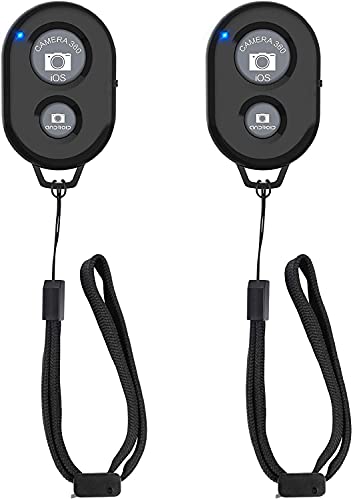
The zttopo remote is a straightforward two-pack with a 30-foot operating range and a wrist strap. The maker says short presses take photos and long presses start video in Instagram and Snapchat; compatibility is also given for Android 4.2.2 and newer and iOS 6.0 and newer. Its small size makes it suitable for carrying on a keychain or in a pocket. This is a simpler choice than a multi-function remote, so it is less suited to buyers seeking zoom or camera switching. App behavior may differ, so check the functions you need in your preferred camera app.
Bottom line: Choose it for two compact shutter remotes and a 30-foot range.
CamKix Bluetooth Camera Shutter Remote
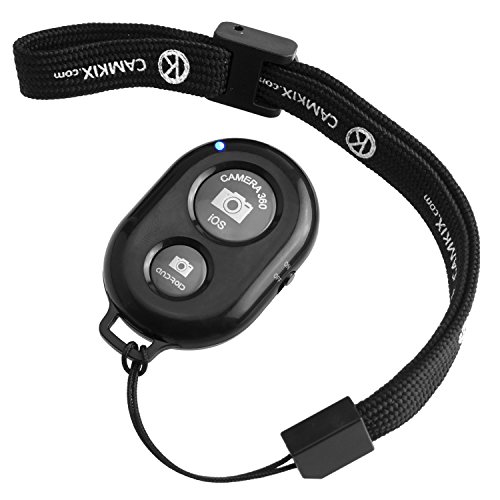
CamKix explicitly targets both smartphones and tablets, making it a useful option if you want one remote for more than a phone. Its maker describes certified Bluetooth wireless technology, one-time pairing, a wrist strap and operation up to 30 feet away. The remote is intended for hands-free selfies, group photos and steady shots, and can be carried on a keychain. It does not add the zoom or camera-switching controls found on a more feature-rich option, so buyers wanting those adjustments from a distance should compare control functions before choosing.
Bottom line: Choose this when tablet compatibility is as important as phone shutter control.
Xenvo Shutterbug Bluetooth Remote
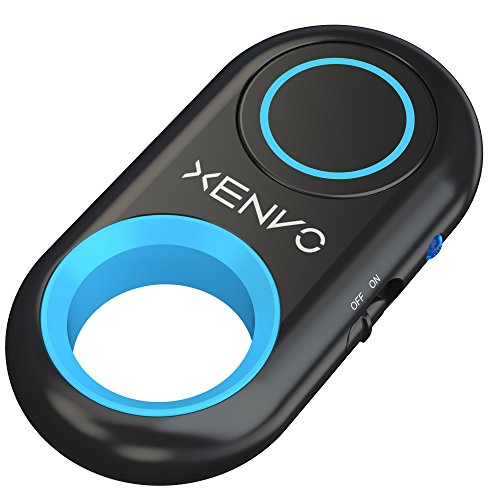
The Xenvo Shutterbug includes a physical on/off switch and a blue pairing indicator, unlike the basic remotes whose features focus mainly on shutter use. Its maker says it can trigger photos and start or stop video, and gives compatibility for iOS 5.0 and newer and Android 4.3 and newer; Windows phones are excluded. At 1.3 inches high, it is a compact choice for carrying with a phone kit.
Bottom line: Pick it if a power switch and visible pairing indicator are useful to you.
How to choose a Bluetooth phone camera remote
Choose by the controls you need, your phone’s operating system, and the distance you expect to stand from the camera. Basic remotes trigger the shutter; more specialized models may add zoom, camera switching, or other buttons. Bluetooth range claims are not guaranteed in every room: walls, the phone’s position, and nearby wireless devices can reduce reliable reach. For indoor group photos, a claimed range of 30 feet may be ample when the phone and remote are in the same open room. If you regularly shoot farther away, compare stated range claims, but leave margin rather than planning to use a remote at its maximum advertised distance.
App support is another deciding factor. A remote may work with a phone’s built-in camera but behave differently in a social or video app. Check compatibility for the exact operating system and the specific controls you intend to use before relying on a remote for a shoot.
Bluetooth remote range and camera app compatibility
A remote’s operating distance is a guide, not a promise of the same reach in every setting. The open-space figure can shrink when the phone is behind a person, inside a bag, or separated by walls; wireless interference can also affect connection reliability. If a remote claims 30 or 50 feet, test pairing and shutter response at a shorter distance before moving the phone farther away.
Compatibility has two parts: the phone’s operating system and the camera app. Some remotes specify minimum iOS or Android versions, while others only broadly name phone and tablet types. A button that triggers a still photo may not start video or control zoom in every app. Verify the app behavior you need, especially when a remote’s extra buttons are the reason you are choosing it.
Choosing between basic shutters and multi-control remotes
Basic shutter remotes are designed to trigger a phone camera without touching the phone, which helps avoid movement from tapping the screen. Multi-control models can add zoom, camera switching, or video-related functions, but those controls are useful only when the phone and app recognize them. Choose a basic unit if your routine is a fixed phone on a tripod and one shutter press; consider extra buttons if you change framing or camera direction during a shot.
The table compares what each remote’s features explicitly establish. A dash means the specifications do not give a value; it does not imply a particular range or pack count.
| Need | Remote to consider | Deciding feature |
|---|---|---|
| Extra camera functions | Wireless Remote with Zoom and Camera Switch | Zoom and camera switching |
| Several simple remotes | AOQIYUE Wireless Remote Shutter (3 Pack) | Three-pack |
| Tablet shutter use | CamKix Bluetooth Camera Shutter Remote | Phone and tablet compatibility |
Pairing and using a phone camera clicker
Pair the remote in the phone’s Bluetooth settings, then open the camera app and check what a short press does before taking an important photo. A reliable setup keeps the phone stable, leaves the remote within practical wireless range, and confirms whether the button triggers a still image or video. A tripod can reduce movement from handling the phone, but a remote cannot correct a moving subject or a shaky support.
For video, confirm both the start and stop behavior in the intended app; a button function supported in one camera app may not carry over to another. For zoom controls, check the phone’s required accessibility or camera settings first. Keep a spare phone shutter method available for a timed group shot, since Bluetooth pairing can be interrupted or disconnected.
Frequently Asked Questions
How far away can a Bluetooth camera remote work?
Use the maker’s range claim as a ceiling, not a guaranteed working distance. Walls, the phone’s placement, and wireless interference can reduce the dependable range, so test the connection at the distance you plan to use.
Will a Bluetooth shutter remote work with every camera app?
No; camera-app support can differ even when the phone’s operating system is compatible. Test the specific button functions in the app you plan to use, particularly for video, zoom, or camera switching.
Can a phone camera remote start video recording?
Some remotes claim video start or stop, while basic shutter controls may only trigger a photo in a given app. Check the function in the target app before recording anything important.
Does a Bluetooth remote work with a tablet camera?
Some models explicitly support smartphones and tablets, but compatibility still depends on the tablet’s operating system and camera app. Confirm both before relying on the remote for a group shot.
Why does my Bluetooth camera remote stop responding?
A remote can lose reliable response when it is too far away, blocked by walls, or affected by wireless interference. Move closer, make sure Bluetooth pairing remains active, and test the shutter again.