
Vertical TV Wall Mounts: 3 Options Compared by Fit

For most vertical TV wall mount shoppers, Mount-It! 37–75-Inch Tilting Mount offers the most flexibility because its tilt adjusts from +5 to -10 degrees while supporting TVs up to 165 pounds. Choose a fixed bracket if the screen will stay in one position, or a rotating arm if you need landscape-to-portrait movement.
We earn a commission if you buy through links on this page. As an Amazon Associate I earn from qualifying purchases. Products are compared on manufacturer specifications, not hands-on testing.
- Best overall: Mount-It! 37–75-Inch Tilting Mount – Tilts after installation and supports TVs up to 165 pounds.
- Best for fixed signage: MP-PWB-64AF 37–75-Inch Fixed Mount – A fixed portrait mount with anti-theft hardware and a 1.5-inch wall profile.
- Best for rotation: FORGING MOUNT 26–65-Inch Rotating Arm – Swivels, tilts and rotates between landscape and portrait positions.
| Product | Best for | TV size | Weight limit | Adjustment | Shop |
|---|---|---|---|---|---|
| MP-PWB-64AF 37–75-Inch Fixed Mount | Fixed portrait displays | 37–75 in | 165 lb | Fixed | Check Price on Amazon |
| Mount-It! 37–75-Inch Tilting Mount | Tilting signage | 37–75 in | 165 lb | +5° to −10° tilt | Check Price on Amazon |
| FORGING MOUNT 26–65-Inch Rotating Arm | Flexible viewing angles | 26–65 in | 88 lb | ±90° rotation | Check Price on Amazon |
Vertical TV Wall Mounts
Compare each mount’s supported TV size, capacity and positioning range before choosing a bracket.
MP-PWB-64AF 37–75-Inch Fixed Mount

For a fixed portrait display, MP-PWB-64AF 37–75-Inch Fixed Mount combines a low 1.5-inch wall profile with anti-theft hardware. The bracket supports VESA patterns from 200 × 100 mm through 400 × 600 mm and TVs from 37 to 75 inches; the mount itself measures 17.5 inches wide and 24.3 inches high. It suits menu boards and public displays that do not need angle adjustments. The fixed design is the main limitation: choose another type if viewers need tilt or rotation after installation. Confirm the TV’s hole pattern and portrait-orientation suitability before mounting.
Bottom line: Choose this for a fixed portrait display where a close-to-wall position matters.
Mount-It! 37–75-Inch Tilting Mount

Unlike a fixed bracket, Mount-It! 37–75-Inch Tilting Mount tilts after installation, with a tool-free range from +5 to −10 degrees to help aim the screen and manage glare. It fits TVs from 37 to 75 inches, supports up to 165 pounds, and accepts VESA patterns from 200 × 200 through 400 × 600 mm. Its 3.2-inch profile leaves more space behind the screen than the 1.5-inch fixed mount. Anti-theft hardware works with a standard padlock, and a built-in bubble level helps during setup. The mount tilts but does not rotate between portrait and landscape.
Bottom line: Choose this when you want post-install tilt without landscape-to-portrait rotation.
FORGING MOUNT 26–65-Inch Rotating Arm
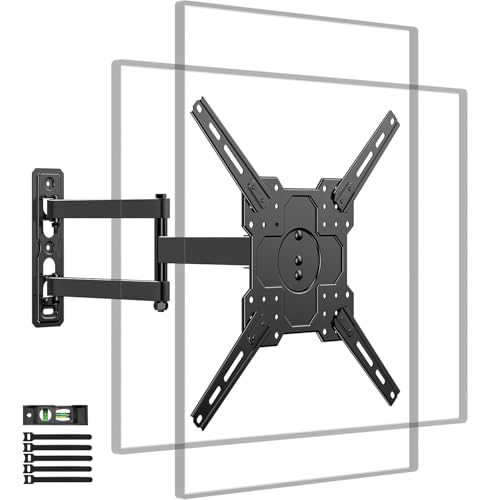
FORGING MOUNT 26–65-Inch Rotating Arm is the option for switching between landscape and portrait: its arm rotates ±90 degrees, swivels ±90 degrees, and tilts from −15 to +5 degrees. It fits 26- to 65-inch TVs up to 88 pounds and supports VESA patterns up to 400 × 400 mm. The arm extends 21.07 inches from the wall and retracts to 3.15 inches, making it useful when the screen needs to move toward different viewing positions. Its 88-pound limit is lower than the 165-pound capacity of the other exact-fit options, so check the TV’s weight before choosing it.
Bottom line: Choose this when rotation and reach matter more than a higher weight capacity.
How to Choose a Vertical TV Wall Mount
Choose by movement first, then verify the TV’s size, weight and VESA pattern against the bracket. A fixed mount suits signage that stays aimed in one direction; a tilting mount adds vertical angle adjustment, while a full-motion arm can add swivel, reach or rotation. VESA refers to the spacing of the threaded mounting holes on the back of a TV, measured horizontally and vertically in millimeters. A pattern such as 400 × 600 mm must fall within the mount’s supported patterns. The TV diagonal alone is not enough to confirm fit: compare all four mounting-hole measurements and the TV’s weight with the bracket limits.
| Need | Mount type | Check before choosing |
|---|---|---|
| Keep the screen stationary | Fixed | VESA pattern and wall clearance |
| Adjust the vertical angle | Tilting | Tilt range and screen clearance |
| Change screen orientation or reach | Rotating arm | Rotation range, extension and weight limit |
Vertical TV Fit and Portrait Orientation
Portrait mounting turns a TV 90 degrees, but a compatible bracket does not by itself guarantee that every television can operate safely in that position. Check the TV manufacturer’s manual for portrait use, ventilation clearances and cable routing before mounting; speakers, ports or cooling openings can be affected by orientation. Measure the screen’s VESA hole spacing in millimeters and compare it with the mount’s supported patterns. Also check the TV’s weight without accessories against the bracket’s capacity. If a TV’s weight or pattern falls outside either limit, do not rely on a close match or an adapter to make the combination safe.
Mounting a TV Safely to a Wall
Fasten the wall plate to structural support, not drywall alone. For a wood-framed wall, locate the studs and use the mount’s specified fasteners; stud spacing is often 16 inches on center but can differ, so confirm the actual framing before drilling. Concrete or brick needs anchors rated for that masonry and compatible with the mount. Keep the screen’s weight within the mount’s limit, and use a second person to lift and secure a large TV. Before drilling, check for wiring or plumbing in the wall and confirm that the bracket can be leveled in the intended orientation.
Common Vertical TV Mounting Mistakes
The most common fit error is matching only the TV’s diagonal size while overlooking its VESA pattern or weight. A TV labeled 55 inches may still have a hole spacing that the bracket cannot accept, so measure center-to-center in both directions. A second mistake is assuming portrait rotation is available on a fixed or tilt-only mount; those designs cannot provide a 90-degree orientation change after installation. A third is mounting into drywall without structural support, which can let the assembly pull free. Before drilling, test the intended screen position against nearby doors, furniture and cable connections so the arm or rotated display has room to move.
Frequently Asked Questions
How do I measure a TV VESA pattern?
Measure the distance between the centers of the mounting holes horizontally and vertically, in millimeters. A 400 × 600 mm pattern means 400 mm across and 600 mm between rows.
Can every TV be mounted in portrait orientation?
No; verify portrait use in the TV manufacturer’s manual before rotating the screen. Check that vents, ports and cables remain clear in the intended position.
Can a TV wall mount attach to drywall alone?
No; secure the wall plate to a stud or suitable masonry rather than drywall alone. Wood studs are often 16 inches apart, but measure their actual locations before drilling.
How much weight capacity should a TV mount have?
The mount’s weight limit must meet or exceed the TV’s weight. If the TV weighs more than the bracket’s rated capacity, select a higher-capacity mount instead.
What is the difference between tilt and rotation?
Tilt changes the screen’s vertical angle, while rotation turns the screen between landscape and portrait orientation. A tilt-only bracket does not provide a 90-degree turn.