
Rii i8 Mini Bluetooth Keyboard: Models Compared

Rii i8+ BT Mini Keyboard is the closest match because its name identifies it as an i8+ Bluetooth keyboard; Rii i8+ 2.4GHz is an i8+ alternative but uses 2.4GHz wireless rather than Bluetooth.
Choose an X8 or another dual-mode model if you need 2.4GHz as well as Bluetooth, and confirm your device supports the connection method you plan to use.
We earn a commission if you buy through links on this page. As an Amazon Associate I earn from qualifying purchases. Products are compared on manufacturer specifications, not hands-on testing.
- Best overall: Rii i8+ BT Mini Keyboard – Its name specifies both the i8+ model and Bluetooth connectivity.
- Best for backlighting: Rii i8+ 2.4GHz – It pairs an i8+ name with LED backlighting and a touchpad, but connects over 2.4GHz.
- Best for dual-mode use: Rii X8 Dual-Mode Mini Keyboard – It supports Bluetooth 5.0 and 2.4GHz RF connections.
| Product | Best for | Connection | Touchpad | Backlighting | Shop |
|---|---|---|---|---|---|
| Rii i8+ BT Mini Keyboard | Bluetooth i8+ match | Bluetooth | — | Backlit | Check Price on Amazon |
| Rii i8+ 2.4GHz | 2.4GHz i8+ use | 2.4GHz | Multi-finger | LED backlit | Check Price on Amazon |
| Rii X8 Dual-Mode Mini Keyboard | Dual-mode connection | Bluetooth 5.0 / 2.4GHz | Multi-finger | RGB backlit | Check Price on Amazon |
| Rii Mini Dual-Mode Keyboard | Multi-device pairing | Bluetooth / 2.4GHz | Touchpad | White LED | Check Price on Amazon |
| Rii X8 2.4G Mini Keyboard | Receiver-only setup | 2.4GHz | Multi-touch | 8-color RGB | Check Price on Amazon |
Rii i8 Mini Bluetooth Keyboard Options
Compare the i8+ Bluetooth-named option with related Rii mini keyboards by connection and controls.
Rii i8+ BT Mini Keyboard

The defining distinction is its i8+ BT name, making this the closest match for a search for an Rii i8 mini Bluetooth keyboard. The product name also identifies a backlight and touchpad, which can be useful for typing and pointer control from a couch or desk. Its name does not identify a receiver connection, so buyers who specifically need 2.4GHz should compare the dual-mode alternatives instead. Confirm that your device supports Bluetooth keyboard input before choosing this model.
Bottom line: Pick this if Bluetooth and the i8+ designation are your main requirements.
Rii i8+ 2.4GHz

Unlike the Bluetooth-named option, this i8+ connects over 2.4GHz and combines a QWERTY keyboard with a multi-finger touchpad. The maker gives it 92 keys and describe single-finger left click, two-finger right click, and two-finger scrolling. LED backlighting and rechargeable Li-ion power are also identified. It is a related i8+ choice for a setup that can use its 2.4GHz connection, but it is not the Bluetooth model sought by the keyword.
Bottom line: Choose it when 2.4GHz matters more than Bluetooth connectivity.
Rii X8 Dual-Mode Mini Keyboard

The X8 differs from the i8+ models by offering both Bluetooth 5.0 and 2.4GHz RF connections. Its multi-finger touchpad and RGB backlighting make it a related compact control option for a TV or computer setup. The dimensions are 5.43 by 3.78 by 0.82 inches, useful if the size needs to fit a particular storage spot. This is an X8 rather than an i8, so choose it for dual-mode flexibility rather than an exact i8 model match.
Bottom line: Pick it if having Bluetooth and 2.4GHz in one keyboard is the priority.
Rii Mini Dual-Mode Keyboard

This Rii mini is described as pairing with two devices, with Bluetooth for compatible devices and 2.4GHz through a USB receiver for devices without Bluetooth. It also combines a touchpad with white LED backlighting and a 500mAh rechargeable battery. The maker gives a 33-foot range and says it can run for over 30 days on a charge; those are maker claims, not universal expectations across devices and usage. It is a related dual-mode option, not an i8 model.
Bottom line: Choose it if you want Bluetooth plus a receiver-based connection.
Rii X8 2.4G Mini Keyboard
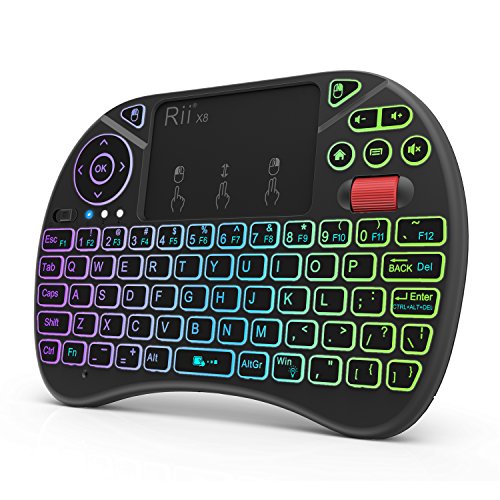
This X8 is a 2.4GHz receiver-based model, unlike the dual-mode X8 and Bluetooth-named i8+ option. Its feature set includes a multi-touch touchpad, left and right mouse buttons, scroll wheel, media controls, and 8-color RGB backlighting. The rechargeable battery is built in. It suits a setup where the included USB dongle is the intended connection method; it is not the Bluetooth i8 model implied by the search. Verify your device has a compatible USB port for the receiver.
Bottom line: Pick it for a receiver-based X8 with extra media and pointer controls.
How to choose a mini Bluetooth keyboard
Choose by connection first: Bluetooth pairs directly with a compatible host, while a 2.4GHz keyboard generally uses a USB receiver. Dual-mode keyboards can cover both situations, but a receiver still requires a usable USB port. For a TV setup where reaching a port is awkward, prefer Bluetooth only if the TV supports Bluetooth keyboard input; for a PC with an open USB port, receiver-based wireless is another option. A touchpad can replace a separate mouse for basic pointer movement, but it does not make every operating-system gesture available. Check device compatibility before buying, especially for streaming sticks and tablets, where keyboard support can differ from ordinary computers.
Bluetooth and 2.4GHz connections compared
Bluetooth and 2.4GHz are different connection paths, so match the keyboard to the host rather than assuming all wireless keyboards pair alike. Bluetooth avoids occupying a USB port, while a 2.4GHz model depends on its receiver. The table summarizes which connection types appear among these Rii options.
| Connection need | Suitable option type | Before choosing |
|---|---|---|
| Bluetooth i8+ model | Bluetooth-named i8+ | Confirm host Bluetooth keyboard support |
| Bluetooth and receiver | Dual-mode model | Check USB access for receiver use |
| Receiver only | 2.4GHz model | Confirm a compatible USB port |
Connection labels matter more than a shared mini keyboard shape: an i8+ 2.4GHz model is not interchangeable with an i8+ Bluetooth-named model for a host that only accepts one connection type.
Touchpad and backlight features
A built-in touchpad saves space when a keyboard is used at a distance, while a separate mouse can provide more precise pointer control. Multi-finger functions vary by model: one supplied i8+ feature set identifies left click, right click, and scrolling gestures, but those controls should not be assumed across every Rii keyboard. Backlighting is useful in a dim room, although RGB and white LED describe different lighting options rather than different connection standards. For frequent typing, consider whether the compact layout gives your hands enough room; for occasional search and navigation, portability may matter more than full-size key spacing.
Compatibility and safe setup checks
Check the host device and connection before relying on a mini keyboard for TV or computer control. Bluetooth input support is device-specific, and a receiver-based keyboard needs a compatible USB port; a USB-C charging port on the keyboard does not establish the type of receiver connection. Keep rechargeable electronics away from heat and water, and use an appropriate charging cable without forcing the connector. For a device mounted behind a television, confirm the receiver can be plugged in and remain accessible before installation. If the keyboard is intended for several devices, verify how its switching process works for that particular model rather than assuming every dual-mode keyboard changes hosts the same way.
Frequently Asked Questions
Can an i8+ 2.4GHz keyboard connect over Bluetooth?
The i8+ 2.4GHz option is identified as a 2.4GHz wireless keyboard, not a Bluetooth model. Choose a product explicitly identified as Bluetooth when the host requires Bluetooth pairing.
Do mini keyboards need a USB port to work?
A 2.4GHz keyboard that uses a USB receiver needs a compatible USB port. Bluetooth avoids that receiver requirement, provided the host supports Bluetooth keyboard input.
What does a touchpad add to a mini keyboard?
A touchpad combines pointer movement with keyboard input, reducing the need to place a separate mouse nearby. Gesture controls differ by model, so check whether the functions you need are identified for that keyboard.
Can I use a mini keyboard with a smart TV?
Some mini keyboards are made for smart TV setups, but compatibility depends on the TV and connection type. Confirm Bluetooth keyboard support or an accessible compatible USB port before choosing.
How often should I recharge a wireless mini keyboard?
Recharge when the keyboard indicates low battery or stops operating reliably; usage and backlight settings affect runtime. One supplied model claims over 30 days per charge, but that figure applies to that model’s claim, not every keyboard.