
GardePro A3S Trail Camera: Models Compared by Fit

The GardePro A3S suits buyers who want a non-cellular trail camera with 64MP photos, while the A3 offers 48MP photos at the same 1296P video resolution. Choose a WiFi model instead if you want smartphone access on site rather than retrieving an SD card.
Trail cameras use motion sensors to trigger photos or video, usually saving captures to a memory card or transferring them to a paired device.
We earn a commission if you buy through links on this page. As an Amazon Associate I earn from qualifying purchases. Products are compared on manufacturer specifications, not hands-on testing.
- Best overall: GardePro A3S 64MP – It is the named non-cellular model and records 64MP photos plus 1296P video with sound.
- Best for a simpler match: GardePro A3 48MP – It keeps non-cellular, SD-card operation and 1296P video while using a 48MP photo resolution.
- Best for rechargeable WiFi: GardePro E8PMB WiFi – It pairs on site with a phone and has a built-in 8000mAh rechargeable battery.
- Best for included storage: GardePro E8 2.0 Pro – It includes a 64GB SD card and offers 4K video with phone-based on-site viewing.
| Product | Best for | Photo resolution | Video resolution | Connection | Shop |
|---|---|---|---|---|---|
| GardePro A3S 64MP | SD-card scouting | 64MP | 1296P with sound | Non-cellular; no WiFi | Check Price on Amazon |
| GardePro A3 48MP | SD-card alternative | 48MP | 1296P with sound | Non-cellular; no WiFi | Check Price on Amazon |
| GardePro E8PMB WiFi | Rechargeable phone viewing | — | — | Direct phone WiFi and Bluetooth | Check Price on Amazon |
| GardePro E8 2.0 Pro | 4K phone viewing | — | 4K | Direct phone WiFi and Bluetooth | Check Price on Amazon |
GardePro A3S Trail Camera and Alternatives
Compare the A3S with related GardePro cameras by capture resolution, connection method, and included power or storage features.
GardePro A3S 64MP
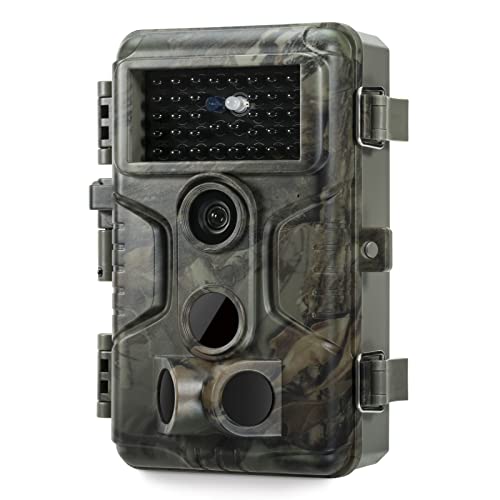
The A3S is the only model here that combines 64MP photos with a non-cellular, non-WiFi setup. It records 1296P video with sound and uses a Sony Starvis sensor; GardePro says its no-glow night vision reaches 100 feet. Captures are retrieved from the SD card, which suits remote scouting where phone access is not the priority. The tradeoff is that checking images requires a visit to the camera, so choose a phone-pairing model if you need to view captures on site.
Bottom line: Choose this if SD-card retrieval and 64MP photos matter more than phone access.
GardePro A3 48MP

The A3 is the closest alternative to the A3S: it shares the non-cellular, non-WiFi approach, 1296P video with sound, Sony Starvis sensor, and stated 100-foot no-glow night vision, but captures 48MP photos instead of 64MP. Like the A3S, it is suited to a setup where you can return to retrieve the SD card rather than check a phone remotely. The lower photo resolution is the key distinction; buyers who prioritize the highest still-photo figure should select the A3S.
Bottom line: Choose this if you want non-cellular SD-card operation and 48MP photos.
GardePro E8PMB WiFi

The E8PMB differs from the A3S by pairing directly with a smartphone through Bluetooth and built-in WiFi, rather than relying only on SD-card retrieval. GardePro says its built-in 8000mAh rechargeable battery can last up to one year at 20 daytime and 20 nighttime photos per day; results depend on that stated capture pattern. The camera does not connect to a home router or cellular network, so it is for on-site phone access, not remote delivery. Photo and video resolution are not provided among the specifications, a limitation for buyers comparing capture detail.
Bottom line: Choose this for rechargeable power and on-site smartphone access.
GardePro E8 2.0 Pro

The E8 2.0 Pro adds 4K video and an included 64GB SD card, making it a different fit from the A3S’s SD-card-only, 1296P approach. Its WiFi and Bluetooth connect directly to a smartphone through the GardePro app; the camera does not connect to a home router or cellular network. GardePro says WiFi 6 and dual antennas provide a range of up to 165 feet.
Bottom line: Choose this for 4K video, included storage, and on-site phone viewing.
How to Choose a GardePro A3S Trail Camera
Choose based on how you want to retrieve captures: the A3S uses a non-cellular, non-WiFi SD-card workflow, while the E8 models pair directly with a phone on site. Trail cameras are commonly set to capture still photos, video, or both when a passive infrared sensor detects movement; detection angle and trigger speed affect whether an animal is centered in frame. The A3S and A3 list a 0.1-second trigger, which can help with fast-moving subjects, but camera placement and the animal’s direction still matter. For a stationary scouting setup that you can revisit, choose the A3S or A3; for on-site phone access, choose a WiFi alternative. These WiFi models are not cellular systems for remote photo delivery.
Trail Camera Placement and Detection
Mount a trail camera about 3 to 4 feet above ground for many deer-trail setups, then angle it toward the expected travel path rather than straight along it. A perpendicular crossing gives the sensor more time to detect an animal and the camera more opportunity to capture it. Avoid pointing toward rising or setting sun, which can cause glare, and clear grass or branches from the immediate foreground to reduce false triggers. Test the framing by walking through the detection zone at the distance you expect animals to pass. Night range figures describe illumination reach, not a guarantee of sharp identification at every distance; subject movement, lens view, and ambient conditions also affect footage.
Non-Cellular and WiFi Trail Cameras Compared
Non-cellular cameras save captures locally, while WiFi trail cameras generally let a nearby phone connect directly for setup or viewing. WiFi does not mean a camera can send photos over long distances: the E8PMB and E8 2.0 Pro specify phone-only direct connection and no home router or cellular connection. Use this distinction to match the camera to the site and your visit schedule.
| Camera style | How captures are accessed | Best fit |
|---|---|---|
| Non-cellular SD-card | Retrieve the card at the camera | Infrequent checks, no phone pairing |
| Direct WiFi and Bluetooth | Connect a nearby smartphone | On-site viewing and setup |
| Cellular | Transmits through a mobile network | Remote delivery where coverage exists |
For a site without dependable cell coverage, local storage or direct phone pairing avoids relying on a cellular signal. A direct WiFi connection still requires you to be near the camera.
Memory Cards, Battery Use, and Camera Safety
Use a memory card that matches the camera’s supported capacity and speed class; format it in the camera before deployment to reduce file-system problems. SD cards are often replaced or reformatted between seasons, and checking a sample capture before leaving the site helps catch framing or recording errors early. Battery life changes with temperature, capture frequency, video length, and wireless activity, so a published runtime tied to a specific photo count should not be treated as universal. Secure the camera to a stable tree or mount, keep the strap clear of the sensor and lens, and do not place it where hikers, livestock, or vehicles could be struck by the mount or startled by a close flash.
Frequently Asked Questions
How high should a trail camera be mounted for deer?
A height of about 3 to 4 feet works for many deer-trail setups. Raise or lower the camera when terrain slopes or the expected animal size changes, and test the frame by walking through the zone.
Does a WiFi trail camera send photos from far away?
A direct WiFi trail camera generally requires a nearby phone rather than sending photos remotely over a mobile network. The E8PMB and E8 2.0 Pro specify phone-only connection and no cellular or home-router connection.
What does a 0.1-second trigger speed mean?
A 0.1-second trigger is the interval from motion detection to capture, not a guarantee that every moving animal will be centered. Aim across the travel path and test the detection zone to reduce missed passes.
How often should trail camera batteries be checked?
Check batteries during each scheduled camera visit, and more often in cold weather or at sites with frequent video triggers. Capture frequency and wireless use can change runtime substantially from a low-activity estimate.
Should I format a trail camera SD card?
Format a compatible card in the camera before starting a new deployment, after preserving any files you want to keep. A test photo and playback check can confirm the card and recording settings are working before you leave.