
Keyboard With Raised Keys: 5 Models Compared

The Logitech K120 is the closest match for a keyboard with raised keys because its deep-profile keys are explicitly called out, alongside a full-size layout. Choose a different option if you want a wireless combo, a wrist rest, or round retro keycaps; key shape and connection type are the main tradeoffs.
We earn a commission if you buy through links on this page. As an Amazon Associate I earn from qualifying purchases. Products are compared on manufacturer specifications, not hands-on testing.
- Best overall: Logitech K120 Full-Size Wired Keyboard – Deep-profile keys and a full-size wired layout suit buyers prioritizing raised keys.
- Best for round keycaps: KNOWSQT MilkTea Retro Wireless Keyboard – Round keycaps and a floating-button design give it a distinctly raised, retro style.
- Best for a wrist rest: MEETION Wireless Keyboard and Mouse Combo – The wireless keyboard includes a wrist rest and pairs with a mouse.
| Product | Best for | Connection | Layout | Key style | Shop |
|---|---|---|---|---|---|
| Logitech K120 Full-Size Wired Keyboard | Deep-profile keys | USB wired | Full-size with number pad | Deep-profile | Check Price on Amazon |
| KNOWSQT MilkTea Retro Wireless Keyboard | Round retro keys | 2.4 GHz wireless | 104 keys | Round, floating | Check Price on Amazon |
| MEETION Wireless Keyboard and Mouse Combo | Wrist-rest comfort | 2.4 GHz wireless | Full-size | — | Check Price on Amazon |
| Wired 104-Key Keyboard and Mouse Combo | Wired number entry | USB wired | 104 keys | — | Check Price on Amazon |
| Logitech MK270 Wireless Keyboard and Mouse | Quiet low-profile keys | Wireless USB receiver | Full-size with number pad | Low-profile | Check Price on Amazon |
Keyboards With Raised Keys
Compare the key shape and setup before choosing a full-size keyboard or combo.
Logitech K120 Full-Size Wired Keyboard

The Logitech K120 is the clearest fit for raised keys here: its deep-profile keys set it apart from options described as low-profile or simply comfortable. The full-size layout includes F-keys and a number pad, and the USB cable connects directly to a Windows PC or laptop without software installation. Choose it for a fixed desk where a wired connection is welcome. Its corded design is the limitation for anyone who wants a clear desk or needs to move the keyboard away from the computer.
Bottom line: Pick it if deep-profile keys and a direct USB connection matter most.
KNOWSQT MilkTea Retro Wireless Keyboard

The KNOWSQT MilkTea keyboard stands out for its round keycaps and floating-button design, rather than a conventional flat-topped key profile. It has 104 keys and uses a single 2.4 GHz USB receiver for the keyboard and mouse; the maker gives a working range of 35 feet. Detachable keycaps and an included cleaning brush suit buyers who want to clean around the keys. The retro round shape is a specific aesthetic, so choose another option if a traditional deep-profile key feel is the priority.
Bottom line: Pick it for round retro keycaps and a shared wireless receiver.
MEETION Wireless Keyboard and Mouse Combo

The MEETION combo differs from the other choices by including a wrist rest with its full-size wireless keyboard. A 2.4 GHz USB receiver connects the keyboard and mouse, and the maker lists compatibility with Windows and macOS; the mouse has 800, 1,200, and 1,600 DPI settings. This is a suitable pick when wrist support and a bundled mouse matter more than a specifically identified raised-key profile. The key shape is not defined, so it is a less certain match for shoppers focused on key height.
Bottom line: Pick it when a wrist rest and wireless mouse combo take priority.
Wired 104-Key Keyboard and Mouse Combo
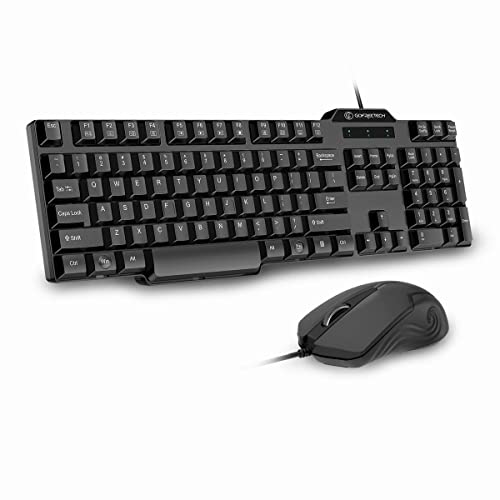
The wired 104-key combo distinguishes itself with 12 multimedia shortcuts and foldable kickstands, making it a practical choice for a fixed workstation used for number entry. Its USB keyboard and mouse require no Bluetooth pairing or charging, and the keyboard has anti-slip feet. The maker identifies Windows and macOS compatibility. No particular raised or deep-profile key design is identified, so shoppers who need a clearly specified raised-key shape should favor the K120 instead.
Bottom line: Pick it for wired full-size number entry and multimedia shortcuts.
Logitech MK270 Wireless Keyboard and Mouse

The Logitech MK270 is the clear alternative for buyers who prefer low-profile, quiet keys over deep-profile keys. Its full-size keyboard has F-keys, a number pad, and arrow keys; the included USB-A nano receiver provides a wireless connection, and the combo includes an ambidextrous compact mouse. The maker gives battery-life figures of 36 months for the keyboard and 12 months for the mouse. Its low-profile keys make it a less direct match for someone specifically seeking pronounced raised keys.
Bottom line: Pick it if quiet, low-profile wireless typing suits your desk better.
How to Choose a Raised-Key Keyboard
Choose by the key profile the maker actually identifies: deep-profile keys are the strongest sign here of a pronounced key rise, while low-profile keys sit closer to the keyboard deck. Round, floating keycaps create another raised-looking style, but shape alone does not establish key travel or typing feel. If a defined raised profile is essential, favor an option explicitly described as deep-profile rather than assuming a full-size layout means tall keys.
Connection and layout are separate decisions. A wired USB keyboard avoids battery changes, while wireless models use a receiver; a number pad is useful for frequent spreadsheet or calculator entry but takes desk width. Match the choice to the computer as well: the compatibility differs across these models, and the MEETION combo specifically excludes Linux and Chrome OS.
Key Shapes and Keyboard Profiles
Deep-profile, low-profile, and round floating keys are not interchangeable descriptions. A standard full-size keyboard commonly has 104 or 105 keys, including a number pad, while compact layouts omit some keys to reduce width. A key’s visible height does not tell you its actuation force or travel distance, which are separate specifications; do not infer either from a product’s silhouette.
Use this quick distinction when the key feel is the deciding factor:
| Key description | What it signals | Best fit |
|---|---|---|
| Deep-profile | Pronounced key profile | Raised-key priority |
| Low-profile | Lower key shape | Quieter, flatter feel |
| Round, floating | Distinctive cap shape | Retro look |
For comfortable reach, keep the keyboard centered with the letter keys aligned to your shoulders; a separate number pad can shift the typing area left if it sits on the right.
Wired or Wireless Keyboard Setup
Wired USB keyboards suit fixed desks where a cable is not an obstacle; wireless receiver models reduce cable clutter but require room for the receiver and, depending on the design, batteries. A 33-foot or 35-foot range is a maker claim and depends on placement and interference, so keep the receiver near the keyboard rather than assuming maximum range through walls or metal furniture.
Before choosing a wireless combo, check whether the USB receiver can be used with your computer and whether its operating system is compatible. A USB-A receiver needs a compatible port or adapter. For a fixed setup where battery replacement is undesirable, a wired keyboard is the simpler fit; for a keyboard moved around a room, wireless is more convenient, provided the receiving device stays within its usable range.
Keyboard Position and Wrist Support
Place a keyboard so your elbows stay near your sides and your wrists remain straight rather than bent upward. A built-in wrist rest can support the palms during pauses, but it should not force the wrists to bear weight while typing; keep the hands floating lightly over the keys. Tilt legs change the keyboard angle, so use the flattest position that keeps your wrists neutral.
Full-size keyboards are wider because the number pad extends the layout; measure the available desk area before choosing one, especially if a mouse must sit beside it. If a raised profile causes the hands to angle upward, adjust the keyboard height or chair rather than reaching farther over the key rows.
Frequently Asked Questions
What does deep-profile keyboard keys mean?
Deep-profile keys have a more pronounced height than low-profile keys. The label describes the key shape, not a guaranteed amount of key travel or actuation force.
Are floating keycaps the same as raised keys?
Floating keycaps are visibly separated from the keyboard deck, but their shape does not establish key travel. Round caps can also differ in feel from conventional deep-profile keys.
How many keys does a full-size keyboard have?
A common full-size layout has 104 or 105 keys, including function and navigation keys plus a number pad. Exact layouts vary, so count the keys if a particular shortcut or dedicated key matters.
Does a wireless keyboard need Bluetooth?
No; a wireless keyboard can connect through a USB receiver instead of Bluetooth. Confirm that the computer has a compatible port or adapter before choosing a receiver-based model.
How should I position a raised-key keyboard?
Keep the keyboard low enough for straight wrists and elbows near your sides. If the keys make your wrists bend upward, lower the keyboard angle or adjust the chair rather than stretching over the keys.