
USB Handbrake for PC: 5 Sim Racing Models Compared

A USB handbrake for PC is a separate sim-racing control, and aikeec USB Handbrake with Clamp suits most people here because it includes a clamp and a Hall sensor. These models are described for Windows PC use; choose a different setup if you need console or Mac compatibility.
Before choosing, check that your game can bind a separate handbrake control and that your rig can secure the mounting style you select.
We earn a commission if you buy through links on this page. As an Amazon Associate I earn from qualifying purchases. Products are compared on manufacturer specifications, not hands-on testing.
- Best overall: aikeec USB Handbrake with Clamp – Includes a clamp and uses a Hall sensor for Windows PC sim racing.
- Best for 16-bit sensing: CNRAQR 16-Bit USB Handbrake – Uses a 16-bit non-contact sensor and is explicitly sold without an installation bracket.
- Best for aluminum construction: Jetmilai USB Handbrake with Clamp – Combines CNC-machined aluminum and mild steel with a clamp.
| Product | Best for | Sensor | Mounting | Shop |
|---|---|---|---|---|
| aikeec USB Handbrake with Clamp | Clamped mounting | Hall sensor | Clamp included | Check Price on Amazon |
| 64 Bit USB PC Handbrake, Red | Red finish | Hall sensor | Clamp included | Check Price on Amazon |
| CNRAQR 16-Bit USB Handbrake | Bracket-free rigs | 16-bit sensor | Bracket excluded | Check Price on Amazon |
| 64-Bit PC USB Handbrake, Red and Black | Forza Horizon 5 | 64-bit Hall sensor | — | Check Price on Amazon |
| Jetmilai USB Handbrake with Clamp | Aluminum construction | 64-bit Hall sensor | Clamp included | Check Price on Amazon |
USB handbrakes for PC
Compare these Windows-focused sim-racing controls by sensor, mounting setup and the compatibility claims in their product names.
aikeec USB Handbrake with Clamp
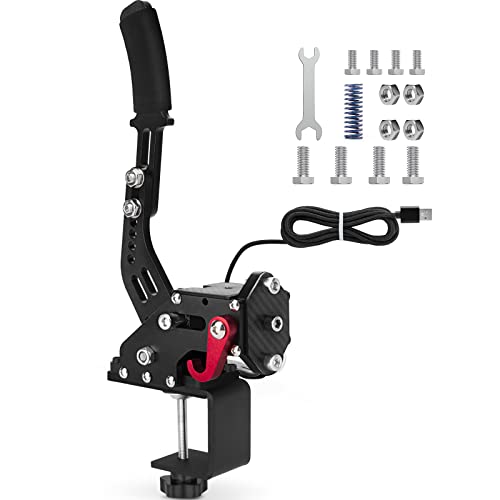
Among these options, this model pairs a Hall sensor with a clamp, making it a straightforward fit for a rig that can hold a clamped control. Its product name calls out Logitech and Thrustmaster wheel compatibility, while the maker names several Logitech and Thrustmaster models and PC games. The maker specifies Windows PC use and excludes Xbox, PlayStation and Mac. The dimensions are 8 inches long, 7 inches wide and 5 inches high. The limitation is platform support: choose another kind of control if you need a console or Mac setup.
Bottom line: Pick this if your rig accepts a clamp and you race on a Windows PC.
64 Bit USB PC Handbrake, Red

The red finish distinguishes this clamp-mounted option from the similar black aikeec model, while its name advertises 64-bit sensing and its features identify a Hall sensor. The maker describes it as an independent USB control for Windows PC and names Logitech wheel models and games including Assetto Corsa, DiRT Rally 2 and Forza Horizon. The dimensions are 8 inches long, 7 inches wide and 5 inches high. Its platform limits matter: it is not for Xbox, PlayStation or Mac, so it will not serve a console-only rig.
Bottom line: Choose it if you want a red clamp-mounted control for Windows PC.
CNRAQR 16-Bit USB Handbrake

Unlike the clamp options, this CNRAQR handbrake explicitly excludes an installation bracket, so it suits buyers who already have a mounting solution. Its steel construction and curved handle set it apart, and the maker says its non-contact sensor is 16-bit. The maker names Windows 11 and earlier, plus compatibility with several Logitech and Thrustmaster wheels and selected games. At 16.14 inches long, it is longer than the other dimensions here. The key limitation is mounting: do not choose it if you need an included bracket or clamp.
Bottom line: Pick it if you already have a compatible way to mount the control.
64-Bit PC USB Handbrake, Red and Black

This red-and-black model explicitly names Forza Horizon 5 among its compatible games and explicitly excludes Forza Horizon 4, a useful distinction if that game is part of your setup. The maker describes a standalone Windows PC peripheral with a 64-bit Hall sensor and names Logitech, Thrustmaster and FANATEC OSW compatibility. Its dimensions are 13.8 inches long, 8 inches wide and 3.6 inches high. A mounting style is not given in the specifications, so compare the physical fit with your rig before choosing this model.
Bottom line: Choose it if Forza Horizon 5 support is a priority and you can verify rig fit.
Jetmilai USB Handbrake with Clamp

Jetmilai stands out for its CNC-machined aluminum and mild-steel construction, paired with an included clamp. The maker describes a 64-bit Hall-effect sensor and plug-and-play connection for Windows PC games, and names Logitech and Thrustmaster wheel models. Its dimensions are 13.78 inches long, 8.07 inches wide and 3.74 inches high. The material and mounting approach may suit a buyer prioritizing a metal build, but its platform scope rules out console and Mac use.
Bottom line: Pick it if you want an included clamp and a metal construction.
How to choose a USB handbrake for PC
Choose by platform, game support and mounting first; sensor-bit claims matter only after those fit requirements. These five controls are described for Windows PC, and some explicitly exclude Xbox, PlayStation and Mac. A USB handbrake usually appears to a game as a separate control that must be assigned in that game’s input settings, rather than as a replacement steering wheel. Check the game’s control menu for a handbrake or assignable axis entry before buying. If your rig has no separate mounting bracket, favor a model with an included clamp; if you already have a mount, an option sold without a bracket may still suit you. Also compare physical dimensions against the space beside your wheel.
Mounting a sim racing handbrake
Mount stability matters because repeated lever pulls can shift a loose control and change its feel. Clamp-included models are useful when a rig has a compatible edge to grip; a bracket-excluded model requires a separate mounting solution. Measure the usable surface and clearance around the lever before setting up, and leave room for the handle to travel without hitting a wheel, seat or monitor stand. Do not assume similarly named devices have the same mount: the products here include different mounting arrangements or omit mounting hardware details altogether. Once secured, make sure the control does not rotate or slide during a firm pull, then bind it in the game and test its full range while stationary.
USB handbrake sensors and game setup
Hall-effect sensors detect lever movement without relying on a contact wiper, while a game still needs the control assigned and calibrated to use that movement. One model here advertises 16-bit sensing and others advertise 64-bit Hall sensing; bit-count claims alone do not establish how a particular game will interpret the input. In the game settings, choose the handbrake axis or button that responds to your lever, then check that released and pulled positions register correctly. If the game only recognizes a button-style input, an analog lever may not behave as expected. Game compatibility can vary by title and configuration, so confirm the exact game and platform support before settling on a model.
USB handbrake compatibility by platform
These products target Windows PC, not a universal USB setup for every gaming system. Xbox, PlayStation and Mac exclusions appear explicitly in several specifications, so a console or Mac user should not assume a PC-only control will work through a wheel base or adapter. Game names also differ: one model explicitly excludes Forza Horizon 4 while naming Forza Horizon 5. Use the table to narrow the choice, then verify the precise game and wheel combination in its compatibility claims. A separate USB handbrake may need its own input binding even when the steering wheel works correctly.
| Need | Closest fit | Reason |
|---|---|---|
| Clamp included | aikeec USB Handbrake with Clamp, 64 Bit USB PC Handbrake, Red or Jetmilai USB Handbrake with Clamp | Each product name or features specify a clamp. |
| Bracket already available | CNRAQR 16-Bit USB Handbrake | Installation bracket is excluded. |
| Forza Horizon 5 listed | 64-Bit PC USB Handbrake, Red and Black | Its features name Forza Horizon 5 and exclude Forza Horizon 4. |
Frequently Asked Questions
Do USB handbrakes work with Xbox or PlayStation?
The models here are described for Windows PC, and several explicitly rule out Xbox and PlayStation. A USB plug alone does not guarantee console recognition, so choose a device whose compatibility specifically includes your console.
How do I bind a USB handbrake in a PC game?
Open the game’s control or input settings and assign the handbrake entry to the new USB control. If the lever is analog, check that the game registers its released and pulled positions rather than expecting only a button press.
Will a PC handbrake work with every racing game?
No; game support is title-specific, and the products name different compatible games. Check the exact game and platform before choosing, especially when a product explicitly excludes a title such as Forza Horizon 4.
How much room should I leave for a handbrake lever?
Leave enough clearance for the full lever movement without striking your wheel, seat or other rig parts. Compare the unit’s length, width and height with the available mounting area before securing it.
Does a USB handbrake need its own mount?
It needs a stable mounting point, but the hardware varies by model. Some options here include a clamp, while another explicitly excludes an installation bracket, so match the included hardware to your rig.