
Handbrake for Logitech G920: 4 PC Options Compared

For most Logitech G920 owners using a Windows PC, CXCESNS 16-Bit USB Handbrake stands out for its non-contact Hall sensor and metal body. Choose another option if a clamp or a simpler feature set matters more; these USB handbrakes are PC add-ons, and wheel compatibility does not mean console compatibility.
We earn a commission if you buy through links on this page. As an Amazon Associate I earn from qualifying purchases. Products are compared on manufacturer specifications, not hands-on testing.
- Best overall: CXCESNS 16-Bit USB Handbrake – Pairs G920 compatibility with a 16-bit non-contact Hall sensor and a 95% metal body.
- Best for clamp mounting: Aikeec USB Handbrake with Clamp – Its name and details identify a clamp-mounted version, plus Windows PC and G920 compatibility.
- Best for broad game support: 64-Bit USB PC Handbrake – Its compatibility list includes G920 and a range of PC racing games.
- Best for simple setup: RYLNOK 64-Bit USB Handbrake – The maker describes a USB plug-and-play setup with no driver installation.
| Product | Best for | Listed wheel fit | Shop |
|---|---|---|---|
| CXCESNS 16-Bit USB Handbrake | Hall-sensor control | G25, G27, G29, G920, G923, T300, T500 | Check Price on Amazon |
| Aikeec USB Handbrake with Clamp | Clamp mounting | G25, G27, G29, G920, G923, T300, T500 | Check Price on Amazon |
| 64-Bit USB PC Handbrake | Game compatibility | G27, G29, G920, G923, T248, T300, T500 | Check Price on Amazon |
| RYLNOK 64-Bit USB Handbrake | Driver-free setup | G25, G27, G29, G920, G923, T300, T500 | Check Price on Amazon |
Handbrakes for Logitech G920
These USB add-ons are aimed at G920 owners racing on Windows PCs; compare their sensor and mounting features.
CXCESNS 16-Bit USB Handbrake

The 16-bit non-contact Hall sensor and 95% metal body distinguish this option from the other G920-compatible choices. The maker says it works with the G920 on Windows PC and includes auto-calibration, adjustable handle height and angle, and a 63-inch cable. Its feature set suits drivers who prioritize sensor type and handle adjustment. The limitation is platform: it is a PC handbrake, so a G920 console setup is not covered by its compatibility.
Bottom line: Choose this if you want a Hall-sensor unit with adjustable handle positioning for Windows PC.
Aikeec USB Handbrake with Clamp
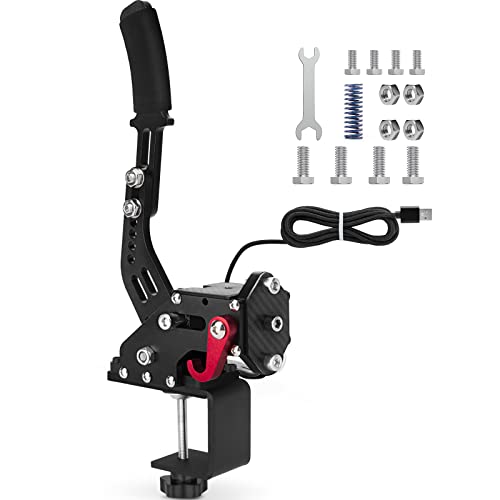
The included clamp is the clearest differentiator here: the maker identifies a clamp version, while the maker names a Hall sensor and reinforced spring. It is described as a standalone USB add-on compatible with the G920 and Windows PC, with support for games including Assetto Corsa, Forza Horizon, and DiRT Rally 2. This suits a rig that needs a clamp-style mount. The important limitation is that the maker excludes Xbox, PlayStation, and Mac use.
Bottom line: Pick this when the clamp-style mounting option is the deciding feature.
64-Bit USB PC Handbrake

The broad game list sets this handbrake apart: the maker names Assetto Corsa, DiRT Rally 2, ETS2/ATS, Forza Horizon 4/5, Project CARS 2/3, and WRC 7/8/9. It also names Logitech G920 compatibility for use on a Windows PC and describes a standalone USB connection. That makes it a candidate for players whose game choice matters more than a specified sensor or mount style. The platform excludes Xbox, PlayStation, Switch, and Mac.
Bottom line: Choose this if the Windows racing games match your setup.
RYLNOK 64-Bit USB Handbrake

The maker explicitly describes this unit as plug-and-play with no driver installation, and its name identifies a clamp. It lists the G920 among compatible wheels and names Windows PC games such as ETS2/ATS, Assetto Corsa, DiRT Rally 2, and Forza Horizon. The separate USB controller format suits a PC sim-racing rig where a straightforward connection is the priority. The limitation is platform support: the maker excludes Xbox, PlayStation, and Mac.
Bottom line: Pick this if you want the driver-free setup and a clamp.
How to choose a G920 handbrake
Choose first by platform: the G920-compatible add-ons here are described for Windows PC, not console play. A USB handbrake is a separate input device, so wheel compatibility alone does not guarantee a game will recognize or assign its axis; check the game’s control settings for a handbrake binding. Next compare how the lever reports input: a Hall sensor is explicitly identified on some options, while others do not identify a sensor type. If a feature is a must-have, select an option that names it rather than assuming all USB handbrakes behave alike.
USB handbrake setup and game fit
A USB racing handbrake connects as an added controller rather than replacing the G920 wheel. After connecting it to a Windows PC, open the game’s control menu and assign the handbrake input; some games may require selecting or calibrating the control separately. Game compatibility lists are not interchangeable with console compatibility: the products here name Windows titles such as Assetto Corsa, Forza Horizon, and DiRT Rally 2, while their exclusions include consoles. Confirm that your specific game supports a separate handbrake axis before choosing an add-on.
Clamp mounting and rig placement
Mounting style matters because a handbrake needs a firm surface within comfortable reach. As a practical fit rule, measure your intended attachment surface and available lever clearance before ordering, and confirm the clamp opening suits the surface thickness. Position the lever so a full pull cannot strike a wheel, keyboard, or nearby hardware.
Handbrake safety and control
Keep the lever and cable clear of moving rig parts, and secure the unit before use so a hard pull cannot shift its mount. A handbrake is a control input, not a substitute for a vehicle’s real parking brake or any real-world safety system. Start with a low in-game force or sensitivity setting if the game offers one, then adjust gradually; aggressive input mapping can make a simulated car harder to control. Check the USB cable route before moving the seat or pedals to avoid pulling the connected device off its mount.
Frequently Asked Questions
Will a USB handbrake work with G920 on Xbox?
The options here are described for Windows PC, and their compatibility notes exclude Xbox. A G920 connection by itself does not make a separate USB handbrake console-compatible.
Does a G920 handbrake work in every racing game?
No; the game must recognize and allow binding of a separate handbrake input. Check the game’s control settings, since a wheel-compatible handbrake may not be supported by every title.
How do I bind a USB handbrake in a racing game?
Connect it to the Windows PC, open the game’s controls, and assign the detected input to handbrake. If the game offers controller calibration, run it before driving so the lever’s range is recognized.
Where should I mount a sim racing handbrake?
Mount it on a firm surface within comfortable reach, with enough clearance for the lever to move without hitting nearby equipment. Measure the surface thickness and confirm it fits the clamp before ordering a clamp-style unit.
Can I use a USB handbrake on a Mac?
The products here state Windows PC compatibility and exclude Mac, so do not assume they will work on macOS. Verify platform support for any handbrake before choosing it for a Mac setup.