
Freestyle Libre 3 Covers: 4 Types Compared by Fit

For a straightforward transparent adhesive cover, AZEN’s 100-pack is the clearest match because it is made for Libre 3 and is latex-free. Choose a different style if you want a cotton patch, a hard cap for bump protection, or compatibility with Libre 1, 2, or Plus.
We earn a commission if you buy through links on this page. As an Amazon Associate I earn from qualifying purchases. Products are compared on manufacturer specifications, not hands-on testing.
- Best overall: AZEN Libre 3 Transparent Covers, 100-Pack – A 100-pack of transparent, breathable, latex-free covers made for Libre 3.
- Best for broader sensor fit: Ceeport Multi-Sensor Patches, Tan, 30-Pack – Pre-cut patches are intended for Libre 1, 2, 3, Plus, and select Medtronic sensors.
- Best for bump protection: Amolyfe Libre 3 Plus Hard-Cap Covers, 20-Pack – Combines an adhesive patch with a hard cap.
- Best for center-free adhesive: HECHUAN Transparent Covers, 50-Pack – The patch has no hole and no glue in the center.
| Product | Best for | Pack size | Material or design | Sensor fit | Shop |
|---|---|---|---|---|---|
| AZEN Libre 3 Transparent Covers, 100-Pack | Transparent patches | 100 | Transparent adhesive patch | Libre 3 | Check Price on Amazon |
| Ceeport Multi-Sensor Patches, Tan, 30-Pack | Multi-sensor fit | 30 | Natural cotton adhesive patch | Libre 1/2/3, Plus; Enlite, Guardian | Check Price on Amazon |
| Amolyfe Libre 3 Plus Hard-Cap Covers, 20-Pack | Bump protection | 20 | Adhesive patch with hard cap | Libre 3 Plus | Check Price on Amazon |
| HECHUAN Transparent Covers, 50-Pack | Center-free patch | 50 | Transparent, no-center-glue patch | Libre 3 Plus | Check Price on Amazon |
Freestyle Libre 3 covers compared
Compare each cover’s construction and sensor compatibility before choosing a patch style.
AZEN Libre 3 Transparent Covers, 100-Pack

AZEN stands out for its 100 transparent patches made specifically for Libre 3. The maker says the breathable adhesive is waterproof and latex-free, and that the cover helps keep the sensor from falling off. The large pack suits someone who wants a simple adhesive layer rather than a cap or a multi-sensor patch. Each patch measures about 2.95 inches long and wide. The limitation is the single-device fit: choose another option if you need a patch for multiple sensor families or want a hard shell over the sensor.
Bottom line: Choose this if you want a clear, single-purpose Libre 3 overpatch in a large pack.
Ceeport Multi-Sensor Patches, Tan, 30-Pack

Ceeport differs from the dedicated Libre 3 covers by spanning several sensor families, including Libre 1, 2, 3, and Plus, plus Enlite and Medtronic Guardian. Its tan, pre-cut patches use natural cotton and have no glue in the center. The maker says the medical-grade adhesive is waterproof and sweatproof, dries quickly, and is latex-free and hypoallergenic. This option suits households or users changing between compatible sensor models. Its broader stated fit is useful, but buyers who want a clear cover or a hard cap should choose a different design.
Bottom line: Pick this if broad sensor compatibility matters more than a transparent patch.
Amolyfe Libre 3 Plus Hard-Cap Covers, 20-Pack
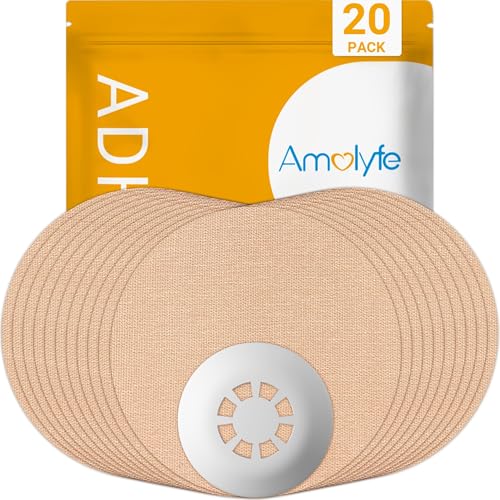
Amolyfe is the only option here with a hard cap over the adhesive patch, adding a physical barrier against bumps and snags. The pack contains 20 tan patches with one hard shell, and the maker says the breathable, latex-free medical-grade adhesive is waterproof and intended to last through the sensor’s lifespan. It suits active users who want more than a flat adhesive layer. The named fit is Libre 3 Plus, so confirm compatibility with your specific Libre 3 sensor before ordering rather than assuming the Plus and standard model are interchangeable.
Bottom line: Choose this for the hard-cap design, after verifying your exact sensor model.
HECHUAN Transparent Covers, 50-Pack

HECHUAN’s defining feature is a transparent patch with no hole and no adhesive in the center, a design intended to reduce the chance of pulling the sensor when changing the patch. The pack includes 50 covers. The maker says the material is comfortable and durable and that the patch does not affect sensor readings. This style suits someone who wants a transparent overpatch without center adhesive. Its compatibility is Libre 3 Plus, so check the exact model before buying if your sensor is standard Libre 3.
Bottom line: Pick this if you want a clear patch with no adhesive in its center.
How to choose a Libre 3 cover
Choose first by the protection you need: a flat overpatch holds the sensor against the skin, while a hard cap adds a barrier against direct bumps. Adhesive patches can help reduce snagging, but they do not replace the sensor maker’s wear and care guidance. Check the sensor model name before selecting a patch; compatibility labels may distinguish Libre 3 from Libre 3 Plus. For a patch that covers skin around the sensor, measure the available area and compare it with patch dimensions when supplied. Avoid stretching an overpatch tightly across a sensor, since tension can pull at the adhesive edge during movement.
Adhesives and backing styles can affect removal comfort. Remove slowly, keeping the skin taut, and stop if the area becomes painful or irritated.
Adhesive patch or hard cap
A standard overpatch adds adhesive coverage, while a hard-cap style adds a raised shell for impact protection. Neither design should be treated as a substitute for checking that the sensor remains attached and functioning. Water resistance claims belong to the particular cover’s maker; they do not change the sensor’s own water-use limits. Skin response also matters: latex-free or hypoallergenic wording does not guarantee that every person will tolerate an adhesive. Test carefully and remove the patch if irritation develops.
The table summarizes the practical design choices represented here.
| Need | Design to consider | Tradeoff |
|---|---|---|
| Clear, simple cover | Transparent adhesive patch | No hard outer shell |
| Impact barrier | Adhesive patch with hard cap | Bulkier construction |
| Several sensor families | Multi-sensor patch | Check the exact model list |
Check sensor fit before applying a cover
Match the cover to the exact sensor family and generation printed on the sensor packaging or device instructions. A label that includes Libre 3 Plus is not enough by itself to establish fit for standard Libre 3, and vice versa. Patch shape and center adhesive also matter: a no-center-glue design leaves the sensor’s center uncovered by adhesive, while a conventional patch may use a different layout. Apply only to clean, dry skin and smooth the edges without pulling the patch tight. If a cover edge begins lifting, avoid using loose or dangling material that could snag.
Wear and removal safety
Skin adhesives can cause irritation or an allergic reaction even when a product is labeled latex-free or hypoallergenic. Check the skin routinely, especially under the patch edges, and remove the cover if redness, itching, or discomfort develops. Do not let a patch interfere with sensor readings, access, or required device care. Swimming and showering claims for an overpatch do not establish the sensor’s own water limits; use the sensor’s published instructions for water exposure. Remove adhesive gently rather than pulling quickly, and avoid applying a new patch over broken or irritated skin.
Frequently Asked Questions
How long should a Libre 3 cover stay on?
Wear time depends on the adhesive and skin conditions, including sweat, water exposure, and friction. Replace a cover if an edge loosens or the skin underneath becomes irritated; do not use the cover to extend the sensor’s prescribed wear period.
Can I use Libre 3 Plus covers on Libre 3?
Do not assume the two fits are interchangeable. Check the exact sensor model named on the cover and the sensor packaging before applying it.
Do sensor covers protect against bumps?
A flat adhesive cover mainly helps hold the sensor in place, while a hard cap adds a physical barrier against bumps and snags. A cap still does not eliminate impact risk, so protect the sensor during contact activities.
Should I remove an overpatch if my skin itches?
Yes, remove the cover if itching, redness, pain, or a rash appears. Latex-free and hypoallergenic labels do not rule out an individual reaction to adhesive.
Can I shower or swim with a sensor cover?
Some cover makers describe their adhesive patches as waterproof, but that claim does not establish the sensor’s water limits. Follow the water-exposure instructions for the specific sensor model.