
Jumper 16-Inch Laptop: Models Compared by Fit

For a Jumper 16-inch laptop, choose Jumper 16-Inch N5095 Laptop if you want a 16-inch display with 16GB RAM and a 512GB SSD. Jumper 16-Inch Celeron Laptop is also 16 inches, but has 4GB RAM and 128GB eMMC storage; choose the 17.6-inch models only if a larger screen suits your setup.
We earn a commission if you buy through links on this page. As an Amazon Associate I earn from qualifying purchases. Products are compared on manufacturer specifications, not hands-on testing.
- Best overall: Jumper 16-Inch N5095 Laptop – Its 16-inch display is paired with 16GB DDR4 RAM and a 512GB SSD.
- Best for basic tasks: Jumper 16-Inch Celeron Laptop – It has a 16-inch 1920 × 1200 display and 128GB eMMC storage.
- Best for a larger screen: Jumper 17.6-Inch i3 Laptop – Its 17.6-inch display is larger than the requested 16-inch size.
| Product | Best for | Screen size | RAM and storage | Battery capacity | Shop |
|---|---|---|---|---|---|
| Jumper 16-Inch N5095 Laptop | More memory | 16 in | 16GB DDR4, 512GB SSD | 38Wh | Check Price on Amazon |
| Jumper 16-Inch Celeron Laptop | Light workloads | 16 in | 4GB DDR4, 128GB eMMC | — | Check Price on Amazon |
| Jumper 17.6-Inch i3 Laptop | Large display | 17.6 in | 16GB RAM, 256GB SSD | 53.2Wh | Check Price on Amazon |
| Jumper 17.6-Inch N5095 Laptop | Storage capacity | 17.6 in | 16GB RAM, 1TB SSD + 128GB storage | 38Wh | Check Price on Amazon |
| BoxWave ClearTouch Film for Jumper J1 | Screen protection | 16 in | — | — | Check Price on Amazon |
Jumper 16-Inch Laptops and Related Options
Compare screen size and core specifications first, then decide whether a larger laptop or a screen accessory fits your need.
Jumper 16-Inch N5095 Laptop

Unlike the 4GB model, this Jumper laptop pairs a 16-inch FHD IPS display with 16GB DDR4 RAM and a 512GB SSD. A 38Wh battery and four stereo speakers round out the hardware. This is the closest match for someone who wants a 16-inch Jumper laptop with more memory and SSD space. The limitation is that its 38Wh capacity is modest relative to larger laptop batteries, so buyers prioritizing long unplugged sessions should compare runtime needs carefully.
Bottom line: Choose this if you want the requested 16-inch size with 16GB RAM and a 512GB SSD.
Jumper 16-Inch Celeron Laptop

This 16-inch Jumper model stands apart with a Celeron processor, 4GB DDR4 RAM and 128GB eMMC storage rather than the larger memory and SSD combination in Jumper 16-Inch N5095 Laptop. The product name mentions a one-year Office 365 subscription. It may suit simple browsing or document tasks when the screen size matters more than storage capacity. The 4GB of RAM and 128GB eMMC make it a limited choice for demanding multitasking or storing large media libraries.
Bottom line: Pick this for a 16-inch screen and simple tasks rather than heavier multitasking.
Jumper 17.6-Inch i3 Laptop

This Jumper is a larger-screen alternative, not a 16-inch laptop: it has a 17.6-inch display and a 1920 × 1200 resolution. Its maker gives an Intel i3-10100Y, 16GB RAM and a 256GB SSD, while the name also mentions two RAM channels and a full-featured Type-C port. The 53.2Wh battery is larger in capacity than the 38Wh battery identified for Jumper 16-Inch N5095 Laptop. Choose it if a larger viewing area matters more than matching the requested screen size. Its larger chassis may be a poor fit for a sleeve or desk space sized around a 16-inch machine.
Bottom line: Choose this if you specifically want a larger 17.6-inch screen.
Jumper 17.6-Inch N5095 Laptop
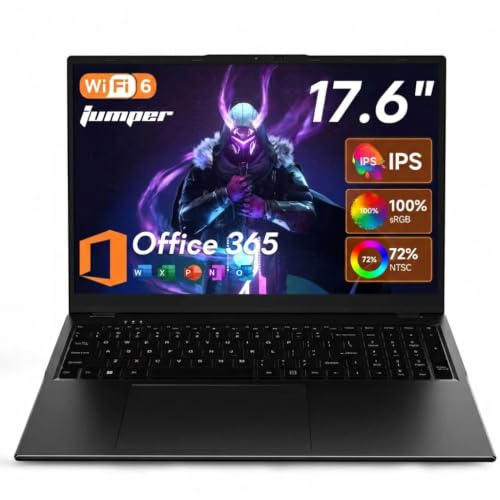
This 17.6-inch Jumper differs from the exact-size choices by offering a larger display and a combined storage configuration named as 1TB SSD plus 128GB storage. Its maker identifies an N5095 processor, 16GB RAM and a 38Wh battery; the name also includes Office 365. The display resolution is 1920 × 1200 and the maker states up to eight hours of battery life. It suits someone who prefers a roomy screen and more listed storage over a 16-inch fit. Because its screen is 1.6 inches larger diagonally than the requested size, check your carrying case dimensions before choosing it.
Bottom line: Pick this if you want a larger display and its named storage configuration.
BoxWave ClearTouch Film for Jumper J1

This is a screen protector accessory for the Jumper J1 Convertible Laptop (16 in), not a laptop. The two-pack uses a clear thermoplastic film, and its maker says it is precision-cut for that device and has a glueless adhesive. It may suit a J1 owner looking for a film intended to shield the screen from everyday scratches and dust. The 99% visual clarity is a maker claim. Compatibility is specifically named for the J1 Convertible Laptop, so confirm your exact device model before selecting it; a matching diagonal size alone does not guarantee a screen protector will fit.
Bottom line: Choose this only if you need film for the specified Jumper J1 Convertible Laptop.
How to Choose a Jumper 16-Inch Laptop
Start with screen size, then compare memory and storage against the tasks you expect to run. The 16-inch options here range from 4GB RAM and 128GB eMMC to 16GB RAM and a 512GB SSD, a meaningful difference for multitasking and keeping files locally. RAM holds data for active tasks; storage keeps files and applications between sessions. An SSD generally uses flash memory, while eMMC is also flash storage but typically serves entry-level devices. For many current desktop applications, 8GB RAM is a practical minimum; 16GB offers more headroom for multiple browser tabs and simultaneous apps. If you need a bigger display, the 17.6-inch alternatives are not exact size matches. Measure your desk space and carrying sleeve before prioritizing screen area.
What the Screen Measurements Mean
A laptop’s screen size is measured diagonally, not across its width, so a 16-inch screen does not indicate the laptop’s full outer dimensions. The Jumper 16-inch displays use a 1920 × 1200 resolution and 16:10 aspect ratio; that shape provides more vertical screen space than a 16:9 display at the same width. A 17.6-inch option is 1.6 inches larger diagonally, but its chassis dimensions and weight also affect portability. Check the laptop’s width and depth against your bag’s internal measurements, leaving room for padding. A screen protector is also device-specific: matching the nominal diagonal alone does not ensure its cut matches the bezel or camera position.
RAM, SSD and eMMC Compared
RAM and storage solve different problems: RAM supports active work, while SSD or eMMC capacity holds saved files and programs. This table helps distinguish the options by their hardware rather than treating all storage types as equivalent.
| Configuration | Typical fit | Trade-off |
|---|---|---|
| 4GB RAM, 128GB eMMC | Basic browsing and documents | Less room for multitasking and files |
| 16GB RAM, 512GB SSD | More simultaneous apps and local files | Still consider external or cloud storage for large archives |
| 16GB RAM, 1TB SSD plus 128GB storage | More named storage capacity | Screen size is 17.6 inches, not 16 inches |
Storage labels can refer to separate drives or partitions, so confirm how a combined capacity appears in the operating system if that distinction matters. Keep some SSD space free for updates and temporary files; a nearly full drive can make file management difficult.
Battery Capacity and Everyday Safety
Watt-hours (Wh) measure battery energy capacity, while milliamp-hours (mAh) alone cannot be compared fairly without voltage. The products here identify capacities of 38Wh and 53.2Wh, but capacity by itself does not promise a particular runtime: screen brightness, processor load, wireless use and battery age all change consumption. One product’s up-to-eight-hour figure is a maker claim, not a guarantee for every workload. For travel, check airline rules before packing spare lithium-ion batteries; installed laptop batteries are generally handled differently from spare batteries, and airlines commonly require spares in carry-on baggage. Avoid leaving a charging laptop on bedding or other soft surfaces that can block ventilation, especially during demanding work.
Frequently Asked Questions
Is a 16-inch laptop screen measured across the display?
No, laptop screen size is measured diagonally across the visible display. A 16-inch diagonal does not tell you the laptop’s full width or depth, so check the chassis dimensions for bag fit.
Is 4GB RAM enough for everyday laptop use?
Four gigabytes can handle light browsing and document work, but it leaves less room for many open tabs or simultaneous apps. For more multitasking headroom, 8GB is a practical minimum for many current desktop tasks, with 16GB providing additional capacity.
What is the difference between an SSD and eMMC?
Both SSDs and eMMC use flash storage, but eMMC is commonly used in entry-level systems and is generally slower than a modern SSD. For a laptop used with larger applications or frequent file transfers, an SSD is usually the more capable storage type.
Does a 38Wh battery last eight hours?
Not necessarily; watt-hours describe capacity, while actual runtime depends on screen brightness, workload, wireless activity and battery condition. Treat an up-to-eight-hour figure as a maker claim and plan for less runtime during demanding use.
Will any 16-inch screen protector fit a Jumper laptop?
No, a matching diagonal measurement alone does not ensure the film aligns with the display edges, camera or bezel. Confirm the exact Jumper model, since the named protector is intended for the J1 Convertible Laptop.