
SK Hynix SC311 SATA 512GB: Fit and Alternatives

The SK Hynix SC311 512GB 2.5-inch SATA drive suits a computer with a compatible SATA bay; the deciding fit is its SATA interface, not just its capacity. Choose a different option if your device needs an M.2 NVMe drive or more than 512GB.
For a close match, SK Hynix SC311 512GB SATA (HFS512G32TNF-N2A0A) is the 512GB SK Hynix SATA model in the products; SK hynix Gold S31 500GB SATA and Lufasnd 512GB SATA SSD are alternatives with different capacities or branding.
We earn a commission if you buy through links on this page. As an Amazon Associate I earn from qualifying purchases. Products are compared on manufacturer specifications, not hands-on testing.
- Best overall: SK Hynix SC311 512GB SATA (HFS512G32TNF-N2A0A) – It matches the requested 512GB capacity and 2.5-inch SATA interface.
- Best for SK hynix-branded alternative: SK hynix Gold S31 500GB SATA – It is a 500GB SK hynix 2.5-inch SATA drive with up to 560MB/s read speed.
- Best for 512GB capacity: Lufasnd 512GB SATA SSD – It is a 512GB 2.5-inch SATA SSD, though it is from a different brand.
| Product | Best for | Capacity | Interface | Shop |
|---|---|---|---|---|
| SK Hynix SC311 512GB SATA (HFS512G32TNF-N2A0A) | Direct SATA match | 512GB | 6Gb/s SATA | Check Price on Amazon |
| SK hynix Gold S31 500GB SATA | SK hynix alternative | 500GB | SATA | Check Price on Amazon |
| Lufasnd 512GB SATA SSD | 512GB alternative | 512GB | 6Gb/s SATA | Check Price on Amazon |
| SK Hynix S32 Series 1TB SATA | Extra capacity | 1TB | SATA III | Check Price on Amazon |
SK Hynix SC311 SATA 512GB and alternatives
Compare the closest capacity and interface matches, then confirm the drive fits your computer’s bay and connector.
SK Hynix SC311 512GB SATA (HFS512G32TNF-N2A0A)

For a 512GB SK Hynix 2.5-inch SATA replacement, this drive is the closest match in the group. Its model is HFS512G32TNF-N2A0A, and the interface is 6Gb/s SATA. That makes it a candidate for a laptop or desktop with a compatible 2.5-inch SATA connection. The specifications do not give sequential speed figures, so buyers who need a specific throughput target should compare that requirement before choosing. Confirm your computer has a 2.5-inch SATA bay and the right physical connection; an M.2 NVMe slot is not interchangeable.
Bottom line: Choose this if you need a 512GB SK Hynix 2.5-inch SATA drive.
SK hynix Gold S31 500GB SATA
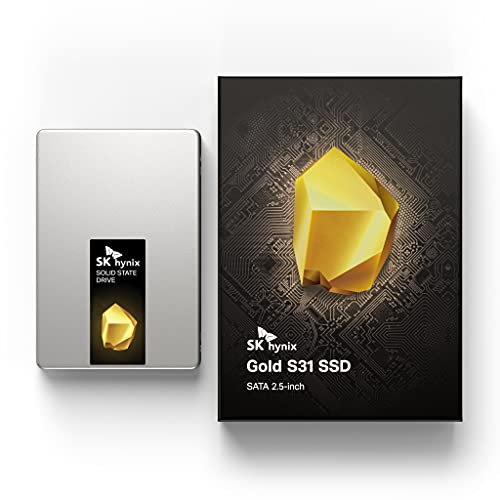
The Gold S31 differs from the target mainly in capacity: it offers 500GB rather than 512GB. SK hynix gives sequential speeds up to 560MB/s read and 525MB/s write, and the drive uses a 2.5-inch SATA form factor. The specifications also cite a 5-year warranty and up to 600 TBW; these are maker claims, not a guarantee for every workload. This option suits a buyer who prioritizes a branded SATA drive and accepts the smaller capacity. Its maker does not make it a 512GB match, so choose another drive if that capacity is essential.
Bottom line: Choose this if 500GB is sufficient and you want an SK hynix SATA option.
Lufasnd 512GB SATA SSD

This drive matches the target’s 512GB capacity and 2.5-inch SATA type, but it is a Lufasnd model rather than an SK hynix drive. Its maker gives sequential speeds up to 520MB/s read and 500MB/s write, and identifies the flash as 3D NAND TLC. Those speed figures are advertised maximums, not a promise of the same result in every computer. It may suit a buyer focused on matching capacity and interface rather than brand.
Bottom line: Choose this if 512GB and SATA fit matter more than SK hynix branding.
SK Hynix S32 Series 1TB SATA

The S32 Series gives twice the nominal capacity of the 512GB target, making it the capacity-focused alternative here. It is a 2.5-inch SATA III drive with TLC NAND; its maker gives speeds up to 560MB/s read and 510MB/s write. That higher capacity only helps if the computer supports a 2.5-inch SATA drive and the extra space is useful. Buyers replacing a drive for an exact 512GB match should favor the SK hynix 512GB model instead.
Bottom line: Choose this if you want more storage and your system supports 2.5-inch SATA.
How to choose a 2.5-inch SATA SSD
Match the interface and physical bay before comparing capacity or speed. A 2.5-inch SATA SSD connects through a SATA data connection and a separate SATA power connection; a bare M.2 NVMe drive uses a different slot and protocol. SATA III is commonly called 6Gb/s, but that link rate is not the same as file-transfer speed: practical sequential speeds for consumer SATA SSDs typically top out around 500–560MB/s. Use this as a sense check, not a guaranteed result. If your computer has only an M.2 slot, verify that it supports SATA M.2 specifically; an NVMe-only slot will not accept a 2.5-inch SATA drive. Also check the bay’s thickness clearance, especially in slim laptops.
512GB versus 500GB and 1TB
Choose capacity based on the space you need and the size your computer supports. Drive makers count capacity in decimal units, so a 512GB drive may appear as about 477GiB in an operating system before formatting and system partitions take their share. A 500GB model is slightly smaller, while 1TB offers substantially more room; neither difference changes whether the connection fits. This group includes the exact 512GB SK hynix SATA model, a 500GB SK hynix SATA option, and a 1TB SK hynix SATA option, plus a 512GB drive from another brand. If matching an existing 512GB drive is important, select by capacity and interface rather than by the similar-looking model names.
Check SATA fit before replacing a drive
A 2.5-inch SATA SSD requires both a compatible physical space and a SATA connection. Most standard 2.5-inch drives are about 100mm long and 70mm wide, while thickness is commonly 7mm or 9.5mm; laptop brackets can affect the allowed height. The specifications give 2.5-inch sizing for some options, but not every drive’s thickness. Before ordering, check the existing drive label or measure the available bay if clearance is tight. In a desktop, confirm there is a SATA data port and a power lead; some cases also require a mounting tray. Never force a connector or place a loose drive where it can short against metal.
Install and handle an internal SSD safely
Back up important files before replacing a system drive, and shut down and disconnect power before opening a computer. Internal drives are sensitive to static discharge, so touch grounded metal before handling the drive or use an antistatic strap. A new SSD may need partitioning and formatting before it appears as usable storage; a system-drive replacement also requires an operating system migration or reinstall. Keep screws snug rather than overtightening them, and secure the drive so vibration or movement cannot pull at its cable. SATA drives do not need routine mechanical servicing, but backups remain important because solid-state storage can still fail without warning.
Frequently Asked Questions
Will a 2.5-inch SATA SSD fit an M.2 slot?
No, a 2.5-inch SATA drive does not physically fit an M.2 slot. M.2 drives vary by protocol: check whether the slot supports SATA, NVMe, or both before choosing a module.
How fast can a SATA III SSD transfer data?
Consumer SATA III SSDs commonly reach about 500–560MB/s in sequential transfers. The 6Gb/s interface rate includes encoding overhead, so it is not a 6GB/s file-copy speed.
Why does a 512GB SSD show less space?
A 512GB drive is about 477GiB when expressed in binary units. Formatting, system partitions, and installed software reduce the available free space further.
Do I need a SATA cable for a 2.5-inch SSD?
A 2.5-inch SATA SSD needs a SATA data connection and SATA power. In a laptop, these may connect through a built-in bay connector; a desktop commonly uses separate cables.
Can I replace a hard drive without reinstalling Windows?
Yes, if you clone the old drive to the SSD or migrate its contents before swapping drives. Back up important files first, and ensure the destination has enough usable capacity for the data being copied.