
Wii Console RVL-101: Model Fit and Bundles Compared

The white Wii RVL-101 in Nintendo Wii RVL-101 White suits buyers who want the specified model with a Wii Remote Plus, Nunchuk, and sensor bar. Choose Nintendo Wii RVL-101 Black Bundle for a black RVL-101 bundle; choose another model only if its different console type or unclear model fit better suits your needs.
The RVL-101 is the horizontal Wii model without GameCube game compatibility, so it is not the right choice if you want to play GameCube discs.
We earn a commission if you buy through links on this page. As an Amazon Associate I earn from qualifying purchases. Products are compared on manufacturer specifications, not hands-on testing.
- Best overall: Nintendo Wii RVL-101 White – The white RVL-101 bundle includes a Wii Remote Plus, Nunchuk, and sensor bar.
- Best for black console: Nintendo Wii RVL-101 Black Bundle – This black bundle identifies the console as RVL-101 and includes one controller and Nunchuk.
- Best for GameCube games: Nintendo Wii RVL-001 White Bundle – Its RVL-001 console is identified as compatible with GameCube games and includes two controllers.
| Product | Best for | Model | Color | Included controllers | Shop |
|---|---|---|---|---|---|
| Nintendo Wii RVL-101 White | White RVL-101 | RVL-101 | White | Wii Remote Plus, Nunchuk | Check Price on Amazon |
| Nintendo Wii RVL-101 Black Bundle | Black RVL-101 | RVL-101 | Black | 1 Wii Remote, 1 Nunchuk | Check Price on Amazon |
| Nintendo Wii White Premium Bundle | OEM controllers | Wii model unspecified | White | — | Check Price on Amazon |
| Nintendo Wii White Renewed Bundle | Basic white bundle | Wii model unspecified | White | Wii Remote, Nunchuk | Check Price on Amazon |
| Nintendo Wii RVL-001 White Bundle | GameCube compatibility | RVL-001 | White | 2 controllers, 2 Nunchuks | Check Price on Amazon |
Wii Console RVL-101 Bundles
Compare the identified console models and included controllers before choosing a bundle.
Nintendo Wii RVL-101 White
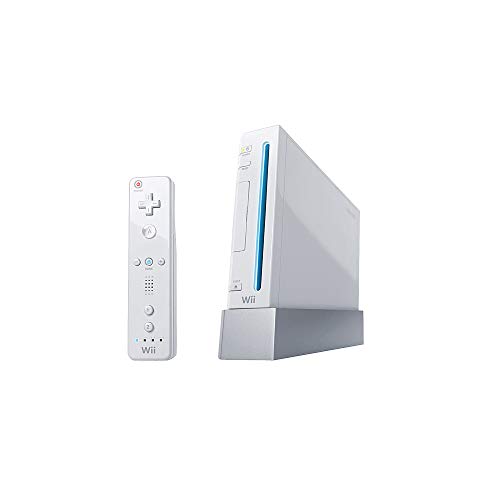
Nintendo Wii RVL-101 White is the white RVL-101 bundle and the only option here whose included controller is identified as a Wii Remote Plus. The package also includes a Nunchuk, sensor bar, AC adapter, and AV cable; built-in Wi-Fi is listed for internet connection. Its console measures 8.5 × 6.25 × 1.75 inches and weighs 2.7 pounds. This suits a buyer who wants the specified model and a defined set of core accessories. The model cannot play GameCube discs, so choose a compatible RVL-001 instead if GameCube games are essential.
Bottom line: Pick this bundle if you want a white RVL-101 and a Wii Remote Plus.
Nintendo Wii RVL-101 Black Bundle

Nintendo Wii RVL-101 Black Bundle is the black RVL-101 option, with one Wii Remote and one Nunchuk. The bundle also includes a silicone cover, wrist strap, power cable, AV cable, and sensor bar. The seller says it was tested and works. This is the clearest fit for a buyer who specifically wants a black RVL-101 with the essentials. Its one-controller setup is a limitation for local multiplayer; a second Wii Remote would be needed for games that support another player. Like other RVL-101 consoles, it does not support GameCube discs.
Bottom line: Choose this if you want a black RVL-101 and need one controller set.
Nintendo Wii White Premium Bundle

The seller says the system was tested and is in nice condition. This can suit a buyer who values original-brand controllers more than a confirmed RVL-101. The unknown model makes it a poor fit if you need to ensure RVL-101 compatibility or avoid a GameCube-capable RVL-001.
Bottom line: Pick this if original OEM controllers matter more than a confirmed model.
Nintendo Wii White Renewed Bundle
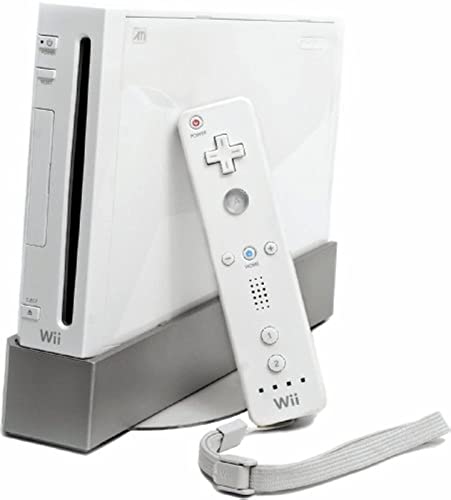
Nintendo Wii White Renewed Bundle is a renewed white Wii bundle with a Wii Remote, Nunchuk, sensor bar, Wii Remote Jacket, AC adapter, and AV cable. The bundle suits someone seeking the named accessories without requiring a specific RVL model. That missing model distinction matters if you need the RVL-101 or want to know whether GameCube discs are supported; confirm the console model before ordering.
Bottom line: Choose this for the basic accessories if exact model fit is not essential.
Nintendo Wii RVL-001 White Bundle

Nintendo Wii RVL-001 White Bundle is the RVL-001 alternative for buyers who want GameCube game compatibility rather than an RVL-101. It includes two controllers, two Nunchuks, a sensor bar, power adapter, and AV cable, making it the only bundle here explicitly equipped for two controller sets. RVL-001 is a different Wii model, so it is not a substitute when the RVL-101 designation is a requirement.
Bottom line: Choose this if GameCube support and two controller sets matter more than RVL-101.
How to Choose a Wii Console RVL-101 Bundle
Choose by console model first, then compare the included controller set and cables. RVL-101 is the Wii model without GameCube disc compatibility; RVL-001 is the model to seek when GameCube support matters. For a straightforward RVL-101 setup, look for a Wii Remote, Nunchuk, sensor bar, power adapter, and AV cable. A Wii Remote Plus is an updated Wii Remote with built-in MotionPlus functionality, but a standard Wii Remote still works with many Wii games. If two people will play together, look for two complete controller sets; one Remote and one Nunchuk serve one player in games that use that combination.
A console bundle is not automatically complete for every television or game. Wii AV cables use composite video with yellow video and red/white audio plugs, so confirm the TV accepts them or plan for a compatible connection solution. Do not assume that a bundle with an unspecified model is RVL-101.
Wii RVL-101 and RVL-001 Compatibility
The RVL-101 plays Wii games but not GameCube discs, while RVL-001 supports GameCube discs and controllers. That distinction is the key fit rule: if you own GameCube discs, choose an RVL-001; if not, an RVL-101 can still serve as a Wii game console. The RVL-001 has GameCube controller ports and memory-card slots under a top cover, which the RVL-101 lacks.
Wii game compatibility can also depend on the game’s controller requirements. Some games use a Wii Remote alone, while others use a Nunchuk or another supported controller. Check the game case’s controller icons before choosing a bundle with only one controller set, especially for multiplayer play.
Wii Bundle Accessories and Connections
A Wii setup needs power, a display connection, and a way to detect controller movement: commonly an AC adapter, AV cable, and sensor bar. The sensor bar is a positional reference for the Wii Remote, not a camera, and should sit centered above or below the display. Keep it unobstructed and point the remote toward the screen for pointer-based menus and games.
Wii composite AV uses three color-coded plugs: yellow for video and red and white for stereo audio. Many newer televisions omit composite inputs, so check the TV’s ports before relying on the included cable. Built-in Wi-Fi enables network connection, but Nintendo discontinued many Wii online services; local play and offline game use do not require a network connection.
Wii Console Setup and Care
Place the Wii on a firm, open surface and leave airflow around its vents; avoid enclosing it in a tight cabinet during use. The RVL-101 is designed for horizontal placement, so use a stable, level surface rather than balancing it vertically. Keep liquids away from the console, adapter, and cable connections, and disconnect power before moving the system or cleaning around its ports.
Use fresh batteries in the Wii Remote and attach its wrist strap before play, particularly during motion-controlled games. Secure the strap around the wrist and keep enough room between players and nearby people or objects to swing safely. A worn cable, damaged plug, or loose sensor-bar connection is a reason to stop setup and replace or resolve the faulty part before use.
Frequently Asked Questions
Can the Wii RVL-101 play GameCube games?
No, the RVL-101 does not play GameCube discs. Choose the RVL-001 model for GameCube compatibility; Wii games remain the intended format for either console.
What accessories does a Wii need to start playing?
A basic setup needs the console, AC adapter, display cable, sensor bar, and at least one Wii Remote. Games that use a Nunchuk require that accessory too, and multiplayer games may need additional controller sets.
Does the Wii sensor bar need to be above the TV?
No, the sensor bar can sit above or below the display. Keep it centered and unobstructed, then select the matching sensor-bar position in the Wii settings so the pointer behaves correctly.
Will a Wii AV cable work with a newer TV?
Only if the TV accepts composite video and stereo audio through compatible inputs. Wii composite cables use yellow video plus red and white audio plugs, so check the television’s ports before setup.
How many controllers do two Wii players need?
Most two-player games require two Wii Remotes, and some also require a Nunchuk for each player. Check the game’s controller symbols because requirements vary by title.