
4K 120Hz Monitor Options: Five Models Compared

The Dell S2725QS is a strong starting point for a 4K 120Hz monitor because its IPS panel pairs 4K resolution with a height-adjustable stand. The maker does not include prices, so they cannot establish which model is cheapest.
Choose another model if you want a curved 32-inch screen, a white finish, or a refresh rate above 120Hz; those distinctions matter more than an unverified price comparison.
We earn a commission if you buy through links on this page. As an Amazon Associate I earn from qualifying purchases. Products are compared on manufacturer specifications, not hands-on testing.
- Best overall: Dell S2725QS 27-inch – It combines 4K at up to 120Hz with an IPS panel and height, swivel, and pivot adjustments.
- Best for a curved screen: Gawfolk 32-inch 4K Curved – Its 32-inch VA display has a 1500R curve and a 120Hz refresh rate.
- Best for higher refresh rates: Acer Nitro VG270K V4 27-inch – Its 27-inch 4K IPS panel supports 160Hz, with a DFR mode up to 320Hz.
| Product | Best for | Screen and panel | Refresh rate | Stand adjustment | Shop |
|---|---|---|---|---|---|
| Dell S2725QS 27-inch | Adjustable desk setup | 27-inch IPS | Up to 120Hz | Height, swivel, pivot | Check Price on Amazon |
| CRUA 27-inch 4K 120Hz | White monitor setup | 27-inch IPS | 120Hz | Tilt | Check Price on Amazon |
| Gawfolk 32-inch 4K Curved | Large curved screen | 32-inch VA, 1500R curve | 120Hz | — | Check Price on Amazon |
| Acer Nitro VG270K V4 27-inch | Higher refresh mode | 27-inch IPS | 160Hz; DFR 320Hz | — | Check Price on Amazon |
| ASUS TUF VG27UQ1A 27-inch | Gaming motion features | 27-inch, panel type — | 160Hz | — | Check Price on Amazon |
4K 120Hz Monitor Options
Compare screen format, refresh rate, and stand flexibility to narrow these 4K monitors to your setup.
Dell S2725QS 27-inch

The Dell S2725QS stands out for desk flexibility: its stand adjusts for height, swivel, and pivot, while the other models do not specify those adjustments. The 27-inch IPS panel has 3840 × 2160 resolution, up to 120Hz, 99% sRGB, and a 1,500:1 contrast ratio. It also includes FreeSync Premium and an anti-glare surface. This makes it a fit for a desk shared between work and gaming. Its refresh rate tops out at 120Hz, so buyers seeking a faster panel should compare the 160Hz options instead.
Bottom line: Pick this if an adjustable stand matters as much as 4K at 120Hz.
CRUA 27-inch 4K 120Hz

The CRUA is the only white monitor, making its finish a practical differentiator for a matching desk setup. Its 27-inch IPS panel has 3840 × 2160 resolution, a 120Hz refresh rate, 120% sRGB color coverage, 350 nits brightness, and a 1,000:1 contrast ratio. The specifications also specify FreeSync, HDMI 2.1, DisplayPort 1.4, built-in speakers, tilt adjustment, and a 75 × 75 mm wall-mount pattern. It suits buyers who want those connections and a white finish. The stand adjustment is tilt only, so it offers less positioning flexibility than a stand with height adjustment.
Bottom line: Choose this for a white finish, HDMI 2.1, and a 27-inch 120Hz IPS panel.
Gawfolk 32-inch 4K Curved
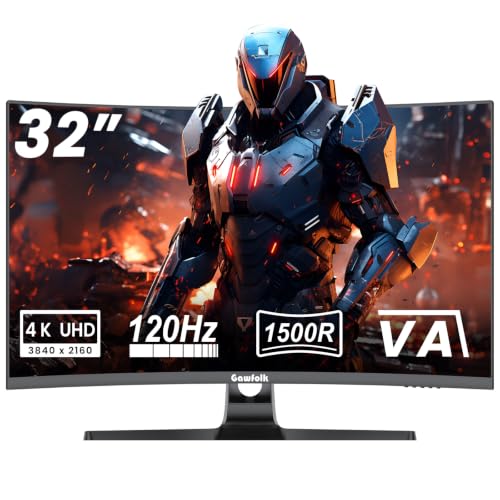
The Gawfolk gives you the largest screen here: a 32-inch VA panel with a 1500R curve, compared with the 27-inch flat screens in the other entries. It combines 3840 × 2160 resolution with a native 120Hz refresh rate and a 1ms response time. The specifications also cite G-Sync and FreeSync compatibility, speakers, and a 100 × 100 mm VESA pattern. This format suits viewers who prefer a large curved display for games or video.
Bottom line: Pick this if you want a larger 32-inch curved display rather than a compact flat panel.
Acer Nitro VG270K V4 27-inch

The Acer Nitro offers a higher listed refresh rate than the 120Hz models: 160Hz at 4K, plus a DFR mode listed at 320Hz. Its 27-inch IPS panel has 3840 × 2160 resolution and AMD FreeSync Premium. The specifications also list two HDMI 2.1 ports, DisplayPort, speakers, and VESA mounting. That makes it a fit for buyers prioritizing a faster refresh mode and multiple HDMI connections.
Bottom line: Choose this if you want a 27-inch 4K panel with a 160Hz rate and DFR mode.
ASUS TUF VG27UQ1A 27-inch

The ASUS TUF pairs a 160Hz refresh rate with ELMB Sync, which the maker says combines motion-blur reduction with variable refresh rate. Its 27-inch 4K display also lists G-SYNC compatibility, FreeSync Premium, variable overdrive, HDR, and 95% DCI-P3 color gamut. Those features make it a fit for buyers comparing gaming synchronization and motion options alongside resolution. The panel type and stand adjustments are not among the specifications, so buyers who require IPS or a particular ergonomic range should verify those points before selecting it.
Bottom line: Pick this if its ELMB Sync and synchronization features suit your gaming setup.
How to choose a 4K 120Hz monitor
Start with the combination of resolution and refresh rate your computer or console can actually output. A 4K display has 3840 × 2160 pixels, while 120Hz can refresh the image up to 120 times per second; reaching that rate depends on the device, game, cable, and selected display mode. Check the input and output specifications on both ends, not just the monitor’s maximum. For a desk used for reading or editing, stand adjustment and anti-glare treatment can be as important as refresh rate. If you specifically need more than 120Hz, compare the 160Hz models, but verify that the desired refresh rate is available at 4K rather than a reduced resolution.
Screen size and viewing distance
A 27-inch 4K screen packs the same 3840 × 2160 pixels into less space than a 32-inch 4K screen, so interface elements can appear smaller at the same scaling setting. At 32 inches, the curved Gawfolk is physically larger and its 1500R curve changes the viewing feel; choose it only if your desk has room for the extra width. Before ordering, measure the usable desk width and viewing distance, and leave enough space for the stand or monitor arm. For a desk depth under 24 inches, check the monitor’s depth with its stand and your preferred viewing position rather than assuming a large curved display will fit comfortably.
Refresh rate, connections, and gaming modes
A monitor’s maximum refresh rate is not a guarantee that every connected device will deliver that rate at 4K. HDMI 2.1 and DisplayPort 1.4 appear among these models’ connection specifications, but the supported resolution and refresh rate can depend on the source device, cable, and mode. Variable refresh features such as FreeSync or G-SYNC compatibility coordinate the display refresh with compatible graphics output; verify support on the device you plan to connect. Use the monitor’s native resolution for a 4K image, and check mode-specific limits before relying on the Acer’s DFR 320Hz figure. A faster mode can trade away resolution.
Stand fit, mounting, and eye-level setup
Stand movement matters when a monitor is used for long sessions: a height-adjustable screen can be positioned without stacking objects beneath it, while tilt alone changes only its angle. Set the top of the visible screen near eye level and keep the display roughly an arm’s length away, then adjust for comfort and text size. VESA patterns describe the spacing of mounting holes in millimeters, so a mount must match the monitor’s pattern and support its weight. The CRUA specifies 75 × 75 mm and the curved Gawfolk 100 × 100 mm; check mount compatibility before buying an arm. Keep cables routed so they cannot pull a mounted display off balance.
| Need | Compare |
|---|---|
| Position screen height | Look for a height-adjustable stand, such as the Dell’s |
| Mount to a compatible arm | Match the monitor’s VESA pattern and mount load rating |
| Fit a smaller desk | Measure the screen and stand footprint before selecting 32 inches |
Frequently Asked Questions
Can a 4K monitor run at 120Hz over HDMI?
Yes, but the monitor, source device, cable, and selected mode must all support the needed output. HDMI 2.1 is listed for some models here, but check the exact 4K refresh-rate support for your device and port.
Do I need a special cable for 4K at 120Hz?
The cable must support the bandwidth required by the source, display, and chosen mode; a connector’s shape alone does not establish that. Check the device and monitor specifications for the cable standard they require, especially when using 4K with HDR or variable refresh.
Is 27 inches or 32 inches better for a 4K monitor?
A 27-inch screen takes less desk space, while a 32-inch display makes the same 3840 × 2160 pixels physically larger. Measure your desk and viewing position; under 24 inches of desk depth is a reason to check footprint and distance particularly carefully.
What does 120Hz mean on a monitor?
A 120Hz refresh rate means the display can refresh its image up to 120 times per second. A computer or console must also output the selected resolution and refresh rate, and games may run below that ceiling depending on hardware and settings.
Can I mount a monitor with any VESA arm?
No; the arm’s mounting pattern and supported load must match the monitor. Common patterns include 75 × 75 mm and 100 × 100 mm, and those dimensions refer to the spacing between mounting holes.