
Sony PlayStation 2 AV Cable: 3 Cables Compared

For most PS2 owners, PS2/PS3 RCA Composite AV Cable is a straightforward pick because it explicitly supports PS2 and PS2 Slim and provides a 6-foot composite cable. Choose 6-Foot PS1/PS2/PS3 AV Cable or COMeap PS2 AV Cable, 6 ft if you prefer their specified connector or compatibility details; a standard RCA cable needs a TV with composite inputs.
We earn a commission if you buy through links on this page. As an Amazon Associate I earn from qualifying purchases. Products are compared on manufacturer specifications, not hands-on testing.
- Best overall: PS2/PS3 RCA Composite AV Cable – Explicitly supports PS2 and PS2 Slim, with a 6-foot cable and three color-coded RCA plugs.
- Best for flexible cable: 6-Foot PS1/PS2/PS3 AV Cable – A 6-foot cord with copper wire and flexible PVC housing.
- Best for converter pairing: COMeap PS2 AV Cable, 6 ft – Describes use with an RCA-to-HDMI converter for displays with HDMI input.
| Product | Best for | Console compatibility | Shop |
|---|---|---|---|
| PS2/PS3 RCA Composite AV Cable | PS2 Slim owners | PS1, PS2, PS2 Slim, PS3 | Check Price on Amazon |
| 6-Foot PS1/PS2/PS3 AV Cable | Flexible cable needs | PS1, PS2, PS3 | Check Price on Amazon |
| COMeap PS2 AV Cable, 6 ft | HDMI converter pairing | PS1, PS2, PS2 Slim, PSX, PS3 Slim | Check Price on Amazon |
Sony PlayStation 2 AV Cables
Compare cable length, console compatibility, and the connection type before choosing a cord for your setup.
PS2/PS3 RCA Composite AV Cable
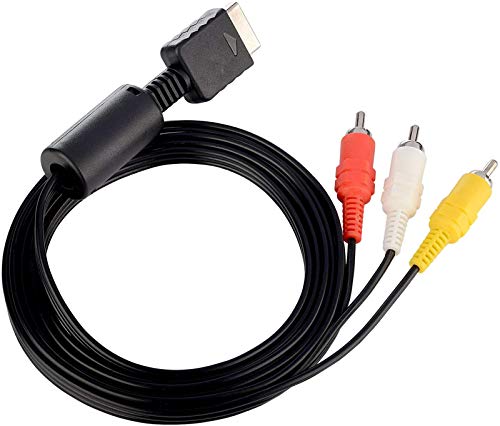
The clearest fit for a PS2 Slim is this 6-foot cord, which explicitly names both PS2 and PS2 Slim compatibility. Its yellow RCA plug carries composite video, while the red and white plugs carry stereo audio. The cable is described as plug-and-play and also supports PS1 and PS3 consoles. It suits a setup with matching composite inputs on the display. The limitation is connection type: a display with HDMI inputs only cannot accept these RCA plugs directly, so choose another connection path if the TV lacks composite inputs.
Bottom line: Choose this for a PS2 or PS2 Slim setup with composite RCA inputs.
6-Foot PS1/PS2/PS3 AV Cable
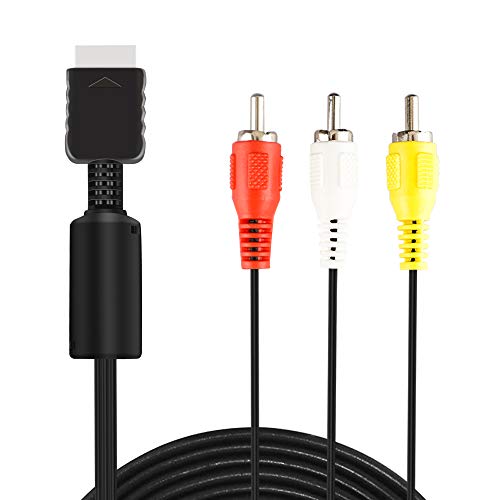
The distinguishing detail here is its flexible PVC housing and copper wire, alongside a 6-foot length for connecting a compatible PlayStation to a nearby display. The cable has the familiar yellow video and red/white audio RCA plugs, and it names PS1, PS2, and PS3 compatibility. Its copper pins are described as fitting securely. This is a sensible option when cord flexibility matters in a crowded console area. The compatibility wording does not separately call out PS2 Slim, so owners of that console should confirm the plug fit before ordering.
Bottom line: Pick this when flexible cable construction is a priority.
COMeap PS2 AV Cable, 6 ft

The notable distinction is its use alongside an RCA-to-HDMI converter, which can help connect composite output to a display that accepts HDMI. The cable itself has red, yellow, and white RCA connectors and is described as compatible with PS1, PS2, PS2 Slim, PSX, and PS3 Slim. The source also mentions a converter with USB power, but does not establish that the converter is included with this cable, so confirm the package contents if you need one. This choice suits a converter-based setup, not a direct HDMI connection from the cable alone.
Bottom line: Choose this if you plan to connect through an RCA-to-HDMI converter.
How PS2 composite AV connections work
A PS2 composite cable carries analog video and stereo audio over three RCA plugs: yellow for video, red for right audio, and white for left audio. The console end plugs into the PlayStation AV Multi Out port, while the colored plugs connect to matching composite inputs on a TV. Composite combines video into one signal, unlike component video, which separates it into multiple video channels. A typical North American PS2 composite signal is 480i; the display and game determine the actual presentation. If a TV has no yellow composite input, the cable alone cannot connect it to HDMI.
Use the color coding to avoid swapping audio and video, and select the TV’s composite input after connecting. Composite picture quality is generally softer than component or HDMI because the video information shares one signal path.
Choosing a cable for your PS2 setup
Start with the console’s AV Multi Out connection and the display’s available inputs; those two ends decide whether a cable is suitable. A direct RCA cable is appropriate when the display has composite video and stereo audio inputs. For an HDMI-only display, use a compatible active composite-to-HDMI converter; a passive adapter cannot change an analog signal into a digital HDMI signal. Verify whether the converter needs USB power and whether it is actually included with a cable purchase.
Use this quick decision table to match the display connection to the needed setup.
| Display input | Connection choice | Key check |
|---|---|---|
| Yellow, red, white RCA | Direct composite cable | Match plug colors |
| HDMI only | Composite-to-HDMI converter | Confirm power and package contents |
| Component video | Component cable, if supported | Do not mistake green for composite yellow |
Understanding PS2 video and TV compatibility
Most North American PS2 games use 480i composite output, while some games support other modes that require a different cable or setup. A composite-to-HDMI converter changes the connector format but does not inherently upscale the console’s image or create higher-resolution game output. TVs vary in how they process older interlaced signals, so the same console can look different across displays.
Composite and component are not interchangeable: composite uses one yellow video plug, while component video uses three video plugs, commonly green, blue, and red, plus audio. Check the input labels on the TV rather than relying on plug color alone, especially when multiple analog inputs are grouped together.
Connecting and caring for PS2 AV cables
Connect the console and TV while powered off, then seat each RCA plug firmly without forcing it. Keep the cable away from tight bends and avoid pulling it out by the wire; grip the connector body instead. A kink near either plug can stress the internal conductors and lead to intermittent picture or sound.
For troubleshooting, check that the yellow plug is in the composite video input, the red and white plugs are in audio inputs, and the TV is set to the correct source. If audio works but video does not, inspect the yellow connection first; if picture works but one audio channel is missing, check that channel’s RCA plug and input.
Frequently Asked Questions
Can a PS2 AV cable connect directly to an HDMI TV?
No, a composite RCA cable does not connect directly to an HDMI input. Use an active composite-to-HDMI converter, and confirm whether it requires USB power.
What do the red, white, and yellow plugs carry?
Yellow carries composite video, while red and white carry right and left stereo audio. Match each plug to its corresponding labeled input to avoid missing sound or picture.
Will a PS2 composite cable improve picture resolution?
No, a cable does not raise the console’s output resolution. Composite video is typically 480i for North American PS2 use, and a converter may change the connection format without upscaling.
Can I use a PS2 composite cable with a component input?
A single yellow composite video plug is not the same as component video’s three video connections. Check the TV’s input labels and use a component cable when connecting through component video.