
Panlong OBD2 Scanner App: 5 Adapters Compared

For an Android phone or tablet, Panlong Bluetooth OBD2 Scanner is the direct Panlong match because it supports compatible Android scan apps and reads and clears engine codes. Choose another adapter if you need iPhone support, a handheld display, or broader enhanced vehicle data.
OBD2 adapters connect to a vehicle’s diagnostic port and send engine data to a compatible app; the adapter and app must both support the phone and vehicle.
We earn a commission if you buy through links on this page. As an Amazon Associate I earn from qualifying purchases. Products are compared on manufacturer specifications, not hands-on testing.
- Best overall: Panlong Bluetooth OBD2 Scanner – Android app compatibility plus code reading, code clearing, and live sensor data.
- Best for iPhone: OBDLink MX+ – Supports iPhone, Android, and Windows, with enhanced OEM support for named brands.
- Best handheld option: ANCEL AD310BT – Combines a handheld engine scanner with Bluetooth-connected diagnostics.
| Product | Best for | Phone or device support | Connection style | Diagnostic features | Shop |
|---|---|---|---|---|---|
| Panlong Bluetooth OBD2 Scanner | Android app scans | Android phones and tablets | Bluetooth adapter | Codes, live sensor data | Check Price on Amazon |
| Bluetooth OBD2 Scanner for iOS, Android, Windows | Cross-platform basics | iOS, Android, Windows | Bluetooth adapter | Codes, readiness, live data | Check Price on Amazon |
| OBDLink MX+ | Enhanced OEM data | iPhone, Android, Windows | Bluetooth adapter | Engine, ABS, SRS, TPMS data | Check Price on Amazon |
| BLCKTEC 420 Bluetooth OBD2 Scanner | App-based diagnosis | iOS and Android | Bluetooth adapter | Codes, live data, battery tests | Check Price on Amazon |
| ANCEL AD310BT | Handheld and phone | Handheld; app-connected phone | Handheld plus Bluetooth | Engine codes, voltage monitoring | Check Price on Amazon |
Panlong OBD2 Scanner App Options
Compare phone compatibility and diagnostic functions first, then confirm the adapter works with your vehicle and chosen app.
Panlong Bluetooth OBD2 Scanner

The Panlong adapter is the direct fit for Android app-based engine checks: it reads and clears trouble codes and displays live sensor data. It supports Torque, Dashcommand, Car Scanner ELM OBD2, and OBD apps on Google Play, and the maker says it supports nine OBD-II protocols. Its vehicle coverage includes 1996-and-newer US vehicles and 2000-and-newer EU and Asian vehicles that are 12V gas or light diesel. It suits Android users who want phone-based checks. Its Android-only support makes it the wrong pick for an iPhone user.
Bottom line: Pick this for Android-based engine-code checks and live sensor readings.
Bluetooth OBD2 Scanner for iOS, Android, Windows

The broadest named phone and computer support here is this Bluetooth adapter, which works with iOS, Android, and Windows. Its features include reading engine trouble codes, resetting the check-engine light, checking smog-readiness status, and viewing live sensor data; compatible apps named include Torque, OBD Fusion, and Car Scanner. The maker excludes motorcycles, 24V diesel vehicles, new-energy and hybrid vehicles, and vehicles that do not meet OBD-II requirements. It suits someone who wants a cross-platform alternative to Panlong, but the exclusions make vehicle eligibility an essential check.
Bottom line: Choose this when iOS or Windows support matters more than a Panlong-specific match.
OBDLink MX+

For drivers seeking more than basic engine codes, the OBDLink MX+ advertises access to additional live parameters such as ABS, SRS, and TPMS, with enhanced OEM support for several named automakers. It works with iPhone, Android, and Windows, and is recommended for apps including FORScan, Torque, BimmerCode, Dashcommand, AlfaOBD, and Carista. The maker also cites over-voltage and battery-drain protection and firmware updates. This is a more specialized alternative for users of supported apps and vehicles. Confirm compatibility and feature support for the specific vehicle before choosing it.
Bottom line: Choose this for supported OEM-specific data and compatible third-party apps.
BLCKTEC 420 Bluetooth OBD2 Scanner
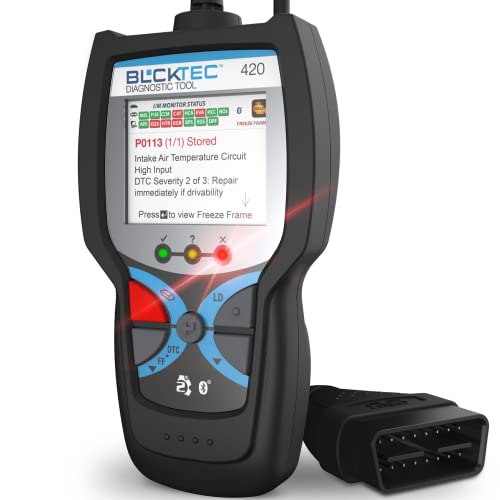
The BLCKTEC 420 pairs with its own app on iOS and Android, unlike Panlong’s support for Android apps from Google Play. Its functions include reading and erasing codes, live data, battery and alternator tests, and code-severity information. The maker says its app offers vehicle-tailored diagnostic guidance. It is aimed at DIY users who want several checks in one phone-connected tool.
Bottom line: Choose this if iOS support and battery or alternator checks are priorities.
ANCEL AD310BT

The ANCEL AD310BT stands apart by combining a handheld scanner with Bluetooth connectivity, so it can be used with its screen or a phone. Its features cover engine trouble-code reading, code meaning, clearing after repair, voltage monitoring, reports, dashboards, and trip information. That makes it suitable for someone who wants a standalone checking option as well as app-connected use. The maker does not establish which phone platforms or third-party apps are supported, so users who need a specific app or operating system should confirm that compatibility before buying.
Bottom line: Choose this when a handheld unit is as important as phone connectivity.
How to choose an OBD2 scanner app adapter
Start by matching the phone, app, and vehicle before comparing scan functions. OBD-II is the onboard diagnostics system used for emissions-related checks, and US light-duty vehicles generally adopted it beginning with model year 1996. A typical diagnostic connector is a 16-pin trapezoid-shaped port, commonly beneath the driver-side dashboard. Basic readers focus on engine codes and emissions data; enhanced systems may access modules such as ABS, SRS, or TPMS, depending on the vehicle and software. For a check-engine light, choose an adapter and app that both support the phone; for under-hood module data, confirm support for the specific vehicle and module.
| Need | Match before choosing |
|---|---|
| Engine code checks | OBD-II vehicle and compatible app |
| iPhone use | Adapter and app with iOS support |
| Enhanced module data | Vehicle, adapter, and app support |
OBD2 vehicle and app compatibility
Most US cars and light trucks from model year 1996 onward use OBD-II, but vehicle coverage is not the same as support for every app or diagnostic function. OBD-II covers a common set of emissions-related data; enhanced manufacturer-specific features can vary by make, model, engine, and adapter. Check that the vehicle uses a 12V OBD-II system and that the chosen app supports both the phone operating system and the adapter. Some adapters specify exclusions such as hybrids, motorcycles, or 24V diesel vehicles, so those categories need a specific compatibility check. For a named module such as ABS or airbags, confirm the exact vehicle coverage rather than assuming a generic engine-code reader will reach it.
Reading and clearing check-engine codes
A code reader can retrieve a diagnostic trouble code and its definition, but a code identifies a condition rather than proving which part has failed. Record the code and freeze-frame data, when available, before clearing anything; freeze-frame captures operating conditions around the fault. Clearing a code does not repair its cause, and a persistent fault can turn the warning light back on. Erasing codes can also reset emissions readiness monitors, which may remain incomplete until the vehicle completes the required drive pattern. Use code clearing after a repair or diagnosis, not as a substitute for one. A scanner may report readiness status, but it cannot guarantee that a vehicle will pass an inspection.
Safe use of a Bluetooth OBD2 adapter
Set up an app and pair a Bluetooth adapter while parked, not while driving; live-data screens can divert attention from traffic. The diagnostic port is usually near the driver’s lower dashboard, so make sure an adapter does not obstruct pedals or interfere with leg movement before driving. Keep scan sessions stationary when reading codes or navigating menus, and remove the adapter if its position creates a snag or contact risk. Basic OBD-II scanning is generally intended for engine and emissions diagnostics, while safety-related systems such as airbags need vehicle-specific tools and procedures. A warning light or symptom that affects braking, steering, or drivability calls for prompt professional diagnosis rather than repeated code clearing.
Frequently Asked Questions
Will an OBD2 scanner work with every car?
Most US light-duty cars from model year 1996 onward use OBD-II, but that does not guarantee every adapter or app supports every feature. Check the vehicle’s model and engine against the adapter’s compatibility guidance, especially for hybrids, 24V vehicles, and enhanced modules.
Can a scanner app turn off the check-engine light?
A compatible adapter and app can often clear an engine trouble code, but clearing it does not repair the cause. If the fault remains, the light may return; clearing codes can also reset emissions readiness monitors until the vehicle completes its drive cycle.
Where is the OBD2 port usually located?
The 16-pin diagnostic port is usually beneath the dashboard on the driver’s side, within reach of the steering wheel. Some vehicles place it behind a small cover or elsewhere near the driver’s footwell, so check the vehicle manual if it is not visible.
What does smog readiness mean on a scanner?
Readiness monitors show whether the vehicle’s onboard emissions checks have completed since codes were cleared or power was interrupted. A scan tool can report monitor status, but a recently cleared code may leave monitors incomplete until normal driving conditions allow tests to run.
Can I use an OBD2 adapter while driving?
Live-data monitoring can distract a driver, and a plugged-in adapter may interfere with pedals if it protrudes near the footwell. Set up and review scans while parked, and keep the diagnostic device and cable clear of the driver’s controls.