
Hiipoo Sublimation Ink for Epson: Models Compared

For Hiipoo sublimation ink for Epson, the 580 mL option is the broadest-volume pick, while printer compatibility should decide whether it suits your setup. Choose another option if its printer models or bottle format better match your needs.
Sublimation ink is transferred with heat from printed transfer media onto compatible blanks; confirm your printer model supports the specific refill before ordering.
We earn a commission if you buy through links on this page. As an Amazon Associate I earn from qualifying purchases. Products are compared on manufacturer specifications, not hands-on testing.
- Best overall: Hiipoo 580 mL Sublimation Ink – Its 580 mL size offers more ink than the other choices, with several Epson ET models in its compatibility list.
- Best for 400 mL set: Hiipoo Sublimation Ink 4 x 100 mL (ET Models) – Four 100 mL bottles provide a clearly specified 400 mL total.
- Best for WF printers: Hiipoo Sublimation Ink 4 x 100 mL (WF Models) – Its compatibility list includes WF7710 and several other WF models.
| Product | Best for | Ink volume | Bottle format | Printer compatibility | Shop |
|---|---|---|---|---|---|
| Hiipoo 580 mL Sublimation Ink | More refill volume | 580 mL | Autofill bottles | ET-2800, ET-2850, ET-4800, ET-15000 | Check Price on Amazon |
| Hiipoo Sublimation Ink 337 mL | Smaller stated set | 337 mL | 4 bottles | ET-2800, ET-2850, ET-4800; more listed | Check Price on Amazon |
| Hiipoo Sublimation Ink 4 x 100 mL (ET Models) | Four-bottle set | 400 mL | 4 × 100 mL | ET-2800, ET-2850, ET-4800; more listed | Check Price on Amazon |
| Hiipoo Sublimation Ink 5 x 100 mL | Five-bottle set | 500 mL | 5 × 100 mL | ET-2800, ET-2850, ET-4800; more listed | Check Price on Amazon |
| Hiipoo Sublimation Ink 4 x 100 mL (WF Models) | WF model fit | 400 mL | 4 × 100 mL | WF7710, WF7720, ET-2800; more listed | Check Price on Amazon |
Hiipoo sublimation ink for Epson
Compare bottle volume and printer fit before choosing a refill set.
Hiipoo 580 mL Sublimation Ink

The 580 mL capacity is the largest total among these options, making this set a fit for buyers who want a larger refill supply. Its compatibility list includes several Epson EcoTank models, including ET-2800, ET-2850, ET-4800, and ET-15000, along with other ET and ST models. The maker presents it for DIY and on-demand printing on items such as shirts and mugs. The limitation is that the fit does not cover every Epson printer, so match the exact model before buying.
Bottom line: Choose this set if your Epson model appears in its compatibility list and you want the largest volume.
Hiipoo Sublimation Ink 337 mL

The 337 mL set is distinct for its total and includes one black, cyan, yellow, and magenta bottle. Its compatibility range names Epson ET models such as ET-2800, ET-2850, ET-4800, and ET-15000, plus some WorkForce models. Hiipoo describes the ink for heat-transfer projects including clothing and mugs. The smaller total may suit buyers who do not need the larger 500 mL or 580 mL refill formats; the compatibility should still be checked against the exact printer model.
Bottom line: Pick this set if 337 mL and its four-color format suit your refill needs.
Hiipoo Sublimation Ink 4 x 100 mL (ET Models)

The four separate 100 mL bottles make this option’s total easy to compare: 400 mL across black, cyan, yellow, and magenta. Its compatibility list covers a range of Epson ET, ST, and Expression models, with examples including ET-2800, ET-2850, and ET-15000. The maker claims ICC-free printing and describes the ink as water-based dye sublimation ink. Those performance claims are the maker’s; buyers should focus first on printer fit, since a compatible ink type does not by itself confirm every model’s refill procedure.
Bottom line: Choose it if you want four 100 mL bottles and a compatible printer.
Hiipoo Sublimation Ink 5 x 100 mL

The five-bottle format provides a 500 mL total, including two black bottles alongside cyan, magenta, and yellow. Its compatibility list includes Epson ET models such as ET-2400, ET-2800, ET-2850, and ET-4800, as well as several WorkForce printers. The ink is marketed for custom heat-transfer projects on fabric and hard-surface items. Unlike a four-color set, the extra black bottle is the defining format difference; buyers who need a strictly four-bottle kit may prefer another configuration.
Bottom line: Pick this set if your compatible printer and project justify the extra black bottle.
Hiipoo Sublimation Ink 4 x 100 mL (WF Models)
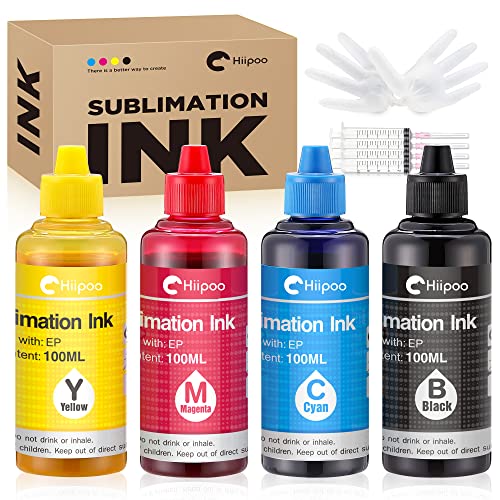
This 400 mL four-color set is notable for naming WorkForce WF7710 and WF7720 in its compatibility list, alongside Epson ET models such as ET-2720, ET-2760, and ET-2800. Each of the black, cyan, magenta, and yellow bottles is 100 mL. Hiipoo claims bright color and water resistance for this water-based dye-sublimation ink. Those are maker claims, not a guarantee for every transfer material or heat-press setup; confirm the exact printer and intended blank compatibility before choosing.
Bottom line: Choose this option when its named WF models match your printer.
How to choose sublimation ink for Epson
Start with the exact printer model, then compare the total ink volume and bottle configuration. Epson’s EcoTank printers use refillable tanks, while cartridge-based printers have different ink-delivery systems; a model name appearing on a compatibility list is the key first check. Sublimation transfers also require compatible transfer paper, a heat press, and blanks with a suitable polyester coating or fabric content. For fabric, higher polyester content generally produces more vivid sublimation color; cotton alone does not hold sublimation dye in the same way. Choose the ink format around your planned workflow: more volume can mean fewer refills, but it is only useful if the printer and transfer process are appropriate.
Printer compatibility and conversion
Printer fit matters more than matching a bottle’s color set: use only an exact model named for the refill and verify the printer’s ink system before filling. Many sublimation setups repurpose compatible inkjet printers, but once a printer has been filled with sublimation ink, switching back to ordinary ink can require extensive flushing and may not be practical. Avoid mixing ink types in a tank because residue can affect color and ink flow. A model family can include different generations or regional versions, so check the complete model number, not just “Epson EcoTank” or “WorkForce.” If you need a particular print quality, test a small transfer first and adjust the color workflow for the paper and blank.
What sublimation printing needs
Sublimation uses heat to transfer dye from printed transfer paper into a compatible polymer surface. Polyester fabric and polymer-coated hard goods are typical targets; uncoated cotton and ordinary untreated ceramics are not equivalent substitutes. A heat press is generally used for flat items, while a mug press or suitable wrap-and-press setup is needed for curved drinkware. Heat, pressure, and dwell time depend on the blank and transfer equipment, so use the blank maker’s settings rather than assuming one universal recipe. Keep transfer paper dry and handle freshly pressed blanks carefully: hot press plates and substrates can cause burns. Ventilate the work area and keep ink away from children and pets.
Choose an ink format by refill need
Bottle totals help distinguish these sets, but a larger number alone does not establish better transfer results. The practical choice depends on how much printing you expect, whether you prefer separate bottles, and whether the included colors match your refill plan. A four-color CMYK arrangement is common for full-color image printing, while an extra black bottle changes the refill balance rather than adding a new color channel. Sublimation results also depend on source artwork, paper, press temperature, pressure, and blank coating. Make a small sample before producing a batch, especially when changing transfer paper or substrate, and keep the printer’s color setup consistent between batches.
Frequently Asked Questions
Can sublimation ink go in any Epson printer?
No; sublimation ink should be used only with a compatible printer and ink-delivery system. Check the complete Epson model number because EcoTank, cartridge, and WorkForce families use different designs.
Does sublimation ink work on cotton shirts?
Sublimation dye bonds best with polyester or a polymer coating, not untreated cotton. For fabric, a high polyester content typically gives stronger color than a cotton-rich shirt.
Do I need a heat press for sublimation?
A heat press is the usual tool for transferring sublimation prints to flat blanks, while mugs require a press or setup suited to curved surfaces. Press temperature and dwell time depend on the blank, so use its specified settings.
Can I switch back to regular ink afterward?
Switching back can be difficult after sublimation ink enters the printer’s ink path. Flushing may be needed, and ink residue can remain, so treat conversion as a one-way choice unless the printer maker provides a supported procedure.