
Portable Security Camera for Travel: 5 Picks Compared

For travel, choose Wireless Battery Indoor Camera because its battery-powered, wire-free design can be placed indoors without a nearby outlet. The other cameras are plug-in models, so they may suit a room with a fixed outlet better than a changing hotel or rental setup.
We earn a commission if you buy through links on this page. As an Amazon Associate I earn from qualifying purchases. Products are compared on manufacturer specifications, not hands-on testing.
- Best overall: Wireless Battery Indoor Camera – Battery power and wire-free placement make it the only pick here designed to move without an outlet.
- Best for 2K plug-in video: Blink Mini 2K+ – This compact indoor model offers 2K video but needs a power connection.
- Best for room coverage: Tapo C210 Pan/Tilt – Pan and tilt give it a 360° horizontal and 114° vertical viewing range.
| Product | Best for | Power | Video | Placement | Shop |
|---|---|---|---|---|---|
| Wireless Battery Indoor Camera | Wire-free travel | Battery-powered | 2K live view | Indoor, portable | Check Price on Amazon |
| Blink Mini 2K+ | Compact plug-in | Plug-in | 2K video | Indoor | Check Price on Amazon |
| Tapo C210 Pan/Tilt | Wide room view | Plug-in | 2K video | 360° pan | Check Price on Amazon |
| Tapo C101 1080p | Night visibility | Plug-in | 1080p | Indoor | Check Price on Amazon |
| Cinnado D1 2K | Pan-and-tilt view | Wired | 2K video | 360° pan | Check Price on Amazon |
Portable Security Cameras for Travel
Compare the power requirements and viewing features first, since only one option here is battery-powered.
Wireless Battery Indoor Camera
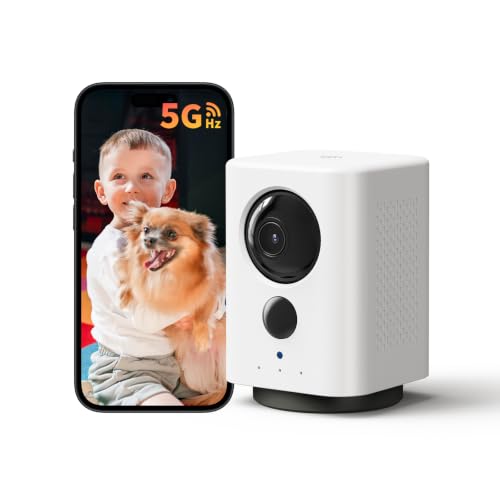
Unlike the plug-in alternatives, this indoor camera runs on a battery and is designed for wire-free placement, which makes it the closest match for travel between rooms. It supports 2.4 GHz and 5 GHz Wi-Fi, 2K live view, night vision, two-way talk, and smart detection with phone alerts. The maker says the battery can last weeks with daily monitoring, but runtime depends on how often the camera is triggered. It is an indoor model, so it is best for monitoring a room rather than outdoor use.
Bottom line: Choose this for indoor monitoring when you need battery power and flexible placement.
Blink Mini 2K+
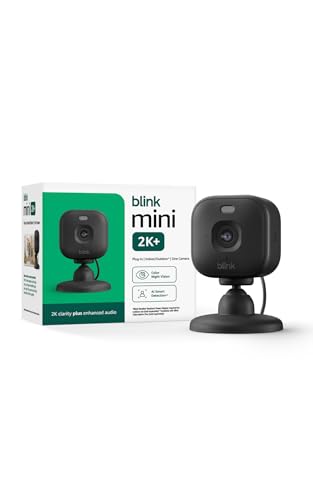
Blink Mini 2K+ stands apart among the plug-in options with a compact body and 2K video, but its power cord makes placement dependent on an outlet. It also offers up to 4x zoom, motion detection, night vision, and two-way talk with noise cancellation. Person and vehicle detection require an optional subscription plan. The cord is the key limitation for travel: choose it for a room where you can keep the camera connected, not for locations where you need to reposition it without power.
Bottom line: Pick this when a compact 2K camera can stay plugged in.
Tapo C210 Pan/Tilt

Tapo C210 Pan/Tilt is the pan-and-tilt choice for viewing a wider indoor area from one fixed position, rather than a camera designed to travel wire-free. Its view moves through 360° horizontally and 114° vertically, and it supports 2.4 GHz Wi-Fi. Recordings can use a microSD card up to 512 GB or the maker’s cloud option. Because it requires a power connection, it fits a room with a dependable outlet better than temporary places where camera positioning changes often.
Bottom line: Choose this for broad indoor coverage where an outlet is available.
Tapo C101 1080p

Tapo C101 1080p offers 1080p video, night vision up to 30 feet, motion alerts, and two-way audio with a built-in siren. Its black finish is a distinguishing detail among these choices, but the camera is still an indoor model and the feature set does not make it wire-free for travel. The night-vision distance may be useful in a darker room; place it where it can remain powered and where the monitored space is within its viewing range.
Bottom line: Pick this for indoor night viewing near a reliable power outlet.
Cinnado D1 2K

Cinnado D1 2K combines 2K video with remotely controlled 360° pan-and-tilt coverage and 24/7 recording options to a microSD card or cloud service. It is explicitly a wired indoor camera, so it is less convenient to move among travel accommodations than a battery-powered unit. Its 2.4 GHz Wi-Fi requirement also matters when choosing a network. This option suits a location where you can leave it connected and want to adjust the view from the phone app.
Bottom line: Choose this for a fixed indoor setup with 2.4 GHz Wi-Fi and an outlet.
How to choose a travel security camera
Battery power is the clearest decision point when you need to move a camera between temporary rooms. A plug-in camera can work for a longer stay if the room has a suitable outlet and the cord can be positioned safely. Check the room’s Wi-Fi band before relying on app features: among these options, some require 2.4 GHz, while Wireless Battery Indoor Camera supports 2.4 GHz and 5 GHz. Also decide whether you need a fixed view or remote pan and tilt; wider mechanical coverage can reduce blind spots, but it does not solve placement or power constraints.
What to check before taking a camera
Confirm the accommodation permits indoor cameras and never point a camera at private areas such as bathrooms or changing spaces. In the United States, audio recording and privacy rules vary by state and context, so disable audio recording or two-way audio if you are unsure whether recording conversations is lawful. Before relying on alerts, test the Wi-Fi connection and notification settings at the destination; hotel captive portals and networks requiring a browser sign-in can prevent some devices from connecting. For a plug-in camera, check outlet location and cord routing so the cable is not a trip hazard.
Battery, wired, and pan-and-tilt designs
Battery models trade continuous outlet power for repositioning flexibility, while wired cameras need a powered location. Pan-and-tilt cameras can turn to cover more of a room, but their wider view depends on placement and network access. Use this quick comparison to match the camera style to the room conditions.
| Need | Choose | Trade-off |
|---|---|---|
| Move between rooms | Battery-powered camera | Runtime depends on activity |
| Keep a camera at one outlet | Plug-in camera | Placement follows power access |
| View different room areas | Pan-and-tilt camera | Needs a stable position and network |
With no outlet within practical cord reach, prioritize a battery model; if you need continuous power for long stays, a plug-in model may be more suitable.
How to place a camera in a temporary room
Place an indoor camera on a stable surface with an unobstructed view of the area you intend to monitor, rather than aiming through windows where glare and reflections can reduce visibility. Keep the camera away from sinks, showers, and other wet areas because these models are described for indoor use, not as weatherproof devices. A pan-and-tilt unit needs room to rotate without hitting nearby objects. For any camera with a cord, keep the cable out of walkways and away from children or pets who might pull it.
Frequently Asked Questions
Can a battery camera work without Wi-Fi?
Wi-Fi is needed for live view and phone-based features on these connected cameras. A battery can power the camera, but it does not provide a network connection.
Will a hotel Wi-Fi network connect to a camera?
Some hotel networks require a browser sign-in or device registration, which can make setup difficult for cameras. Check whether the property supports connecting personal devices before relying on app access.
Where should I place a camera in a rental?
Use an unobstructed indoor view of the specific area you intend to monitor, and keep it out of bathrooms and changing spaces. Avoid placing equipment or cords where it could be knocked over or become a trip hazard.
Do travel cameras record sound automatically?
Audio functions vary by camera, and two-way talk does not necessarily mean continuous audio recording. Recording conversations can raise state-specific legal issues, so turn off audio features if you are uncertain.
How long does a battery security camera last?
Battery runtime depends on how often the camera wakes to detect activity and send alerts. For Wireless Battery Indoor Camera, the maker says daily monitoring can last weeks, with actual runtime varying by trigger frequency.