
4-Pin Backup Camera Options Compared by Fit and Format

For a 4-pin backup camera, BigJade 1080P Dual-Format Camera is the most flexible pick when your monitor accepts AHD or CVBS, because it supports both video formats and PAL/NTSC systems. Choose LASTBUS 4-Pin CMOS Camera or DL003 4-Pin 130° Camera when their camera specifications match your existing setup; verify connector wiring and video format before replacing a camera.
A backup camera sends a rear-facing video feed to a separate display, so it cannot help without a compatible monitor. Drivers who need a complete camera-and-screen system should choose a different type of product.
We earn a commission if you buy through links on this page. As an Amazon Associate I earn from qualifying purchases. Products are compared on manufacturer specifications, not hands-on testing.
- Best overall: BigJade 1080P Dual-Format Camera – Supports AHD/CVBS and PAL/NTSC video systems, with a 4-pin M12/GX12 and RCA connection.
- Best for a 12–24V setup: LASTBUS 4-Pin CMOS Camera – Designed for a 12–24V system and has an 18-LED infrared night-vision function.
- Best for a wide view: DL003 4-Pin 130° Camera – Its 130° viewing angle and IP69K rating suit buyers prioritizing a broad rear view and weather protection.
| Product | Best for | Video format / resolution | Connector | Shop |
|---|---|---|---|---|
| BigJade 1080P Dual-Format Camera | Flexible monitor matching | 1080P AHD/CVBS | 4-pin M12/GX12, RCA | Check Price on Amazon |
| LASTBUS 4-Pin CMOS Camera | 12–24V replacements | 700 TVL CMOS | GX12-4 | Check Price on Amazon |
| DL003 4-Pin 130° Camera | Wide rear view | 800 TVL, 976×576 pixels | 4-pin | Check Price on Amazon |
4-Pin Backup Cameras
Compare the camera’s video format and connector with your existing monitor before choosing a replacement.
BigJade 1080P Dual-Format Camera

BigJade stands out for supporting both AHD and CVBS video, plus PAL and NTSC systems, giving it more format options than the other cameras here. Its 4-pin M12/GX12 and RCA connectors are intended to work with compatible monitors. The camera also has switchable mirror or normal image orientation, parking guide lines, night vision and an IP69 waterproof rating, according to the maker. It suits buyers who know their monitor supports one of those formats and want options for front or rear mounting. The limitation is that a 4-pin plug alone does not confirm wiring or video compatibility.
Bottom line: Choose it when your monitor supports its video format and connector.
LASTBUS 4-Pin CMOS Camera
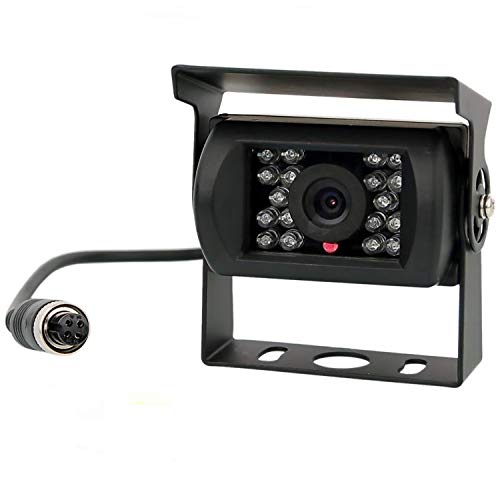
LASTBUS specifies a 12–24V DC system, making the operating-voltage range the key distinction for this replacement camera. It uses a CMOS sensor rated at 700 TV lines and includes 18 infrared LEDs with automatic night-vision switching, according to the maker. The square camera is 3.25 inches tall, 3 inches long and 2.6 inches wide. It may suit an existing GX12-4 setup when the monitor accepts the camera’s video signal and the vehicle supplies the correct voltage. The monitor and extension cable are not included, and the maker warns that some monitors may be incompatible.
Bottom line: Pick it for a compatible GX12-4 setup with a 12–24V supply.
DL003 4-Pin 130° Camera

The DL003 is the wide-angle option, with a 130° viewing angle and 800 TV lines at 976×576 pixels. Its 1/3-inch color CCD sensor and six-layer glass lens distinguish it from the CMOS camera among these choices. It also has an IP69K rating and 18 infrared lights; the maker claims night vision up to 50 feet. The camera is a 12V model, so it suits buyers whose vehicle supply and monitor match those requirements. Its package excludes an extension cable, and the voltage means it is not the choice for a 24V-only supply.
Bottom line: Choose it when a 130° view and a matching 12V system matter most.
How to Match a 4-Pin Camera to a Monitor
Match the video format and wiring, not just the number of pins. AHD and CVBS are different video signals; a monitor must accept the camera’s signal to display its feed. PAL and NTSC are separate video-system formats, so confirm that the camera and display support the same one. A 4-pin connector shell also does not guarantee a shared pinout: manufacturers can assign power, ground and video to different pins. Before replacing a camera, check the monitor model, camera voltage and connector wiring. If those specifications do not match, an adapter may not solve the problem. Choose a camera only after those compatibility checks, especially when the existing system’s wiring is undocumented.
What 4-Pin Camera Specifications Mean
Resolution figures are useful only when interpreted in their format. TV lines (TVL) are an analog-style resolution measure, while 1080P and pixel dimensions use different conventions; do not treat 700 TVL and 1080P as directly interchangeable ratings. A larger viewing angle covers more of the scene but can make objects appear smaller at the screen edge. Infrared LEDs provide illumination for a camera’s night-vision mode, but their count alone does not establish usable distance. Weather ratings such as IP69 and IP69K indicate protection under defined water and dust tests; they do not establish compatibility with a monitor or voltage supply. Prioritize the signal and connector match before comparing image claims.
Choosing a Camera for a Truck, RV or Trailer
For a vehicle with a 12–24V system, choose a camera explicitly designed for that supply; a camera specified for 12V alone is not an interchangeable 24V choice. The monitor and camera must also support the same video format. A wide viewing angle can help cover a broad area behind a long vehicle, while the best angle depends on camera position and how much of the near field you need to see. Use the camera as an aid, not a substitute for mirrors and direct observation: displays can have blind zones, glare or delayed visibility. Secure wiring away from moving parts, hot surfaces and pinch points, and keep the lens clean so dirt does not obscure the view.
Common 4-Pin Camera Replacement Mistakes
The most common replacement mistake is assuming that any 4-pin connector will plug in and work. Confirm the exact connector style and pin assignment, plus AHD or CVBS support and PAL or NTSC compatibility, before connecting power. Another mistake is choosing by resolution alone: a higher-numbered resolution cannot compensate for a signal the monitor cannot decode. Check the supply voltage before wiring; the camera and vehicle system must be compatible. A backup-camera image is not a complete view around a vehicle, and small objects or cross traffic may remain outside its field of view. Test the camera image while parked before relying on it, and retain normal mirror checks when reversing.
Frequently Asked Questions
Can a 4-pin backup camera connect to any 4-pin monitor?
No; the plug shape does not confirm matching pin assignments or video format. Check the monitor’s wiring and whether it accepts AHD or CVBS before connecting a replacement.
What is the difference between AHD and CVBS cameras?
AHD and CVBS use different video signals, so a monitor must support the camera’s format. A camera that supports both can offer more options, but the selected system still needs to match the display.
Does a 12V backup camera work on a 24V truck?
Not necessarily; connect a camera only to a supply within its specified voltage range. A model rated for 12–24V differs from one specified for 12V alone.
Are infrared camera lights useful in complete darkness?
Infrared LEDs provide illumination for night-vision cameras, but LED count does not by itself guarantee a particular viewing distance. Check the camera’s night-vision capability and keep the lens unobstructed.
Is a backup camera enough to reverse a large vehicle safely?
No; use the camera together with mirrors and direct checks because its view can leave blind zones. Stop and check the surroundings whenever the camera view is unclear.