
Fiber to RJ45 Converter Options Compared by Fiber Fit

For a flexible fiber to RJ45 converter, choose Omada MC220L Gigabit SFP Converter if you need an SFP slot that accepts single-mode or multimode modules; the module must match your fiber and link distance. Choose a paired converter set instead when you need both ends of a link and want transceivers included.
We earn a commission if you buy through links on this page. As an Amazon Associate I earn from qualifying purchases. Products are compared on manufacturer specifications, not hands-on testing.
- Best overall: Omada MC220L Gigabit SFP Converter – Its SFP slot accepts single-mode or multimode modules, but you must supply a compatible SFP.
- Best for single-mode links: Gigabit Single-Mode LC Pair, 20 km – The pair includes 1310-nm single-mode modules rated for links up to 20 km.
- Best for included multimode modules: 10Gtek Gigabit Multimode Converter, 2-Pack – The two converters include 850-nm multimode SFP modules rated up to 550 m.
- Best for BiDi multimode links: BiDi Multimode Gigabit Converter Pair – The pair includes BiDi LC transceivers and power supplies for multimode fiber.
| Product | Best for | Fiber modules included | Fiber type and reach | Shop |
|---|---|---|---|---|
| Omada MC220L Gigabit SFP Converter | Flexible SFP choice | No | Single- or multimode | Check Price on Amazon |
| Gigabit Single-Mode LC Pair, 20 km | Long single-mode links | 2 × 1000BASE-LX, 1310 nm | Single-mode; up to 20 km | Check Price on Amazon |
| 10Gtek Gigabit Multimode Converter, 2-Pack | Multimode starter pair | 2 × 1.25G SFP, 850 nm | Multimode; up to 550 m | Check Price on Amazon |
| BiDi Multimode Gigabit Converter Pair | BiDi multimode links | 2 × BiDi LC SFP | Multimode; up to 550 m | Check Price on Amazon |
Fiber to RJ45 Converters Compared
Match the converter’s SFP type and included transceivers to the fiber already installed at both ends of the link.
Omada MC220L Gigabit SFP Converter
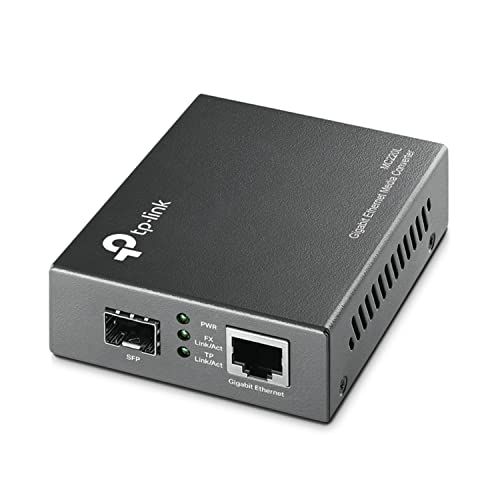
The MC220L is the flexible option because its SFP slot accepts either single-mode or multimode modules, while the other options arrive with specific transceivers. It converts 1000BASE-SX or 1000BASE-LX fiber to 1000BASE-T copper, and its RJ45 port supports 10/100/1000 connections with auto-negotiation and auto-MDI/MDIX. The metal-cased unit is plug and play. The maker says compatible single-mode modules can reach 20 km and multimode modules 550 m. This suits a buyer who already knows which SFP their fiber requires; the limitation is that the SFP is not included, so module compatibility must be checked.
Bottom line: Pick this if you want to select an SFP for your existing fiber.
Gigabit Single-Mode LC Pair, 20 km

This set stands out for its included single-mode transceivers and 20 km reach, making it the long-distance choice among these converters. It comes with two converters, two 1000BASE-LX modules, and two external power supplies. The RJ45 ports support gigabit Ethernet and are downward compatible with 10/100 Mbps; the maker also specifies full- or half-duplex operation, auto-crossover, and 9K-byte jumbo frames. Choose it when both ends of a single-mode LC link need conversion. Its specific 1310-nm single-mode modules are not the flexible choice for an existing multimode run.
Bottom line: Pick this for a paired single-mode link that needs the included 20 km modules.
10Gtek Gigabit Multimode Converter, 2-Pack

The 10Gtek set includes the 850-nm multimode SFPs, unlike the modular converter that requires a separately chosen module. Each of the two units has a 10/100/1000 Mbps RJ45 port with full- and half-duplex auto-negotiation and auto-MDI/MDIX. The included fiber modules use dual LC connectors and are rated for up to 550 m; the copper side supports Cat.5e UTP/STP runs up to 100 m. This is suited to a short multimode connection where both ends need conversion. Its fixed multimode modules and 550 m reach make it a poor match for a single-mode fiber run.
Bottom line: Choose this when you need two converters and included 850-nm multimode modules.
BiDi Multimode Gigabit Converter Pair

This pair uses BiDi LC transceivers, unlike the dual-LC sets, and includes two converters, two transceivers, and two power supplies. The fiber side is specified as 1.25 Gbps multimode with reach up to 550 m; the RJ45 side auto-negotiates at 10/100/1000 Mbps and supports full- or half-duplex and auto-MDI/MDIX. The maker lists IEEE 802.3, 802.3u, 802.3z, and 802.3ab compliance. This suits a link designed for the included BiDi modules. The key limitation is the specific BiDi multimode pairing, so confirm that both ends of the fiber path use compatible transceivers.
Bottom line: Pick this for a multimode link built around compatible BiDi LC modules.
How to Choose a Fiber to RJ45 Converter
Start with the fiber mode and transceiver, then check reach and copper speed. Single-mode fiber is commonly used for longer links, while multimode is common for shorter building or equipment-room connections; the SFP’s wavelength and optical type must match the cable and the transceiver at the far end. Gigabit converters in this group support 10/100/1000 Mbps copper, but their optical modules are gigabit-class, so do not assume a faster fiber module makes the RJ45 port faster. If you already have fiber installed, select a converter/module combination that matches its mode and connector. If you need both ends, a pair with included transceivers avoids having to source each module separately.
| Need | Choose |
|---|---|
| Choose your own fiber module | Converter with an SFP slot |
| Short multimode link, modules included | 850-nm multimode pair |
| Longer single-mode link | 1310-nm single-mode pair, rated up to 20 km |
| BiDi multimode link | Pair with compatible BiDi transceivers |
For copper Ethernet, keep a standard twisted-pair run within 100 m; longer copper runs need a different network design.
Fiber Mode, Connectors, and Reach
Fiber reach is determined by the optical modules and cable, not just the converter chassis. The included multimode modules here are rated up to 550 m, while the single-mode pair is rated up to 20 km; actual link suitability depends on the matching module and fiber path. LC describes the connector interface, while BiDi describes a transceiver arrangement that sends and receives over one fiber strand using compatible optics. A dual-LC link uses a transmit strand and a receive strand. Before choosing, identify whether the installed cable is single-mode or multimode, count available strands, and verify both endpoint modules have matching specifications. Do not connect mismatched optical modes or assume a connector that fits means the transceivers are compatible.
Using SFP and Fixed-Module Converters
An SFP slot lets you select a removable optical module; it does not mean an SFP is included. The modular converter here accepts single-mode or multimode SFPs, and its potential reach depends on the chosen module. Fixed-module packages simplify the selection because the transceiver type and rated reach are supplied together, often as a pair for both ends. For a link between two fiber endpoints, each end needs compatible optical hardware and power, and the two media converters should agree on link speed and fiber type. A practical decision rule: if you cannot identify the existing fiber mode and connector, pause and check those before ordering; the wrong optic can prevent a link even when the RJ45 side plugs in.
Installation and Link Checks
Connect the optical link between compatible transceivers and use a copper Ethernet cable no longer than 100 m on a standard 10/100/1000BASE-T run. Match transmit and receive paths for a dual-LC connection; for BiDi, use the compatible paired optics rather than treating it as ordinary dual-strand fiber. After powering both ends, check the converter status indicators and the network device’s link speed. A link that negotiates at 100 Mbps instead of 1 Gbps can point to a cable, port, or negotiation mismatch. Fiber connectors are precision surfaces: keep dust caps on unused ports and avoid touching or looking into a live optical port. Verify the media converter and power supply are positioned with adequate ventilation and use the power source.
Frequently Asked Questions
Can a fiber converter connect to any Ethernet device?
A gigabit fiber-to-RJ45 converter can connect to a 10/100/1000 Mbps Ethernet port when the copper side negotiates successfully. It does not make a 10 Mbps or 100 Mbps device operate at gigabit speed.
How far can a fiber to RJ45 converter reach?
Reach depends on the fiber type and the installed SFP module: these examples are rated up to 550 m on multimode and 20 km on single-mode. Treat those as module ratings, not a guarantee for every cable path.
Do I need two media converters for fiber?
A typical point-to-point Ethernet link needs a fiber endpoint at each end, often two media converters when neither network device has a compatible fiber port. A converter pair includes both units; an individual converter needs a compatible far-end device or converter.
What is the difference between single-mode and multimode fiber?
Single-mode and multimode use different optical modes and require matching transceivers at both ends. The options here illustrate the practical reach difference: multimode modules are rated up to 550 m, while the single-mode set is rated up to 20 km.
Can I use an SFP converter without an SFP module?
No, an SFP-slot converter needs a compatible optical module to form a fiber link. Confirm the module matches the cable mode, connector, wavelength, and the module at the far end before connecting it.